

Your Kwikset SmartCode lock arrives promising keyless convenience, but programming it feels like cracking a safe. Between model variations (955, 264, 913) and strict code rules, one misstep triggers lockouts or security gaps. This guide delivers exact programming steps verified by Kwikset’s technical specifications—no guesswork. You’ll learn how to program smart code door lock systems correctly on your first attempt, avoid common pitfalls, and maintain military-grade security. Whether you’re installing a new lock or troubleshooting a stubborn keypad, these model-specific instructions work immediately with your physical lock in hand.
Critical warning: Never program with the door closed. A single failed code attempt can trap you outside. Keep your physical key within arm’s reach during all procedures—it’s your emergency lifeline when codes reject. Fresh batteries are non-negotiable; weak power causes mid-programming failures that reset your progress.
Essential Safety Setup for SmartCode Programming
Skip these steps, and you’ll face avoidable lockouts. Programming must happen with the door fully open and unlocked—period. Treat your physical key like a fire extinguisher: accessible but unused until emergencies.
Pre-Programming Checklist
- Door position: Physically verify it’s open and unlocked
- Key access: Place backup key on a hook 3 feet from the lock
- Battery status: Install brand-new alkaline batteries (leak-prone rechargeables fail mid-process)
- Testing space: Clear 3 feet around the door for immediate code verification
Visual Confirmation System
Your lock speaks through light and sound—learn its language:
– ✅ Green flash + 1-2 beeps: Success (proceed to next step)
– ❌ Red flash + 3 beeps: Failure (duplicate code or sequence error)
– ⚠️ No response: Dead batteries or faulty contact (reseat batteries immediately)
SmartCode 955: Programming Code Setup & User Management
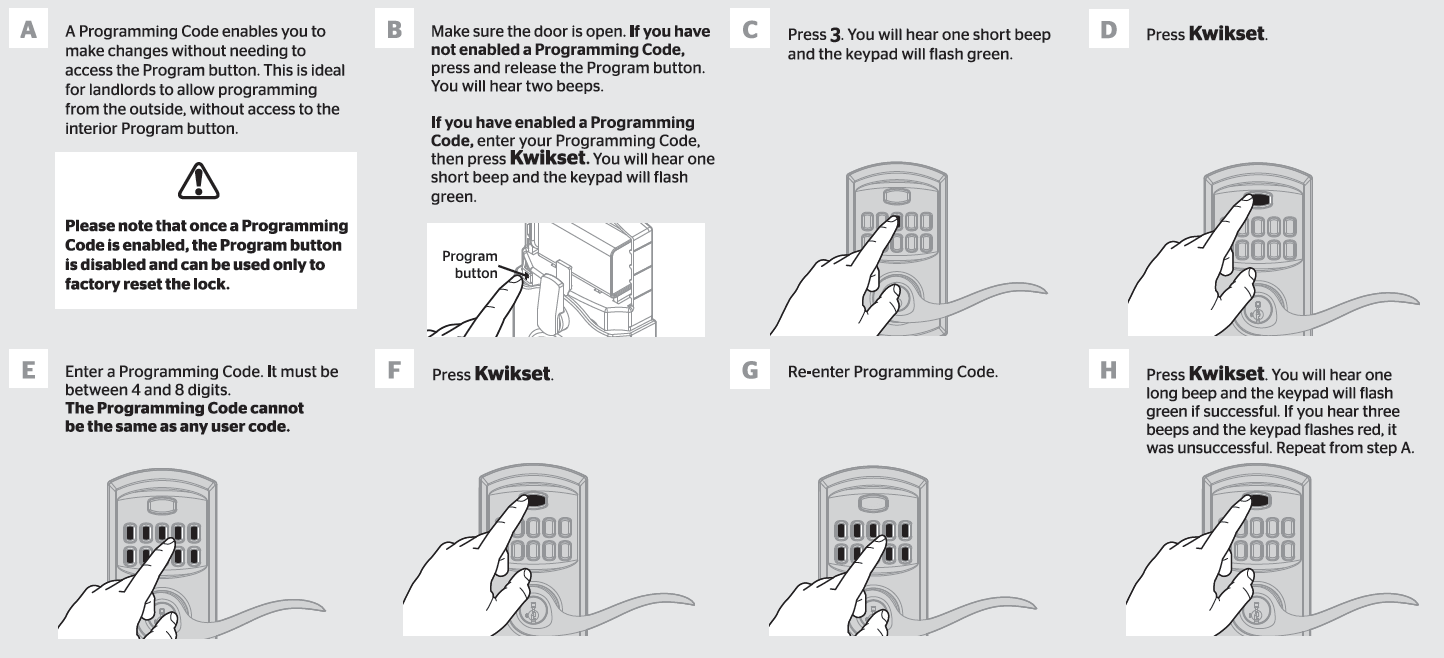
This model’s hidden program button requires precise access. Use a SmartKey tool (included) or straightened paperclip—bent tools damage internal contacts.
Enable Programming Mode
- Locate program button behind interior cover (remove screws with security bit)
- Press once: 2 beeps confirm entry into programming mode
- Press 3: Short beep + green flash signals programming code setup
- Enter new 4-8 digit code: Must differ from all user codes (e.g., avoid 1234 if user code is 12345)
- Confirm: Press Kwikset → re-enter code → Kwikset
- Success: 1 long beep + green flash (if red flashes, restart with fresh batteries)
Delete User Codes Without Programming Code
Use when you’ve forgotten your programming code:
– Press program button → 2 beeps
– Press 2 → green flash
– Press Kwikset → enter user code → Kwikset
– Re-enter code → Kwikset → long beep confirms deletion
Pro tip: Always delete old codes before adding new ones—exceeding 30 codes crashes the system.
SmartCode 264 Deadbolt: Change Programming Code in 60 Seconds
Unlike the 955, this model uses your existing programming code to initiate changes—no interior access needed.
Critical Sequence for New Codes
- Start with door open (non-negotiable for safety)
- Enter current programming code (default: 0-0-0-0)
- Press Kwikset → 4 → Kwikset (must complete within 5 seconds)
- Enter new 4-10 digit code: Avoid birthdays or addresses (e.g., 7824, not 0815)
- Press Kwikset once more
- Success: Double green flash + 2 beeps (if red flashes, first 4 digits duplicate another code)
Time-saver: Write new codes on masking tape before starting—fumbling wastes battery power.
SmartCode 275 Contemporary: Initial Setup Must-Dos
This model’s default programming code (0-0-0-0) is a security liability. Change it before adding user codes.
Change Default Programming Code
- Ensure door is open (test with lock engaged)
- Enter 0-0-0-0 → press enter arrow (single beep)
- Press 4 → enter arrow (single beep)
- Enter new 4-10 digit code: Must not match any future user codes
- Press enter arrow:
– 2 beeps = success (green flash)
– 3 beeps = failure (first 4 digits conflict with existing code)
Critical note: Your programming code never unlocks the door—it only manages settings. Treat it like a master key.
Universal User Code Management Rules
These rules apply to all Kwikset SmartCode models. Violate them, and your lock rejects new codes.
Add User Codes Across All Models
- Open door and remove battery cover
- Press program button for target slot:
– Slot 1: 1 press
– Slot 2: 2 presses (green flash per press)
– Continue pattern up to slot 30 - Enter 4-8 digit code (button models) or 4-10 digits (touchscreen)
- Press lock button to save
- Test immediately with door open (close only after verification)
Code Uniqueness Enforcement
First 4 digits must differ across all codes—this isn’t optional:
– ✅ Valid: 2947 (slot 1) and 8163 (slot 2)
– ❌ Invalid: 29475 and 29476 (same first 4 digits)
Consequence: Adding 29476 after 29475 triggers 3 beeps and red flash—no error message explains why.
Factory Reset: When Selling Your Home or Lock Fails
Use this nuclear option only when moving or after persistent failures. It erases all codes—no recovery possible.
Complete System Reset Procedure
- Remove battery cover (use security bit if present)
- Slide out battery pack (4 AA batteries)
- Press and hold program button
- Reinsert batteries while holding button
- Hold 30 seconds until LED flashes red
- Press program button once more
- Confirmation: Green flash + single beep (if silent, batteries are dead)
Warning: Reprogramming takes 15+ minutes—have all user codes ready. Never skip testing each code with the door open first.
Troubleshooting Common Programming Failures

When codes reject, 90% of issues stem from these fixable errors. Stop guessing—follow this diagnostic tree.
Why Your Lock Rejects New Codes
- First 4 digits conflict: Check all existing codes (even deleted ones occupy memory)
- Programming code = user code: Impossible—reassign one immediately
- Weak batteries: Replace before reattempting (low power causes red flashes)
- Feature disabled: On 955 models, verify programming mode is enabled via interior switch
Quick Fix Protocol
- Test all working codes with door open
- Replace batteries with new alkalines
- Delete newest code (conflicts often occur here)
- Re-add code using slot not previously used
Pro tip: If red flashes persist after step 2, perform factory reset—corrupted memory is likely.
Security Best Practices for SmartCode Locks
Your lock is only as secure as your code management. Follow these Kwikset-recommended protocols.
Code Hygiene Essentials
- Change all codes annually (set calendar reminders)
- Delete guest codes within 24 hours of visitor departure
- Never use predictable sequences: Addresses, phone numbers, or “1234”
- Store codes offline: Use a password manager—not a sticky note on the door
Monthly Maintenance Checklist
- Test every user code with door open
- Wipe keypad with dry microfiber cloth (dirt causes stuck buttons)
- Check battery voltage (replace below 1.3V per cell)
- Verify physical key turns smoothly (lubricate annually with graphite powder)
Final verification: After programming, test every code with the door open for 30 seconds. Only close the door when all codes work reliably. Your SmartCode lock now operates with military-grade security—no lockouts, no guesswork. Remember: the strongest lock fails when codes are predictable. Change them quarterly, enforce uniqueness, and keep that physical key accessible. For Z-Wave models (913/955), explore SmartThings community forums for remote code management—but never sacrifice local access for convenience. You’ve just transformed a confusing keypad into a fortress. Now go enjoy keyless freedom.



