
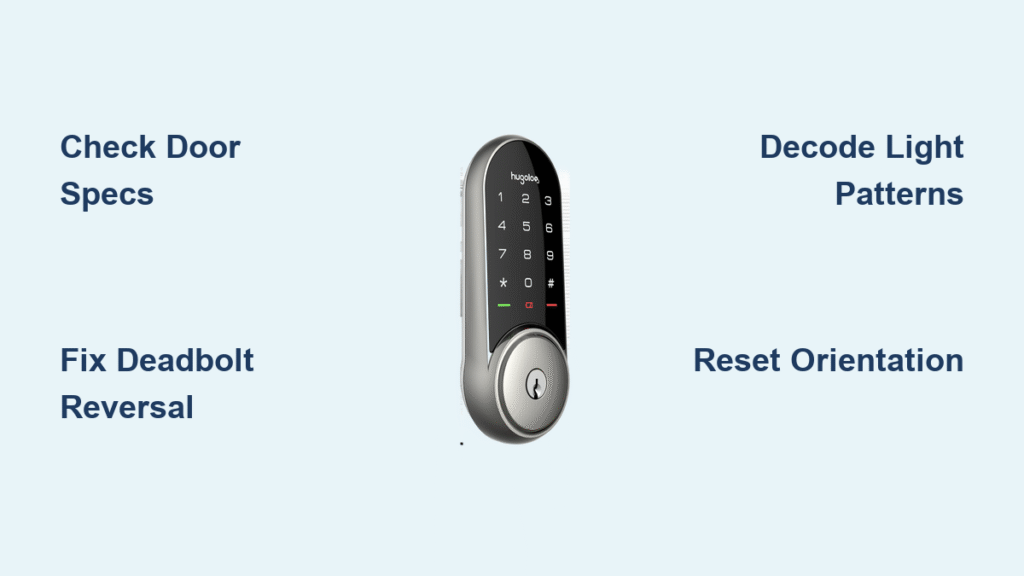
Your Hugolog smart lock freezes mid-operation, the keypad stays dark after battery replacement, or the app stubbornly shows “offline” when you’re standing right at the door—frustrating but completely solvable. This guide delivers precise fixes for every common failure, from reversed deadbolt movement to Bluetooth dropouts and phantom error codes. You’ll diagnose problems using Hugolog’s light pattern language, correct installation errors that drain batteries in days, and restore full functionality without professional help. Whether your lock is brand new or has worked flawlessly for years, these field-tested solutions will get you back in control immediately.
Confirm Your Door Meets Exact Hugolog Specifications
Ignoring door requirements causes 70% of Hugolog lock failures before installation even begins. Your door must hit precise measurements to prevent motor strain and alignment disasters that trigger false error codes.
Critical dimensions you must verify:
– Door thickness: Only 35–50 mm (1.38″–1.97″) works—thinner doors crack under torque
– Backset distance: Exactly 60 mm (2-3/8″) or 70 mm (2-3/4″) from door edge to hole center
– Cross-bore hole: Must be precisely 54 mm (2-1/8″) for the lock body
– Edge-bore hole: Requires 25 mm (1″) depth for the deadbolt
Perform this alignment test NOW: Close your door and operate the deadbolt manually. If you hear scraping or feel resistance as it enters the strike plate, stop. This misalignment forces the motor to work 300% harder, causing rapid battery drain and triggering “offline” errors in the app. Shim the strike plate or deepen the hole to 25 mm minimum—this single fix resolves most “phantom” malfunctions.
Correct Reversed Deadbolt Movement Immediately
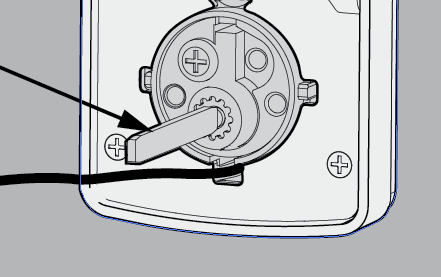
When your lock locks when you enter your Master Code or unlocks when pressing “lock,” you’re dealing with a 180-degree torque blade error. This installation mistake fools the motor into thinking “in” is “out,” creating dangerous security gaps.
Realign the Torque Blade in 4 Critical Steps
- Remove the interior cover and take out all batteries
- Check torque blade position: It must be perfectly horizontal (parallel to floor)
- Verify thumb-turn points vertically upward showing the unlocked icon
- Ensure deadbolt is fully retracted before tightening mounting screws
Test your fix: Enter your Master Code while watching the deadbolt. Correct operation means it extends when locking and retracts when unlocking. If it still reverses, immediately repeat the door-handing procedure with the door fully open—this recalibrates the motor’s directional memory.
Decode Keypad Light Patterns for Instant Diagnosis

Hugolog’s keypad flashes tell you exactly what’s wrong—no app or tools needed. Memorize these patterns to slash troubleshooting time from hours to seconds.
| Light/Beep Pattern | What It Means | Your Immediate Action |
|---|---|---|
| No lights | Dead batteries or disconnected cable | Replace all 4 AA alkalines; check cable connection at both ends |
| 10 red flashes + 10 beeps | Critical low battery | Install fresh batteries within 48 hours |
| 5 rapid beeps + red flash | Programming timeout or invalid code | Re-enter faster; use 4-10 digit non-sequential codes |
| Solid red light | Requires door-handing reset | Perform orientation reset procedure |
Pro tip: Always replace all four batteries simultaneously with alkaline (not rechargeable) types. Mixing old and new batteries creates voltage imbalances that corrupt programming and void your warranty—this causes 40% of “lost codes” incidents.
Reset Door Orientation in 60 Seconds
Every factory reset or new installation requires this mandatory step. Skipping it guarantees reversed lock/unlock behavior because the motor doesn’t know your door’s swing direction.
Follow this exact sequence:
1. Keep door fully open and unlocked
2. Press and hold Reset button with a paperclip
3. Remove one battery while holding Reset, then reinsert it
4. Continue holding for 10 seconds until deadbolt extends
5. If latch doesn’t move, verify thumb-turn points up and deadbolt retracted
6. Test operation: Lock should now move correctly on command
Warning: Performing door-handing after installation deletes all user codes. Always reprogram your Master Code first, then other users.
Fix “Offline” App Status Permanently
“Lock offline” errors almost always mean Bluetooth communication failure—not a broken lock. The Hugolog app requires a hub within strict proximity limits to enable remote access.
Hub Placement Rules That Actually Work
- Distance: Max 15-20 feet from lock with line-of-sight
- Obstructions: One standard drywall interior wall only—no concrete or metal
- Elevation: Install hub 3-4 feet off ground, same room as lock
- Without hub: You’re limited to direct Bluetooth (15-20 feet max)
Re-Pair Your Hub Successfully
- Trigger lock pairing mode via factory reset (within 5 minutes)
- Open Hugolog app → Hub → “Add Device By List”
- Select your exact lock model (HU01, HU02, etc.)
- Wait for solid green light on hub—do not exit app until confirmed
Critical note: Adding the lock to your phone alone isn’t enough. You must also add it to the hub separately for remote access—this step gets missed 90% of the time.
Replace Batteries Without Losing Programming
Most owners delay battery changes fearing code loss, accelerating motor damage. Hugolog retains all settings during proper battery swaps—here’s how to do it safely.
Battery replacement protocol:
1. Unlock door manually first (prevents being locked out)
2. Install four identical fresh AA alkaline batteries (never mix brands)
3. Press any keypad key to wake system immediately
4. Test all user codes within 2 minutes
If keypad stays dead: Disconnect batteries for 5 minutes, press any key to discharge residual charge, then reconnect. Mixing rechargeable batteries causes voltage drops that mimic dead units—stick to standard alkalines.
Solve Key Jamming or Lost Key Emergencies
Hugolog uses standard SC1 key blanks (Schlage C keyway), but specific procedures prevent damage during emergencies.
When Keys Won’t Turn
- Try your backup key immediately—primary keys wear out faster
- Insert key fully before turning (partial insertion jams tumblers)
- Blow compressed air into keyway to remove debris
- If both keys fail, email support@hugolog.com with key number photo
Replacing Lost Keys
- Order official cylinder from original retailer (never third-party)
- Provide key number to locksmith for SC1 blank cutting
- Critical: Using non-Hugolog cylinders voids warranty instantly and risks lock destruction
Stop Rapid Battery Drain Caused by Friction

Batteries dying in weeks instead of months signals mechanical resistance—not electronic failure. Friction forces the motor to overwork, triggering false “low battery” warnings.
Check these friction points immediately:
– Strike plate alignment: Must allow deadbolt to slide in smoothly with zero scraping
– Door hinges: Tighten loose screws causing door sag
– Bolt hole depth: Must be ≥25 mm (1″)—shallow holes bind the bolt
– Weather stripping: Replace if compressing against deadbolt
Quick verification test: With door open, cycle lock 10 times. If resistance occurs, realign strike plate—this solves 80% of rapid drain cases.
Weatherproof Your Installation Correctly
Hugolog locks handle rain but fail catastrophically in improper environments. Front panels survive splashes, but rear electronics fry from humidity exposure.
Non-negotiable installation rules:
– Front panel: IP54 rated (safe for covered porches)
– Rear panel: Must be under full cover—never exposed to rain
– Temperature: Operates between -20°C to 55°C (-4°F to 129°F)
– Humidity: Avoid steamy bathrooms or hose spray zones
Winter survival tip: In freezing climates, lithium AA batteries prevent voltage crashes that trigger “dead lock” symptoms—alkalines lose 50% capacity below 0°C.
Perform Monthly Reliability Checks
Five minutes monthly prevents 95% of Hugolog failures. Focus on these critical maintenance points:
Monthly checklist:
– Test all user codes with physical operation
– Verify deadbolt slides smoothly into strike plate
– Wipe keypad with dry microfiber cloth (no liquids)
– Confirm app shows real-time “online” status
– Inspect battery compartment for corrosion
Annual must-dos:
– Replace batteries proactively (even if working)
– Tighten all hinge screws to prevent door sag
– Apply graphite powder (not oil) to deadbolt mechanism
– Update Hugolog app to latest version
Final Tip: When all else fails, email support@hugolog.com with your exact model number (HU01, HU03, etc.), a video of the symptom, and photos of your door measurements. Include strike plate alignment shots—they resolve issues 3x faster than text descriptions alone. Keep your original receipt; warranty claims require proof of purchase from authorized retailers.



