
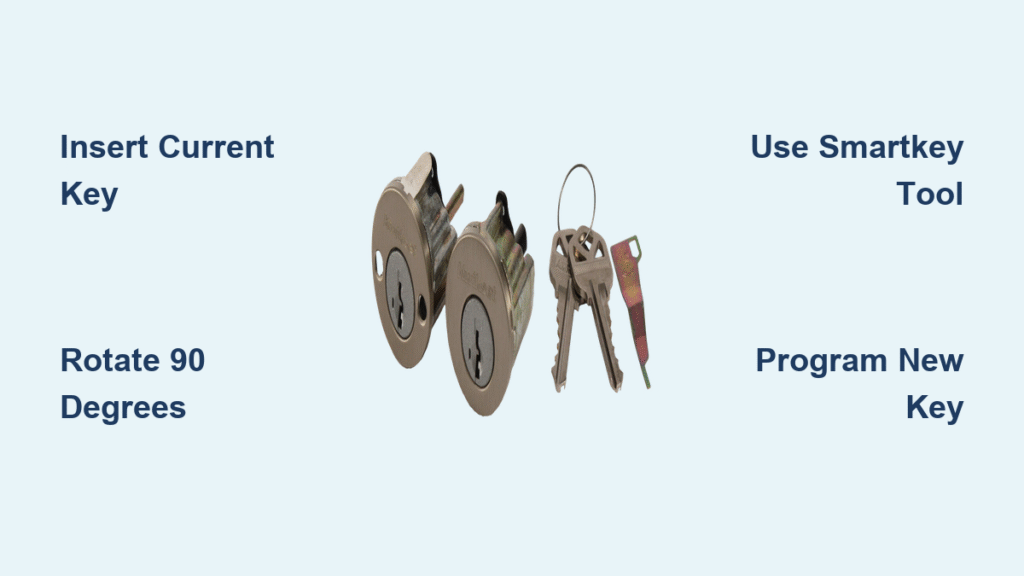
Lost your house keys last Tuesday? Just closed on your dream home and worried previous owners might still have access? Instead of waiting days for a locksmith appointment and shelling out $150 per lock, you can rekey your smart key lock in under half a minute. Kwikset’s SmartKey Security® technology transforms what used to require professional expertise into a simple homeowner task—no special tools beyond what came with your lock.
This guide delivers the precise, step-by-step process to change your lock’s key combination safely and effectively. Whether you’re securing your property after a tenant moves out, consolidating multiple keys into one, or just want peace of mind after misplacing your keys, you’ll gain complete control over your home’s security without expensive service calls.
Why Your Smart Key Lock Won’t Accept New Keys Without Proper Setup
The Patented Wafer System Explained
Kwikset’s SmartKey Security® isn’t magic—it’s brilliant engineering. Inside each lock cylinder, precision-engineered wafers automatically adjust to new key patterns through a learning mechanism. Unlike traditional pin tumbler locks requiring complete disassembly, this system recognizes up to 100,000 unique key combinations across both standard Kwikset and SC1 keyways. The moment you complete the rekeying sequence, those internal components lock into position, rendering your old keys useless while accepting only the newly programmed key.
Finding Your Compatible SmartKey Model
Mechanical locks that support DIY rekeying:
– Perth, Sedona, and Trafford levers (all finishes)
– Prava and Halifax rectangular levers
– Maven round knobs in any finish
– San Clemente handlesets with SmartKey Security®
– All Kwikset deadbolt variations with the SmartKey logo
Smart lock models with rekeying capability:
– Halo Select touchscreen Wi-Fi models
– Matter-enabled smart locks with SmartKey Security® branding
Critical note: Only Kwikset products displaying the SmartKey Security® logo support this feature. Non-Kwikset locks and older Kwikset models without this specific branding cannot be rekeyed using this method.
Critical Pre-Rekeying Checklist You Must Complete
Essential Items Gathered Before Starting
Before touching your lock, verify you have these four non-negotiable items:
– Your current working key (rekeying is impossible without it)
– New key cut to Kwikset specifications (test insertion first)
– Original SmartKey tool (that tiny metal piece included with your lock)
– Alternative entry method (don’t risk locking yourself out)
Safety Setup That Prevents Costly Mistakes
Skipping these safety steps causes 90% of rekeying failures:
1. Prop door fully open with a doorstop or wedge—never attempt this with a closing door
2. Position lock correctly—deadbolts must be locked, knobs/levers must be engaged
3. Test new key insertion—ensure it slides smoothly without resistance
4. Stage SmartKey tool—have it within arm’s reach before starting
Warning: Attempting rekeying without the current key or with the door closed risks permanent lockout. Always have a backup entry method available.
Exact 30-Second Rekeying Process for Kwikset SmartKey Locks
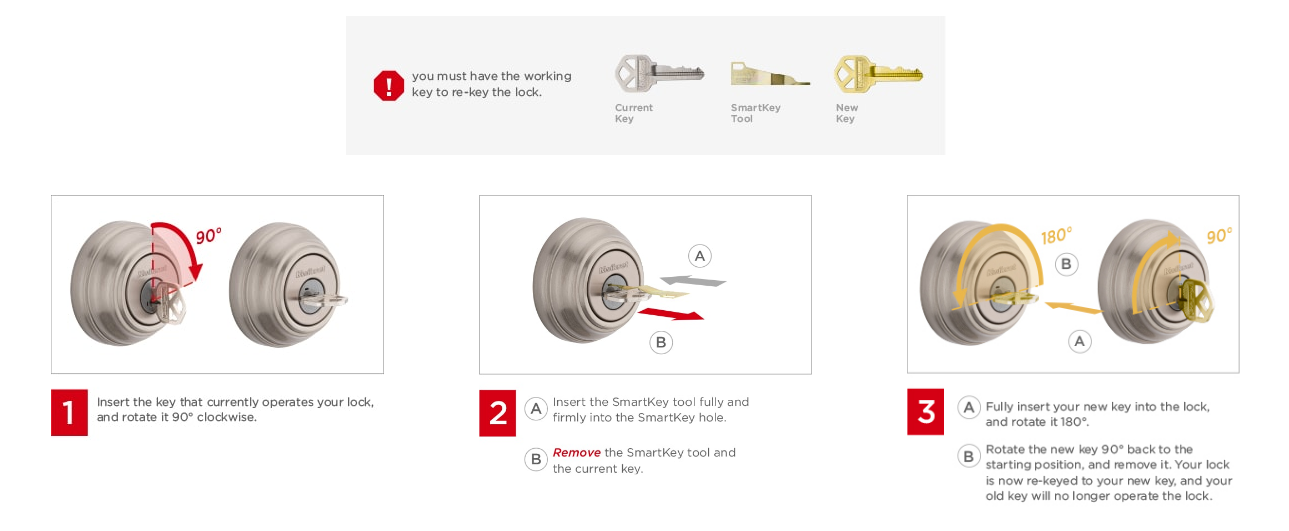
Insert Current Key at Precise 90-Degree Angle
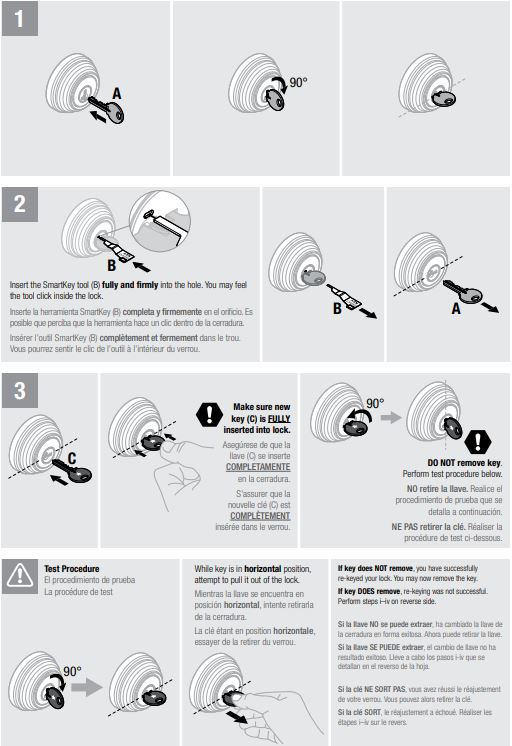
Slide your existing key completely into the keyway until it stops. Rotate it exactly 90 degrees clockwise from vertical (to the 3 o’clock position). You’ll feel firm resistance—this positions the cylinder in learning mode. If the key turns further, you’ve gone too far and must restart.
Activate Learning Mode With SmartKey Tool
Locate the small circular hole beside your keyway (often marked with a key symbol). Insert the SmartKey tool firmly until you hear/feel a distinct click—this takes 5-10 pounds of pressure. Hold for 3 seconds, then remove the tool completely. Pro tip: If the tool won’t insert fully, your key isn’t turned exactly 90 degrees. Adjust slightly until the tool seats properly with that unmistakable click.
Program New Key With Perfect Rotation Sequence
Remove your old key. Insert the new key fully—edge touching the cylinder face. Without pushing or pulling:
1. Rotate 180 degrees counter-clockwise (key points left to 9 o’clock)
2. Rotate 180 degrees clockwise (key points right to 3 o’clock)
3. Gently tug to confirm key stays locked in place
4. Rotate 90 degrees counter-clockwise back to vertical position
Critical detail: Partial rotations cause 70% of rekeying failures. Each turn must be full and precise.
Final Testing That Confirms Successful Rekeying
Remove the new key and test lock operation 3-5 times. The old key should now fail to turn completely—don’t force it. If the new key works but the old one still operates, repeat the process ensuring exact rotations. If both keys work, the SmartKey tool didn’t fully engage during learning mode.
Fix These 3 Common Smart Key Rekeying Failures Immediately
Why Your New Key Won’t Turn After Rekeying
When your newly programmed key won’t operate the lock:
– Check insertion depth—the key must seat completely against the cylinder face
– Verify full 180-degree rotations—partial turns prevent wafer alignment
– Confirm SmartKey tool engagement—that click sound is non-negotiable
– Test key quality—cheap aftermarket keys often have incorrect cuts
Missing SmartKey Tool Replacement Strategy
If you’ve lost the original tool (a common issue):
– Contact Kwikset support immediately—they offer free replacements
– Visit Home Depot or Lowe’s—many carry replacement tools
– Never attempt rekeying with substitutes—paperclips or screwdrivers can permanently damage the cylinder
Lost Current Key Emergency Protocol
You cannot rekey without the original key. Your only options:
– Contact your home builder or previous owner
– Call a professional locksmith for lock replacement
– Replace the entire lock cylinder ($25-$40 at hardware stores)
Security Benefits That Make Smart Key Locks Worth the Investment
Three-Layer Break-in Protection Features
SmartKey locks defeat common attack methods through:
– Pick resistant design—internal wafers block traditional lock picks
– Bump proof construction—special guard prevents bump key attacks
– Grade 1 security rating—meets commercial-grade durability standards
Single-Key Convenience That Simplifies Your Life
Rekey every SmartKey lock in your home to operate with one key. No more juggling multiple keys for different doors or fumbling at 2 a.m. when you’re half asleep. This consolidation works across all Kwikset SmartKey products—mechanical locks, deadbolts, and even smart locks.
Long-Term Maintenance and Key Management Strategies
SmartKey Tool Storage Protocol
Keep your SmartKey tool in a memorable, secure location:
– Inside your emergency kit (not near the lock itself)
– With your passport or important documents
– In a password-protected home safe
Pro tip: Photograph the tool’s location in your phone for quick reference during emergencies.
Strategic Rekeying Timing Schedule
Don’t wait for security breaches—rekey proactively:
– Within 24 hours of moving in—eliminate previous occupant access
– Immediately after lost keys—especially children’s keys
– Within 1 hour of service providers leaving—after cleaners, contractors, or dog walkers
– Every 18 months—as routine security maintenance for rental properties
Cost Analysis: DIY Rekeying vs Professional Locksmith Services
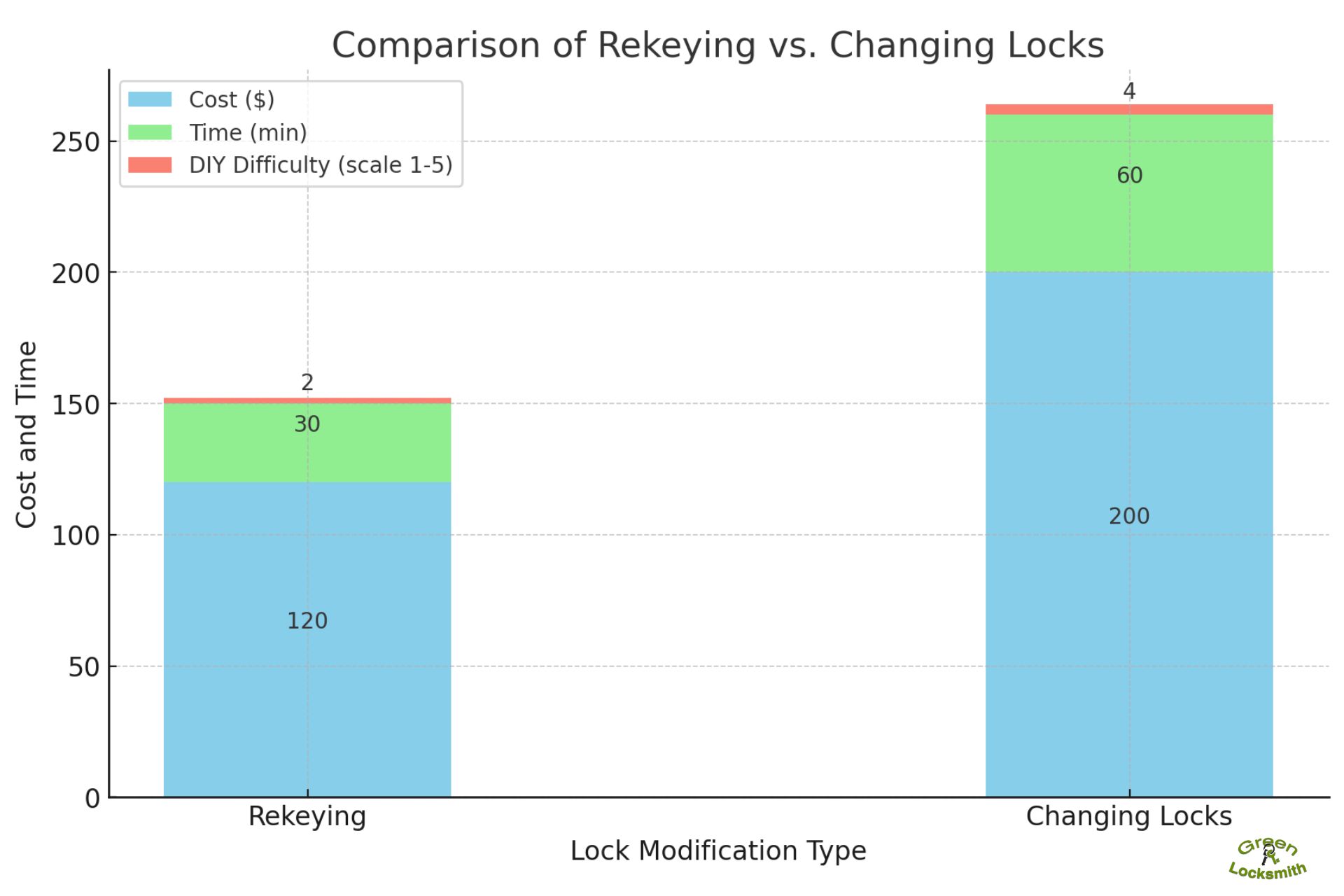
Real Dollar Savings Breakdown
- Professional rekeying: $75-$150 per lock (plus service call fees)
- DIY rekeying: $0 after initial lock purchase
- Time investment: 30 seconds vs 1-2 hours waiting for locksmith
- Long-term value: Unlimited free rekeying versus recurring service costs
Where to Buy Smart Key Locks With Best Value
SmartKey Security® locks provide maximum value when purchased:
– At Home Depot or Lowe’s during seasonal sales
– Direct from Kwikset with warranty registration
– In multi-pack bundles for entire home security
– As replacement cylinders for existing Kwikset locks
Emergency Rekeying Quick Reference Guide
Before starting checklist:
– [ ] Door secured open with wedge
– [ ] Current key verified as working
– [ ] New key fully inserted without resistance
– [ ] SmartKey tool located and undamaged
– [ ] Alternative entry method confirmed
Three-step sequence reminder:
1. Turn current key 90° clockwise (3 o’clock position)
2. Insert/remove SmartKey tool with firm click
3. Program new key (180° left, 180° right, 90° back to vertical)
Mastering smart key lock rekeying puts you in complete control of your home security while saving hundreds annually in locksmith fees. The process takes less time than brewing coffee but delivers peace of mind worth its weight in gold. Keep your SmartKey tool accessible but secure—this tiny piece of metal gives you instant security restoration whenever needed. Practice the sequence once with a spare lock to build confidence, then rekey your entire home to a single key for ultimate convenience. Remember: with SmartKey Security®, your home’s security is literally in your hands—no waiting, no appointments, no compromises.



