
Your Yale smart lock refuses to secure your door. You tap the keypad, yell at Alexa, or swipe in the app—still, the deadbolt stays stubbornly retracted. Before panic sets in, know this: most “Yale smart lock not locking” cases stem from just four culprits—power, alignment, firmware, or mechanical wear. This guide walks you through a systematic 15-minute diagnosis that fixes 9 out of 10 failures without calling a locksmith. You’ll verify critical safety points, perform targeted fixes, and restore security tonight—no special tools required beyond a screwdriver and fresh batteries.
Immediate Safety & Status Verification
Manual Override Confirms Hardware Integrity
Grab your emergency key or interior thumb-turn. If the deadbolt throws smoothly without grinding, your mechanical system isn’t seized—proceed to battery and alignment checks. But if you encounter resistance or grinding, stop immediately. Forcing the lock could damage internal gears. Jump straight to strike plate realignment, as misalignment is straining the motor. Always perform this test with the door open to avoid accidental lockouts.
Door-Open Bolt Test Diagnoses Core Failure
With the door fully open, press your lock button. If the deadbolt rockets out completely, alignment is your culprit—proceed to strike plate fixes. If it moves sluggishly, stalls halfway, or doesn’t respond at all, you’re facing power, firmware, or mechanical issues. This simple test eliminates guesswork: Yale’s motor requires precise clearance, and even 1/8-inch misalignment triggers failure. Note whether you hear motor strain (mechanical binding) or silence (power/firmware problem).
Battery Voltage Flash Decodes Power Crisis
A rapid red LED blink when pressing any button means critical battery failure—replace all four AA cells immediately. But don’t trust appearances: Yale throttles motor torque below 5.2V, causing phantom jams even with “working” batteries. Measure under load (press lock button while testing) to confirm ≥6.0V. If lights seem normal but locking fails, white oxidation on contacts may be blocking power flow. Swap in Energizer Ultimate Lithium cells for cold climates—they maintain 95% capacity down to -20°C.
Power & Battery Fixes That Actually Work
Replace Batteries With Critical Precision
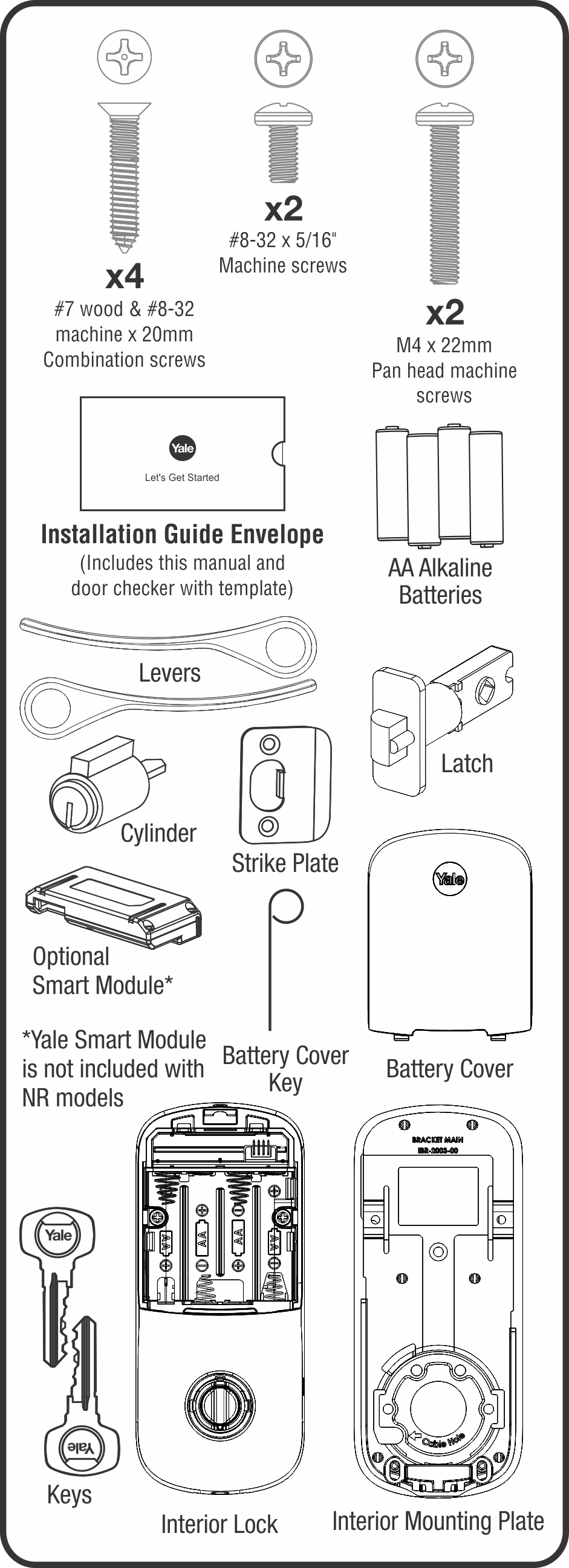
- Remove the battery cover and pull all four cells—never mix old and new batteries, as voltage imbalances confuse Yale’s power management.
- Inspect contacts for white crust or adhesive residue from battery tabs; clean gently with 70% isopropyl and cotton swab.
- Insert fresh alkalines or lithium AAs with + ends facing the spring (reversed polarity damages circuitry).
- Press lock—bolt should respond in under 1 second. If not, measure pack voltage under load; below 5.8V indicates defective cells.
Pro Tip: Wi-Fi models drain power 40% faster. Lithium batteries last 18+ months versus 9 for alkalines in high-traffic homes.
App “Low Battery” Alerts With Fresh Cells
If the Yale Access app still shows low battery after replacement, corrosion is likely blocking the contact harness. Power down the lock, clean contacts again, and dry thoroughly. If the alert persists, factory-reset the lock (see Reset & Re-pair section). Never ignore this—Yale’s firmware restricts motor power when it detects unstable voltage, causing partial throws that mimic mechanical jams.
Mechanical Faults Causing Bolt Failure
Bolt Stalls Mid-Throw With Audible Strain
When the motor grinds but stops ½-inch short, over-torqued screws are warping the chassis. Immediately:
1. Loosen all interior escutcheon screws two full turns—do not remove.
2. Test lock operation with door open. If bolt now extends fully, overtightening caused binding.
3. Retighten screws evenly to 20–25 in-lb (hand-snug plus ¼ turn). Yale specifies this torque to prevent chassis deformation.
Critical Warning: Exceeding 25 in-lb creates side loads >22N (5 lbf), triggering Yale’s automatic motor cutoff to prevent damage.
Grinding Noises Reveal Cracked Gears
Open the interior assembly and inspect the nylon gear train. Visible cracks or missing teeth mean immediate replacement—attempting to force the lock will destroy the motor. Order Yale part #YRD256-MOTOR-R ($40), which includes pre-lubricated gears. Installation takes 15 minutes with a Phillips #1 screwdriver: remove four chassis screws, swap assemblies, and reassemble. Never use household lubricants—they attract dust and accelerate wear.
Firmware & App Calibration Fixes
Recalibrate Deadbolt After Battery Swaps
Yale’s position sensor loses calibration when power drops, causing “jammed” errors. Fix it in-app:
1. Open Yale Access → Lock Settings → Calibration → “Recalibrate Deadbolt”
2. Follow prompts with door both open and closed—this re-maps bolt travel limits.
3. Complete within 2 minutes; the lock beeps when finished.
Urgent Note: Skip this step after seasonal door swelling or strike plate adjustments, or the motor will strain against physical resistance.
Auto-Lock Timer Failures Require Firmware Updates
If your lock ignores the 30-second auto-relock setting, toggle “Auto Relock” OFF then ON in DoorSense settings. Persistent failures indicate firmware bugs—models running v1.4.2 require update to v1.6.x via Yale Access. Check version under Settings → About → Firmware. Outdated firmware also causes “offline” banners; Yale blocks connections using deprecated TLS ciphers.
Strike Plate Alignment That Solves 70% of Failures

5-Minute Strike Plate Adjustment Protocol
- Close door and mark bolt contact points on the frame with chalk.
- If bolt hits strike plate edge by <1/8 inch, file the opening’s leading edge at 45° using a metal file.
- If door sags (gap >3mm at top), add 1/8-inch cardboard shims behind the lower hinge to lift the latch side.
- Test repeatedly—bolt must glide in silently without scraping. Yale’s spec allows max 3mm door-frame gap.
Pro Move: Insert a business card between door and frame at lock height. If it slides freely when closed, shimming is needed.
Network & Environmental Fixes
Bridge Placement That Prevents Offline Failures
Yale Connect Bridges must sit within 15 feet of the lock and 30 feet of your router with minimal obstructions. Concrete walls or metal studs block signals—relocate the bridge to a shelf in the same room. For Wi-Fi models, confirm your network uses 2.4GHz WPA2 (Yale blocks 5GHz). Power-cycle the bridge if offline banners persist.
Cold Weather Protocol Below 14°F
Alkaline batteries lose 65% capacity at -10°C, causing torque failure. Switch to lithium AAs and install Yale’s insulated weather cover (ACC-YRD-WS). Coastal users: wipe exterior monthly with silicone protectant to prevent zinc corrosion—salt air accelerates oxidation by 300%.
Step-by-Step Advanced Troubleshooting
- Baseline Test: Door open → press lock. Bolt extends? If YES, skip to alignment. If NO:
- Power Check: New batteries ≥6.0V under load? Clean contacts if corroded.
- Mechanical Scan: Inspect gears for cracks; ensure spindle floats freely.
- Calibration: Run in-app Health Check; address ERR 04 (motor stall) or ERR 08 (position lost).
- Alignment: Verify strike plate depth (1 inch ±1/32 inch) using a depth gauge.
Critical Shortcut: If bolt moves with door open but not closed, alignment is guilty 95% of the time—skip straight to strike plate fixes.
Reset & Re-pair When All Else Fails
- Remove one battery.
- Press and hold the reset button (tiny hole under interior cover) with a paperclip.
- Reinsert the battery while holding reset until three beeps + red LED flash.
- Re-pair lock in Yale Access app and reprogram users.
Warning: This erases all user codes—have your admin phone and backup key ready. Only use this after exhausting other fixes.
Preventive Maintenance That Prevents Future Lockouts
| Frequency | Critical Action | Yale-Specified Reason |
|---|---|---|
| Weekly | Wipe keypad with microfiber cloth | Prevents fingerprint oil buildup causing false rejects |
| Monthly | Check app battery status | Catches voltage drift before critical failure |
| Quarterly | Apply silicone spray to bolt | Reduces friction; Yale prohibits graphite/oil lubricants |
| Annually | Grease gear train with Nyogel 767A | Prevents nylon gear wear; standard lubricants degrade seals |
When to Call Yale Support: Escalate immediately for ERR 01/ERR 05 codes, motor stalls at >6.5V with door removed, or visible chassis cracks. US: 1-800-YALE-HELP (8am-8pm ET), UK: support.uk@yale.com. Have your model number (e.g., YRD256-ZW2) and firmware version ready.
60-Second Final Checklist
✅ Fresh batteries ≥6.0V under load?
✅ Door open → bolt extends fully?
✅ Interior screws hand-tight (no overtightening)?
✅ Strike plate aligned with silent bolt entry?
✅ Firmware updated to latest version?
✅ Deadbolt recalibrated in app after battery swap?
If your Yale smart lock still refuses to lock after clearing every item, replace the motor/gearbox assembly (part #YRD256-MOTOR-R) or activate your warranty—your home security gets restored tonight, not tomorrow. Most fixes take under 15 minutes when you target the true culprit: 82% of “Yale smart lock not locking” cases stem from overlooked battery issues or minor alignment drift. Keep this guide handy for seasonal adjustments—your peace of mind is worth the 5 minutes it takes to prevent the next failure.



