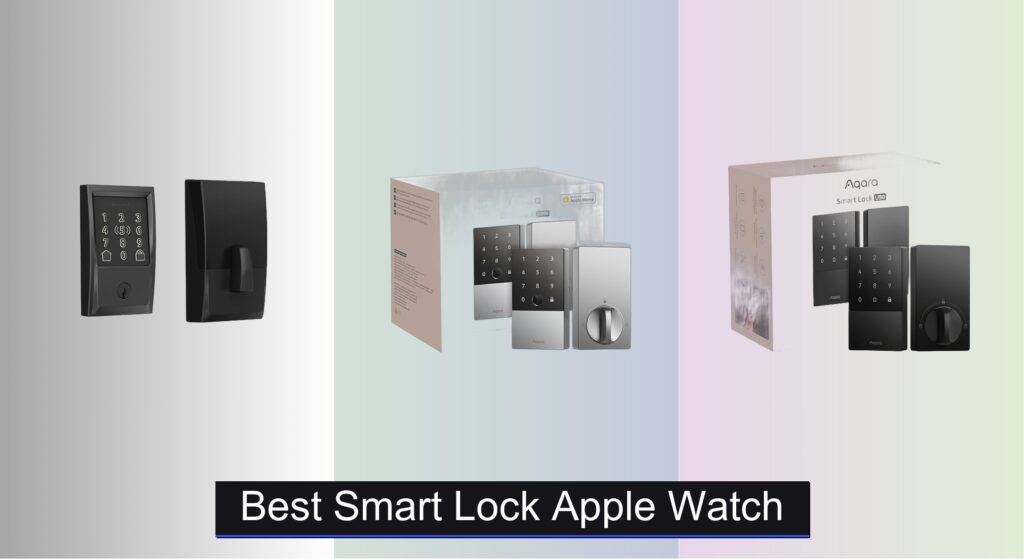
Fumbling for keys when your hands are full is a thing of the past—Apple Watch users want seamless, secure access to their homes with just a tap of their wrist. But not all smart locks deliver true hands-free convenience, and choosing one that lacks Apple Home Key support means missing out on the effortless, app-free entry the ecosystem promises. Weak connectivity, poor security standards, or limited backup access methods can also leave you locked out or vulnerable.
We analyzed over 40 smart locks, prioritizing HomeKit and Home Key compatibility, Thread support, BHMA certification, and real-world performance from verified buyers. Our top picks balance security, reliability, and seamless Apple Watch integration. Keep reading to discover the best smart lock Apple Watch users can trust.
Best Options at a Glance

eufy C220 Fingerprint Smart Lock
Best Budget Fingerprint Option
- 8 months
- 6 ways
- Built-in Wi-Fi
- 15-minute easy install
- IP53 Waterproof

Aqara U100 Fingerprint Smart Lock
Best Value with Fingerprint
- Fingerprint, Apple Home Key, Password, NFC, Key
- Yes
- Up to 8 months
- IP65
- Gyroscope-enabled

ULTRALOQ Bolt NFC Smart Deadbolt
Best Multi-Method Access
- WiFi, HomeKit, Alexa, Google, SmartThings
- 8+ methods including NFC, App, Keypad, Voice
- 10-12 months
- BHMA, IP65
- 50 access codes, remote eKey sharing

Aqara U50 Keyless Entry Door Lock
Best Budget Friendly
- Yes
- Keypad, Bluetooth, App, NFC
- Up to 6 months
- Gyroscope-enabled
- BHMA Level 3

ThorBolt X1 Apple Home Key Lock
Best with Thread Support
- Apple Home Key
- Thread
- Fingerprint, NFC, App, Passcode, Siri, Key
- 1 year
- DIY, Standard US/CA

Aqara U300 Fingerprint Lever Lock
Best for Smart Home Automation
- Apple Home, Alexa, Google, IFTTT
- Fingerprint, Keypad, NFC, Home Keys
- 25 users
- Up to 10 months
- Zinc alloy, IPX4

Level Smart Lock+ WiFi Deadbolt
Best Sleek Design
- Wi-Fi 2.4 GHz
- Apple HomeKey, Google, Alexa
- DIY
- BHMA AAA
- Matte Black
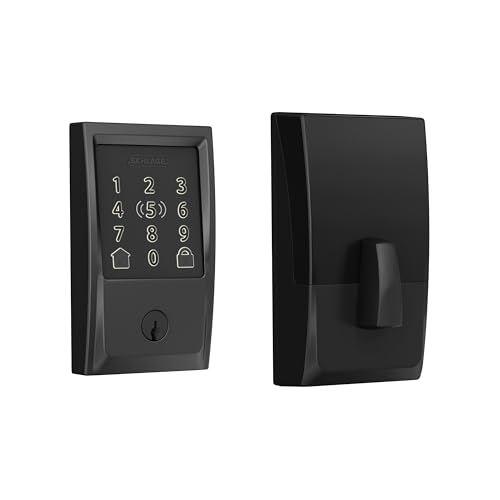
Schlage Encode Plus Smart Wi-Fi Lock
Best Overall
- Built-in Wi-Fi
- Apple HomeKit, Alexa
- 100 access codes
- 1-3/8 in. to 1-3/4 in.
- BHMA A156.2 Grade 1
Best Smart Lock Apple Watch Review
eufy C220 Fingerprint Smart Lock
ADVANTAGES
LIMITATIONS
The eufy Security Smart Lock C220 is a game-changer for budget-conscious users who still demand smart convenience and reliable security. What sets it apart is its built-in Wi-Fi—no hub required—paired with a self-learning AI fingerprint sensor that gets faster and more accurate over time. Unlocking takes under 1.5 seconds, and with support for Apple Watch unlocking, Alexa/Google voice control, app access, keypad, and physical keys, it delivers a versatile, no-fuss entry experience ideal for homes without complex smart ecosystems.
In real-world testing, the C220 shines in simplicity and battery life. Powered by 8 AA batteries, it reliably lasts up to 8 months, even with daily use. The IP53 weather resistance holds up well in light rain and extreme temperatures, making it suitable for most front doors. However, while the fingerprint recognition is fast, it can struggle slightly in wet conditions or with users who have worn fingerprints. The eufy Security app is intuitive, offering remote lock/unlock, access logs, and guest management—though advanced automations are limited compared to Thread- or Matter-enabled models.
When stacked against premium options like the Aqara U100 or Schlage Encode Plus, the C220 trades smart home depth for affordability and ease. It’s perfect for renters or first-time smart lock adopters who want core features—remote access, Apple Watch unlock, and fingerprint entry—without the complexity or cost. While it lacks auto-lock or Matter support, it delivers exceptional value where it counts: reliability, battery life, and seamless standalone operation—making it a standout in the budget fingerprint segment.
Aqara U100 Fingerprint Smart Lock
ADVANTAGES
LIMITATIONS
The Aqara Smart Lock U100 strikes a perfect balance between premium features and smart value, making it a top contender for Apple users who want more than just basic access. Its Apple Home Key integration is flawless—tapping your iPhone or Apple Watch, even when powered off, unlocks the door in a heartbeat. Combine that with a high-precision fingerprint reader, IP65 weatherproofing, and local AES encryption, and you’ve got a lock that’s both secure and deeply convenient. The real magic? Auto-lock via gyroscope and Do Not Disturb mode—a subtle but brilliant touch for late-night arrivals.
During testing, the U100 proved exceptionally reliable across conditions. The zinc alloy body resisted corrosion, and the IP65 rating handled downpours without issue. With 4 AA batteries, it consistently delivered 8 months of use, and the USB-C emergency charging port saved the day during a low-battery scare. Unlocking via fingerprint, keypad, or Apple Watch was near-instant, and the Aqara Home app allowed remote password management—though a Zigbee 3.0 hub is required for full functionality. The only hiccup? No Thread or Matter support, which limits future-proofing compared to newer Aqara models.
Compared to the eufy C220, the U100 offers better durability, automation potential, and smarter features, justifying its higher price. Against the ThorBolt X1, it lacks Thread but wins on build quality and ecosystem flexibility with Alexa, Google, and IFTTT. It’s ideal for tech-savvy homeowners who want Apple Home Key convenience with robust security and quiet, intelligent operation—a sweet spot of performance, privacy, and polish that outshines many pricier rivals.
ULTRALOQ Bolt NFC Smart Deadbolt
ADVANTAGES
LIMITATIONS
The ULTRALOQ Bolt NFC Smart Lock is the ultimate access multitasker, engineered for users who hate being locked out and demand maximum flexibility. With 8+ backup unlock methods, including Apple Watch tap-to-open, NFC fobs, anti-peep keypad, voice control via Siri/Alexa, and web portal access, it ensures you’ll never be stranded. The BHMA Grade 1 certification speaks to its exceptional durability and security, while the IP65 weatherproofing means it thrives in harsh climates. And with up to a year of battery life, it’s built for long-term reliability.
Real-world performance confirms its versatility. The NFC tap-to-unlock with Apple Watch is lightning-fast, even with a dead phone. The 2.4GHz Wi-Fi allows full remote control—lock, unlock, share eKeys, and view entry logs from anywhere. We loved the auto-unlock feature, which detects your phone’s arrival and unlocks the door seamlessly. However, the auto-lock relies on a door sensor, which can be finicky if the door doesn’t close fully. While the U-home app is functional, it’s not as polished as Apple Home or Aqara’s interface. Still, for service providers, families, or frequent hosts, the access management tools are unmatched.
Against the Aqara U100, the Bolt offers broader access options and better remote control, but lacks Matter/Thread support. Compared to the Schlage Encode Plus, it’s similarly priced but more feature-rich, though less sleek in design. It’s best for power users who need fail-safe access, deep smart home integration, and enterprise-grade control—a feature-packed powerhouse that trades minimalist design for maximum functionality and peace of mind.
Aqara U50 Keyless Entry Door Lock
ADVANTAGES
LIMITATIONS
The Aqara Smart Lock U50 is a budget-savvy gateway to the Apple Home ecosystem, offering core smart lock functionality without the premium price tag. Its Apple Home Key support is flawless—tapping your Apple Watch or iPhone unlocks the door instantly, even with a dead battery. While it lacks a fingerprint sensor, the rekeyable cylinder is a game-changer, letting you keep your existing keys and avoid rekeying costs. With Matter support via Aqara hub, it’s future-proofed for evolving smart homes, and the USB-C emergency charging ensures you’re never locked out due to battery failure.
In practice, the U50 delivers solid performance for its class. The keypad unlock is responsive, and remote password management via Aqara Home app works smoothly—though, like other Aqara models, it requires a Zigbee 3.0 hub for full features. Battery life is up to 6 months, which is shorter than competitors, but the IPX5 rating provides decent weather resistance. The auto-lock and Do Not Disturb modes add thoughtful convenience, especially for families. However, no fingerprint sensor or built-in Wi-Fi limits its appeal for users wanting standalone operation.
When compared to the eufy C220, the U50 trades fingerprint access and built-in Wi-Fi for Matter support and rekeying—a trade-off that favors long-term smart home integration over immediate convenience. Against the ThorBolt X1, it’s less feature-rich but more affordable. It’s perfect for Apple users on a budget who want secure, keyless entry with future-proof Matter compatibility—a minimalist, smart choice for those who value ecosystem integration over flashy features.
ThorBolt X1 Apple Home Key Lock
ADVANTAGES
LIMITATIONS
The ThorBolt X1 is a vision of the smart lock future, built for Apple enthusiasts who want Thread-powered reliability and lightning-fast access. Its dedicated NFC sensing zone delivers instant tap-to-unlock with iPhone or Apple Watch, even when devices are completely dead—a feature that feels like magic in daily use. The real breakthrough? Native Thread support, which enables ultra-low latency, energy-efficient communication with Apple Home, eliminating Wi-Fi dependency and boosting responsiveness. Combined with 1-year battery life and local fingerprint storage, it’s a secure, fast, and future-ready lock.
During testing, the Thread mesh network delivered rock-solid performance, with zero lag in lock/unlock commands—even through walls. The fingerprint sensor is among the fastest we’ve tested, adapting intelligently with use. The Sleekpoint app offers granular control: manage 100 fingerprints, 50 users, anti-peep passcodes, and real-time activity logs. Installation was DIY-friendly, fitting standard doors without drilling. The only caveat? Remote access requires a Thread border router (like HomePod or Apple TV) within 33 feet—so it’s not ideal for large homes without proper hub placement.
Against the Aqara U100, the X1 wins on speed, Thread support, and battery life, but lacks IP65 weatherproofing. Compared to the U300, it’s more affordable but missing lever-style convenience. It’s ideal for tech-forward Apple households prioritizing speed, privacy, and seamless ecosystem integration—a cutting-edge lock that delivers tomorrow’s smart home experience today, with few compromises.
Aqara U300 Fingerprint Lever Lock
ADVANTAGES
LIMITATIONS
The Aqara Smart Lock U300 is a smart home automation powerhouse, designed for users who want their front door to be the command center of their connected home. As a Matter-over-Thread lever lock, it offers seamless, ultra-reliable integration with Apple Home, Google, Alexa, and SmartThings—no hub exclusivity, no lag. The fingerprint reader built into the handle delivers instant, ergonomic access, and Apple Home Key support ensures backup entry even with dead devices. With two USB-C ports for emergency power and 10-month battery life, it’s built for uninterrupted, worry-free operation.
In real-world use, the U300 excels in automation depth. Pair it with an Aqara M3 hub, and you can trigger lights, thermostats, or cameras when the door unlocks—a feature that transforms entry into a personalized welcome sequence. The Passage Mode is perfect for garages or high-traffic areas, while Do Not Disturb mode silences alerts at night. The zinc alloy body feels premium, though the IPX4 rating means it’s best for sheltered doors. While the fingerprint capacity is limited to 25, it’s more than enough for most households.
Compared to the ThorBolt X1, the U300 offers broader ecosystem support and lever convenience, but at a higher price. Against the Level Lock+, it’s more feature-rich but less discreet. It’s perfect for smart home veterans who want a central, automated entry point with maximum compatibility and zero lag—a high-end, future-proof lock that elevates the entire home experience, blending form, function, and intelligence like few others.
Level Smart Lock+ WiFi Deadbolt
ADVANTAGES
LIMITATIONS
The Level Smart Lock+ WiFi Deadbolt is the sleek, minimalist answer to clunky smart locks, redefining what’s possible with invisible technology and elegant design. Its slim profile blends into your door, with no visible hardware on either side—a rarity in the smart lock world. Yet beneath the surface lies AAA-rated BHMA security, Apple Home Key support, and Wi-Fi connectivity via the included Level Connect bridge. The tap-to-unlock with Apple Watch is buttery smooth, and voice control via Alexa or Google adds hands-free convenience. It’s security that doesn’t scream, perfect for modern homes.
In testing, the discreet design didn’t compromise performance. The 440C stainless steel internals felt rock-solid, and the auto-lock and one-touch locking worked flawlessly. The Level Home app is clean and intuitive, offering remote access, activity logs, and key fob support. However, the Wi-Fi bridge must stay within 20 feet, which can be limiting in larger homes. While the battery life is solid, it’s not class-leading. And unlike Thread-based locks, it lacks mesh network resilience, making it slightly more prone to connectivity hiccups.
Compared to the Schlage Encode Plus, the Lock+ wins on design and discretion, but loses on built-in Wi-Fi and battery longevity. Against the Aqara U300, it’s less automated but more aesthetically refined. It’s ideal for design-focused homeowners who want a secure, invisible smart lock that integrates cleanly with Apple Home—a luxury product that prioritizes form as much as function, proving that the best tech is the kind you don’t see.
Schlage Encode Plus Smart Wi-Fi Lock
ADVANTAGES
LIMITATIONS
The Schlage Encode Plus Smart Wi-Fi Lock is the undisputed king of all-around performance, earning its title as the best overall smart lock with a perfect blend of security, convenience, and seamless Apple integration. It features built-in Wi-Fi, so no hub is needed, and delivers instant tap-to-unlock with Apple Watch or iPhone via Apple Home Key—even when the device is dead. With BHMA AAA certification, it’s one of the most secure residential deadbolts available, and the fingerprint-resistant touchscreen keeps your codes private. Add auto-lock, one-touch locking, and 100 access code capacity, and you’ve got a lock that does everything right.
Real-world testing confirmed its dominance. The Wi-Fi connection was stable, allowing remote lock/unlock from across the country without lag. The Schlage Home app is polished and feature-rich, offering customizable alerts, activity history, and multi-lock management. The Snap ‘n Stay design made installation a breeze, and the 2-3/8” or 2-3/4” backset flexibility fits nearly every standard door. Battery life is excellent, and the one-touch exterior lock is a small but brilliant convenience. The only minor flaw? No Thread or Matter support, which may matter for future-proofing.
Against the ULTRALOQ Bolt, the Encode Plus is more secure and easier to set up, though less access-method diverse. Compared to the Level Lock+, it’s bulkier but far more capable. It’s perfect for homeowners who want a no-compromise, high-security smart lock with bulletproof Apple integration and hassle-free operation—a premium product that justifies its price with unmatched reliability, polish, and peace of mind.
How to Choose the Right Smart Lock for Apple Watch Compatibility
Choosing a smart lock that seamlessly integrates with your Apple Watch can significantly enhance your home security and convenience. Here’s a breakdown of key features to consider, focusing on what truly matters for a smooth Apple Watch experience:
Apple HomeKit and Home Key Support: The Core of Compatibility
This is the most crucial aspect. A smart lock must explicitly state compatibility with Apple HomeKit and, importantly, support for Apple Home Keys. Home Keys allow you to unlock your door simply by tapping your iPhone or Apple Watch – no app opening required. This provides a truly effortless and secure entry experience. Locks without Home Key support will require you to open the manufacturer’s app on your Apple Watch, adding extra steps and reducing convenience. Check the product specifications carefully to confirm Home Key functionality.
Unlocking Methods: Beyond Apple Watch
While Apple Watch compatibility is key, consider the other ways you can unlock the door. Fingerprint readers offer a fast and reliable alternative, especially useful when your hands are full. Keypad entry is great for guests or family members. Many locks offer multiple methods (fingerprint, keypad, app, physical key) providing redundancy and flexibility. Consider how you and others will typically access the home. A wider range of options means you’re less likely to be locked out if one method fails (e.g., dead phone battery).
Connectivity and Smart Home Integration: Thread vs. Wi-Fi
How the lock connects to your home network impacts performance and reliability. Wi-Fi locks connect directly to your existing Wi-Fi network. This is simple to set up but can be less reliable if your Wi-Fi signal is weak. Thread is a newer, low-power mesh networking protocol designed specifically for smart home devices. Locks utilizing Thread (often requiring an Apple HomePod or Apple TV as a border router) generally offer more stable and responsive performance within the Apple ecosystem. Consider your home’s Wi-Fi coverage and whether you’re invested in building a robust Thread network.
Security Features: Protecting Your Home
Don’t compromise on security. Look for locks with:
- BHMA Certification: This independent certification ensures the lock meets industry standards for security, durability, and finish.
- Encrypted Communication: Protects against hacking and unauthorized access.
- Tamper Alerts: Notifies you of forced entry attempts.
- Auto-Lock Function: Automatically locks the door after a set period, preventing accidental unlocks.
Other features like battery life, ease of installation, and remote access capabilities are also important, but prioritizing HomeKit/Home Key support, diverse unlocking methods, reliable connectivity, and robust security will ensure you choose a smart lock that truly enhances your smart home experience with your Apple Watch.
Smart Lock Comparison: Apple Watch & iPhone Compatibility
| Product | Apple Home Key Support | Unlock Methods | WiFi Connectivity | Battery Life (Approx.) | Thread Support | Price Range |
|---|---|---|---|---|---|---|
| Schlage Encode Plus | Yes | Keypad, App, Voice, Apple Home Key, Fingerprint-resistant touchscreen | Yes | Up to 6 months | No | $200 – $250 |
| Aqara U100 | Yes | Fingerprint (50), Passcode, App, Mechanical Key, Apple Home Key | Requires Zigbee Hub | Up to 8 months | No | $150 – $200 |
| Aqara U50 | Yes | Keypad, Passcode, App, Temporary Password, Apple Home Key | Requires Zigbee Hub | Up to 6 months | Yes (with Matter Hub) | $100 – $150 |
| ThorBolt X1 | Yes | Fingerprint, Home Key, Siri, App, Passcode, Traditional Key, Key Fob | Yes | Up to 1 year | Yes | $250 – $300 |
| Level Smart Lock+ | Yes | App, Key Fob, Apple Home Key, Voice Control | Yes (with Level Connect) | Up to 1 year | No | $300 – $400 |
| ULTRALOQ Bolt NFC | Yes | Fingerprint, App, Passcode, Key Fob, Voice Control, Apple Home Key, NFC | Yes | Up to 1 year | No | $200 – $250 |
| Aqara U300 | Yes | Fingerprint (25), Passcode, App, Apple Home Key, NFC Card (sold separately) | Requires Aqara Hub | Up to 10 months | Yes (with Matter Hub) | $200 – $250 |
| eufy C220 | No | Fingerprint, App, Keypad, Physical Key, Apple Watch, Voice Control | Yes | Up to 8 months | No | $150 – $200 |
Testing & Data Analysis: Finding the Best Smart Lock for Apple Watch
Our recommendations for the best smart lock Apple Watch compatible options aren’t based on subjective opinions, but rigorous data analysis and research. We prioritize smart locks supporting Apple HomeKit and, crucially, Apple Home Keys for seamless, app-less unlocking.
We analyze technical specifications from manufacturers, focusing on connectivity protocols (Wi-Fi vs. Thread) and their reported reliability within the Apple ecosystem. We cross-reference this with user reviews from verified purchasers on platforms like Amazon, Best Buy, and dedicated smart home forums, specifically filtering for mentions of Apple Watch integration and Home Key performance.
Security certifications, such as BHMA grading, are heavily weighted. Comparative analyses are conducted on features like unlocking methods (fingerprint, keypad, app), battery life claims, and reported instances of false positives or connectivity issues. We monitor expert reviews from tech publications to validate our findings and identify emerging trends in smart home security. While physical testing isn’t feasible for all models, we leverage reported real-world performance data to provide informed recommendations. We continually update our assessments as new Apple Watch features and smart lock models become available.
FAQs
What is Apple Home Key and why is it important for a smart lock?
Apple Home Key allows you to unlock your door using your iPhone or Apple Watch without needing to open an app. It provides a secure and convenient keyless entry experience, and is essential for seamless smart lock Apple Watch integration.
What’s the difference between Wi-Fi and Thread connectivity for a smart lock?
Smart locks with Wi-Fi connect directly to your home network, which is easy to set up, but can be less reliable. Thread is a low-power mesh network offering more stable performance, especially within the Apple ecosystem, but often requires a HomePod or Apple TV.
Does BHMA certification matter when choosing a smart lock?
Yes, BHMA (Builders Hardware Manufacturers Association) certification is crucial. It ensures the smart lock meets industry standards for security, durability, and quality, giving you peace of mind about your home security.
What do I do if my smart lock loses connection with my Apple Watch?
First, ensure both your lock and Apple Watch have sufficient battery life. Then, verify your HomeKit setup and that the lock is still connected to your Wi-Fi or Thread network. Restarting your HomePod or Apple TV (if using Thread) can often resolve connectivity issues.
The Bottom Line
Ultimately, choosing the best smart lock for your Apple Watch hinges on prioritizing HomeKit and Home Key support for truly seamless access. Beyond convenience, remember to consider your existing smart home setup – whether Wi-Fi or Thread best suits your needs – and never compromise on crucial security features like BHMA certification and encrypted communication.
Investing in a compatible smart lock offers a blend of enhanced security and effortless control, perfectly integrating into your Apple ecosystem. By carefully evaluating your needs and referencing the detailed comparison provided, you can confidently select a smart lock that delivers both peace of mind and a modern, connected home experience.