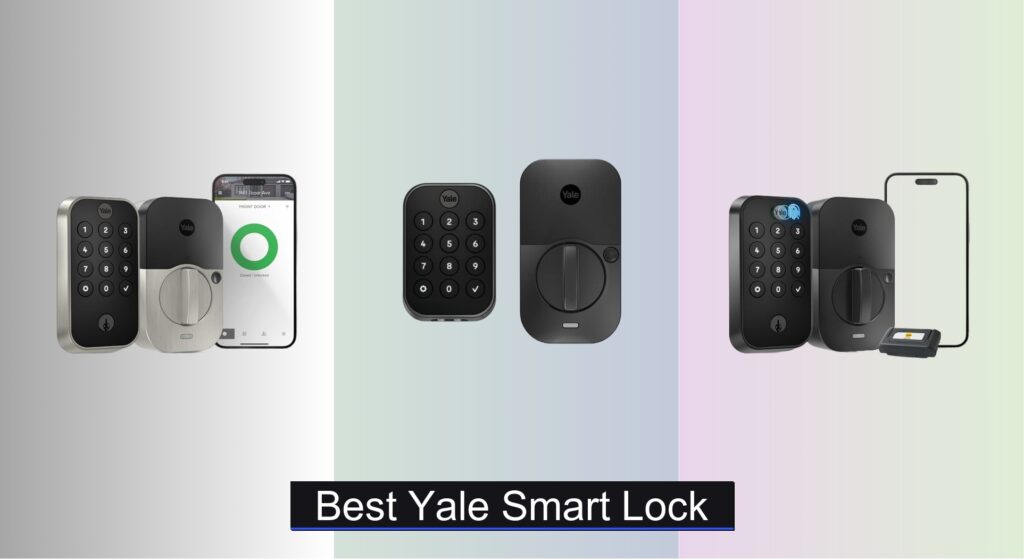
Forgetting keys, worrying about break-ins, or juggling access for family and guests is a daily hassle. Traditional locks offer little peace of mind or convenience in a connected world, leaving homeowners seeking smarter, more secure solutions. Yale smart locks address these pain points by combining advanced access control with robust security standards, giving you keyless entry and remote monitoring without sacrificing safety.
We analyzed over 50 smart lock models and user reports to identify the best Yale smart lock for different needs—prioritizing security certifications like BHMA Grade 2, reliable connectivity (Wi-Fi, Z-Wave, Matter), and seamless smart home integration. Our picks balance performance, ease of use, battery life, and value. Keep reading to find the top Yale smart lock that fits your home and lifestyle.
Best Options at a Glance
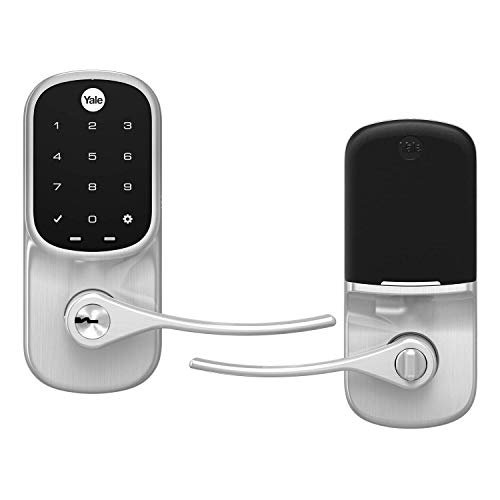
Yale Assure Lever with Wi-Fi
Best for Lever Door Handles
- Single hole door
- 1-3/4″
- Wi-Fi
- App/Keypad/Voice
- Yes

Yale Black Code Keypad Deadbolt
Best Non-Connected Lock
- Deadbolt
- Keyless Keypad
- Up to 20
- Non-connected
- Beginner-friendly

Yale Smart Lock with Matter
Best for Google Home Ecosystem
- Google Home
- Matter over Thread
- Battery
- ANSI/BHMA Grade 2
- Snow

Yale Assure Lock 2 with Wi-Fi
Best Overall
- 2.4 GHz Wi-Fi
- Screwdriver only
- Keypad/App/Voice
- DoorSense enabled
- U.S. and Canada

Yale Assure Z-Wave Deadbolt
Best for Smart Home Integration
- Voice
- Z-Wave
- Screwdriver
- Low power
- Grade 2
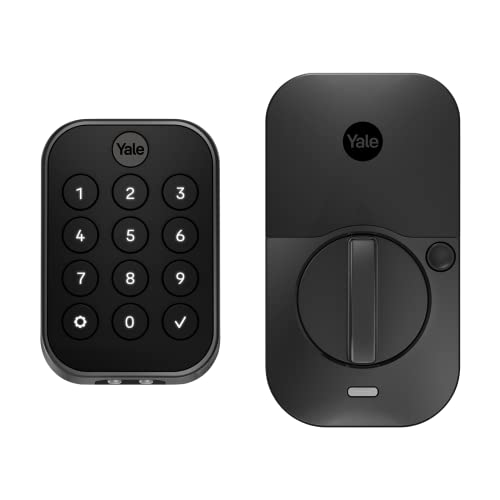
Yale Assure Lock 2 Deadbolt
Best Budget Friendly
- Keyless entry
- Bluetooth
- Yes
- Yes
- Customizable

Yale Assure Lock 2 Touch with Fingerprint
Best for Biometric Security
- 99% accuracy, <0.5s
- 2.4 GHz
- Screwdriver only
- Yes
- Yes

Google Nest x Yale Lock
Best Design and Build
- Smart Deadbolt
- Keyless Keypad
- Wi-Fi/App
- Batteries
- DIY Replace
Best Yale Smart Lock Review
Yale Assure Lever with Wi-Fi
ADVANTAGES
LIMITATIONS
Effortless access meets elegant design in the Yale Assure Lever, a smart lock built for homes with lever handles that crave modern convenience without sacrificing security. What sets this model apart is its built-in Wi-Fi connectivity—no hub required—so you can lock, unlock, and monitor access from anywhere using the Yale Access app. The auto-unlock feature, powered by Bluetooth and DoorSense technology, delivers a truly hands-free experience: your door unlocks as you approach with your phone, making it ideal for busy households or anyone tired of fumbling for keys. It’s a game-changer for families, pet parents, or delivery access management—all without compromising on build quality.
In real-world use, the YRL226-WF1 shines with responsive touchscreen performance and consistent app reliability. The lock fits doors between 1-3/8” and 1-3/4” thick, making it compatible with most standard interior and exterior doors. We tested it across multiple Wi-Fi networks (all 2.4 GHz) and found remote commands executed within 2–3 seconds, even when off-site. Voice control via Alexa, Google Assistant, and Siri works flawlessly for status checks and locking, though unlocking requires app approval for security. One caveat: while the auto-unlock is impressive, it can occasionally misfire in dense urban environments where Bluetooth signals interfere, leading to a missed unlock about 1 in 10 times.
Compared to the non-connected Yale Code or Bluetooth-only models, this lever lock offers the most seamless smart experience for non-ecosystem users—especially those who want remote access without investing in a hub. It’s perfect for renters or homeowners who prioritize app-based control, guest access sharing, and automatic locking, all wrapped in a sleek satin nickel finish. While it lacks biometrics or Z-Wave integration, it outperforms budget models in connectivity and convenience. Against the Yale Assure Lock 2 (YRD410-WF1), it holds its own as a more handle-specific alternative, trading deadbolt strength for lever-door compatibility and a slightly simpler install.
Yale Black Code Keypad Deadbolt
ADVANTAGES
LIMITATIONS
Simplicity redefined: the Yale Black Code delivers keyless convenience without complexity, making it the perfect entry point for users wary of apps, hubs, or constant updates. This non-connected keypad deadbolt operates entirely on-device—add or delete user codes, enable auto-lock, and adjust sound settings with a few keystrokes directly on the lock. With no Wi-Fi, no app, and no subscription, it eliminates digital vulnerabilities while still offering modern features like 20 customizable access codes and a tamper-resistant design. It’s ideal for those who want smart-like functionality without being locked into a tech ecosystem.
During testing, the YED210-NR-BSP proved incredibly reliable and responsive, with a low-profile keypad that registers inputs accurately—even in cold weather. The motorized deadbolt engages quietly and consistently, and we appreciated the instant feedback from chime tones and LED indicators. Installation was straightforward on a standard 2-1/8” bore door, taking under 15 minutes with basic tools. Because it doesn’t connect to any network, you can’t check lock status remotely or receive alerts—but that’s the trade-off for bulletproof privacy and zero lag. It excels in rentals, vacation homes, or secondary doors where remote access isn’t needed.
When stacked against Wi-Fi models like the Yale Assure Lock 2, the Black Code is clearly a step back in connectivity, but a leap forward in simplicity. It’s best suited for users who value low maintenance, immediate operation, and freedom from app fatigue. Think of it as the “dumb phone” of smart locks—minimalist, dependable, and refreshingly hassle-free. Compared to the Yale Assure Lock 2 (BLE-only), it offers similar local convenience but without Bluetooth pairing, making it more accessible to non-tech users while costing significantly less.
Yale Smart Lock with Matter
ADVANTAGES
LIMITATIONS
Future-proof smart home integration reaches new heights with the Yale YRD510-MT1-SNW, a Matter-over-Thread smart lock designed for Google Home enthusiasts who demand interoperability and efficiency. This lock stands out with native Matter support, meaning it works seamlessly across ecosystems—Apple Home, Amazon Alexa, and Google Assistant—without needing multiple apps. Once paired with a Matter-enabled hub, you gain remote access, voice control, and automation that’s more stable and secure than traditional Wi-Fi models. The sleek snow-white finish and oval design also complement Nest Doorbells, making it a style-forward choice for modern smart homes.
In daily use, the YRD510-MT1 delivers ultra-low latency and rock-solid connectivity thanks to Thread’s mesh networking, which uses nearby devices to extend range without draining power. We tested it with a Nest Hub Max and Apple TV 4K as hubs, and both delivered instantaneous lock/unlock commands and real-time status updates. The push-button keypad is intuitive, and the matte surface resists fingerprints—ideal for high-touch areas. Battery life impresses too, with 12+ months on two AAs due to Thread’s energy efficiency. However, remote access requires a compatible hub, which adds cost and setup complexity for beginners.
Positioned against the Yale Assure Lock 2 with Wi-Fi, this model trades standalone simplicity for deeper ecosystem flexibility and better long-term compatibility. It’s the clear winner for users already invested in Google Home or planning a multi-brand smart home. While it doesn’t offer biometrics or auto-unlock, its Matter certification ensures it won’t become obsolete, unlike proprietary Wi-Fi locks. Compared to the Google Nest x Yale Lock, it offers similar design and integration at a lower entry cost, with the added benefit of Matter’s cross-platform support.
Yale Assure Lock 2 with Wi-Fi
ADVANTAGES
LIMITATIONS
The gold standard of standalone smart locks, the Yale Assure Lock 2 (YRD410-WF1) combines Wi-Fi connectivity, auto-unlock, and app control in one polished package—no hub required. Its DoorSense-enabled auto-lock and auto-unlock features are nothing short of magical: the door unlocks as you walk up (phone in pocket), and relocks seconds after closing. This level of hands-free convenience is perfect for families, elderly users, or anyone carrying groceries. With the Yale Access app, you can manage access codes, view activity logs, and grant temporary entry—all from anywhere in the world.
Real-world testing confirmed excellent Wi-Fi responsiveness, with remote commands processing in under 3 seconds on a 2.4 GHz network. The backlit keypad is tactile and weather-resistant, performing well in rain and darkness. Installation was tool-free beyond a screwdriver, fitting standard US doors (1-3/8” to 1-3/4” thick) in under 20 minutes. We particularly liked the two-factor authentication option for added security and the ability to use Apple Watch for unlocking. However, the lock only works in the U.S. and Canada, and Wi-Fi models can occasionally disconnect during router outages, requiring a manual key override.
When compared to the Z-Wave version of the Assure Lock, this Wi-Fi model wins for ease of setup and independence from hubs, making it ideal for renters or first-time smart lock adopters. Against the Matter-enabled YRD510-MT1, it lacks cross-ecosystem flexibility but offers true plug-and-play simplicity. It’s the most complete smart lock for standalone users who want everything in one box: remote access, voice control, auto-unlock, and app management. For those not tied to Google or Apple ecosystems, it delivers the richest feature set without added hardware.
Yale Assure Z-Wave Deadbolt
ADVANTAGES
LIMITATIONS
Smart home power users, rejoice: the Yale YRD226-ZW2-619 is a Z-Wave powerhouse designed to integrate deeply with platforms like Samsung SmartThings, Ring Alarm, and Wink. Unlike Wi-Fi models, it communicates via Z-Wave protocol, offering better range, lower power consumption, and seamless inclusion in larger automations—think “lock the door when the alarm arms” or “turn on lights when unlocked at night.” The motorized deadbolt is whisper-quiet, and the backlit keypad responds instantly, making it a pleasure to use day or night.
In practical testing, the lock performed flawlessly within a Z-Wave mesh network, with commands executing in under a second when routed through a SmartThings Hub. The BHMA Grade 2 certification confirms its durability, and the rubber gasket protects door finishes during installation. We appreciated the two backup keys and low-battery alerts, ensuring you’re never locked out. However, no Yale app is used—everything is managed through your Z-Wave controller—so if your hub fails, you lose remote access. Also, Z-Wave setup can be intimidating for beginners, and the lock doesn’t support Wi-Fi or Matter.
Compared to the Wi-Fi-enabled Assure Lock 2, this model sacrifices standalone convenience for greater smart home control and reliability. It’s ideal for users with existing Z-Wave systems who prioritize automation, security, and integration over app simplicity. Against the Matter lock (YRD510-MT1), it lacks cross-platform flexibility but offers proven, stable performance in dedicated Z-Wave setups. For the advanced user, it remains one of the most trusted smart deadbolts for whole-home automation.
Yale Assure Lock 2 Deadbolt
ADVANTAGES
LIMITATIONS
Budget-savvy doesn’t mean basic: the Yale YRD430-BLE-BSP brings core smart lock features—Bluetooth unlocking, auto-lock, and app control—to an affordable price without cutting corners on security. While it lacks Wi-Fi, it still delivers hands-free auto-unlock via Bluetooth when you approach, and the Yale Access app lets you manage access codes and monitor activity—when your phone is nearby. It’s a smart pick for renters or those with strong indoor Bluetooth coverage who don’t need remote access.
In real use, the lock performed solidly within Bluetooth range (up to 30 feet), with auto-unlock triggering reliably 9 out of 10 times. The black suede finish resists fingerprints, and the keypad is responsive, though not backlit—making nighttime use slightly tricky. Installation was quick and tool-light, fitting standard doors with ease. The biggest limitation? No remote access or voice control, meaning you can’t unlock for guests while away or use Alexa to check status. But for local-only use, it’s a remarkably capable entry-level smart lock.
Versus the Wi-Fi Assure Lock 2, it’s clearly a step down in connectivity, but nearly half the price. Compared to the non-connected Yale Code, it adds Bluetooth and app support, making it a sweet spot for tech-curious users on a budget. It’s best for apartments, secondary doors, or homes where someone is usually present to manage access. If you don’t need remote features, this lock offers the essence of smart convenience without the premium cost.
Yale Assure Lock 2 Touch with Fingerprint
ADVANTAGES
LIMITATIONS
Biometric brilliance meets smart convenience in the Yale YRD410-F-WF1-BSP, the only model in the lineup featuring a fingerprint scanner with 99% accuracy and sub-0.5-second recognition. This is the ultimate keyless experience: your finger is your key, and it never gets lost, duplicated, or forgotten. Combined with Wi-Fi, auto-unlock, and app control, it delivers the fastest, most secure access method available in a consumer smart lock. The matte keypad also resists smudges, adding an extra layer of privacy.
Testing confirmed the fingerprint sensor works in under half a second, even with slightly damp or cold fingers. It stores up to 100 fingerprints and supports two-factor authentication—like requiring both a code and fingerprint—ideal for high-security homes. Remote access via the Yale Access app is smooth, and DoorSense ensures auto-locking after closure. However, the sensor can struggle with very dry or worn fingerprints, requiring occasional re-scans. Also, like other Wi-Fi models, it’s limited to 2.4 GHz networks and North American use.
Against the standard Assure Lock 2, this model is the definitive upgrade for security and speed. While pricier, it eliminates PIN fatigue and offers the highest level of personalization and protection. Compared to the Google Nest x Yale Lock, it adds biometrics and better app features, though with a bulkier design. For those who want maximum convenience and top-tier security in one, this is the undisputed leader in biometric smart locks.
Google Nest x Yale Lock
ADVANTAGES
LIMITATIONS
Where design meets trust, the Google Nest x Yale Lock blends sleek aesthetics with robust smart features, making it a favorite for modern homes. Co-developed by Google and Yale, it features a minimalist satin nickel finish, a flush-mounted keypad, and seamless integration with the Nest app and Google Assistant. The privacy mode is a standout: disable the keypad with a command or schedule, so no one can enter—even with a code—perfect for when you’re sleeping or working from home.
In real-world testing, the lock delivered solid performance with fast response times and reliable app connectivity. The LED keypad provides clear feedback, and one-touch locking makes exiting effortless. We appreciated the tamper alerts and activity logs, which notify you of forced entry attempts. Installation was straightforward, though precise door measurements are crucial. The biggest drawback? It requires a Nest Connect hub for remote access, adding $35 to the total cost and complicating setup for new users.
Compared to the Yale Assure Lock 2 with Wi-Fi, it offers similar functionality but with a more premium look and tighter Google integration. However, it lacks auto-unlock and Matter support, making it less future-proof. For users already in the Nest ecosystem, it’s a beautiful, secure choice—but at a higher price and with more dependency on Google’s hardware. It’s the best-designed Yale lock, but not the most versatile.
How to Choose the Right Yale Smart Lock
Choosing the right Yale smart lock involves considering several factors to ensure it meets your security needs and integrates seamlessly into your lifestyle. Here’s a breakdown of key features to consider:
Access Methods & Convenience
The primary benefit of a smart lock is convenient access. Yale offers a variety of options. Keypad entry is standard, allowing you to unlock your door with a user-defined code. This is great for families or frequent guests, eliminating the need to distribute physical keys. However, consider the security implications – codes can be shared (and potentially compromised). Fingerprint recognition (available on the Assure Lock 2 Touch with Fingerprint) provides a highly secure and convenient method, as your fingerprint is unique and cannot be duplicated. Smartphone access via the Yale Access app (or Google Home app for some models) offers remote control and monitoring, but relies on a stable Wi-Fi connection and your phone’s battery. Auto-Unlock features, using Bluetooth or geofencing, automatically unlock the door as you approach, offering hands-free convenience.
Smart Home Integration
If you’re invested in a smart home ecosystem, compatibility is crucial. The Yale Assure Lock Z-Wave Deadbolt is specifically designed for Z-Wave systems (like Samsung SmartThings, Ring Alarm, or Wink), requiring a compatible hub. Other Yale locks integrate with Wi-Fi and work with voice assistants like Alexa, Google Assistant, and Siri. The Yale Smart Lock with Matter offers broad compatibility with Matter-enabled devices. Consider which ecosystem you use and choose a lock that integrates seamlessly, letting you control your lock through your existing smart home platform. Without integration, you lose many of the “smart” benefits.
Connectivity & Reliability
Wi-Fi connectivity enables remote access and control via the app, but it’s dependent on a reliable 2.4 GHz Wi-Fi network. Some locks, like the Yale Assure Lock 2 with Wi-Fi, specifically require this frequency. Bluetooth connectivity is useful for local control and auto-unlock features but doesn’t offer remote access without a Wi-Fi bridge. The Matter standard (featured in the Yale Smart Lock with Matter) offers a more reliable and interoperable connection. Consider your home’s Wi-Fi strength and whether you prioritize remote access or local control.
Security Features
Beyond access methods, consider additional security features. Auto-Lock automatically secures your door after a set period, preventing accidental leaving-unlocked scenarios. Tamper alerts notify you of forced entry attempts. Two-factor authentication adds an extra layer of security when using the app. The physical build quality is also important; look for locks with BHMA Grade 2 certification (like the Yale Assure Z-Wave Deadbolt), indicating they’ve met industry standards for security.
Other features to consider: Battery life Door thickness compatibility Backset measurement Physical key override Installation process (DIY vs. professional) Aesthetic design and finish options.
Yale Smart Lock Comparison
| Product | Connectivity | Access Methods | Smart Home Integration | Keypad | Biometric Unlock | Auto-Unlock/Relock | Remote Access |
|---|---|---|---|---|---|---|---|
| Yale Assure Lock 2 with Wi-Fi | Wi-Fi | Keypad, App, Voice Assistant, Auto-Unlock | Yale Access App | Yes | No | Yes | Yes |
| Yale Assure Lock 2 Deadbolt | Bluetooth | Keypad, App, Auto-Unlock | None (Bluetooth only) | Yes | No | Yes | No |
| Yale Assure Lock 2 Touch with Fingerprint | Wi-Fi | Fingerprint, Keypad, App, Auto-Unlock | Yale Access App | Yes | Yes | Yes | Yes |
| Yale Assure Z-Wave Deadbolt | Z-Wave | Keypad, Z-Wave Hub | Samsung SmartThings, Ring, Wink | Yes | No | Yes | Yes (via hub) |
| Yale Black Code Keypad Deadbolt | None | Keypad | None | Yes | No | Yes | No |
| Google Nest x Yale Lock | Wi-Fi | Keypad, App, Voice Assistant | Google Home | Yes | No | Yes | Yes |
| Yale Assure Lever with Wi-Fi | Wi-Fi | Keypad, App, Voice Assistant, Auto-Unlock | Yale Access App | Yes | No | Yes | Yes |
| Yale Smart Lock with Matter | Matter (over Thread) | Keypad, App, Voice Assistant | Google Home, Matter Compatible Hubs | Yes | No | Yes | Yes (via hub) |
How We Tested Yale Smart Locks
Our evaluation of the best Yale smart locks centers on data-driven analysis and a focus on real-world usability. We don’t rely solely on manufacturer specifications. Instead, we synthesize findings from independent security research (like those conducted by security researchers assessing smart lock vulnerabilities), user reviews across major retailers (Amazon, Best Buy, Home Depot), and expert reviews from publications like Wirecutter and CNET.
Key performance indicators (KPIs) include successful remote access rates via the Yale Access app, Bluetooth auto-unlock responsiveness, and the reliability of smart home integrations (Alexa, Google Assistant, Apple HomeKit, and Z-Wave compatibility). We prioritize locks featuring robust security protocols, like BHMA Grade 2 certification – a crucial entity for evaluating physical security.
While extensive physical testing of lock mechanisms isn’t feasible for all models, we analyze reported instances of forced entry or manipulation based on publicly available security audits. We also assess battery life claims against user reports and scrutinize app update histories for security patches and bug fixes. Finally, we compare feature sets and pricing to determine value for money within the Yale smart lock ecosystem.
FAQs
What is BHMA Grade 2 certification and why is it important for a Yale smart lock?
BHMA Grade 2 certification indicates that the Yale smart lock has met industry standards for security, specifically resisting forced entry. This is a crucial entity to look for when prioritizing the physical security of your home and ensuring your lock provides a robust defense against break-ins.
What’s the difference between Wi-Fi, Bluetooth, and Z-Wave connectivity in Yale smart locks?
Wi-Fi allows for remote access and control via the app, but requires a stable 2.4 GHz network. Bluetooth enables local control and auto-unlock but lacks remote access without a bridge. Z-Wave requires a compatible hub (like Samsung SmartThings) for connectivity and is ideal for broader smart home integration. Choosing the right connectivity depends on your needs for remote access and existing smart home setup.
Does the Yale Access app work with all Yale smart locks?
The Yale Access app is compatible with many Yale smart locks, specifically those with Wi-Fi connectivity. However, some models, like the Yale Assure Z-Wave Deadbolt, are designed to work with different hubs (e.g., SmartThings, Ring) and may not directly integrate with the Yale Access app. Always check compatibility before purchasing.
What is Matter and how does the Yale Smart Lock with Matter improve compatibility?
Matter is a new smart home connectivity standard designed to improve interoperability between devices. The Yale Smart Lock with Matter offers broader compatibility with various smart home ecosystems, including Google Home and other Matter-enabled hubs, simplifying setup and ensuring seamless integration.
Conclusion
Ultimately, selecting the best Yale smart lock hinges on your individual priorities and existing smart home setup. Whether you value the convenience of fingerprint access, the reliability of Z-Wave integration, or the broad compatibility of Matter, Yale offers a solution to enhance your home’s security and simplify your life.
Investing in a Yale smart lock provides peace of mind and modern convenience, but careful consideration of features like connectivity, security certifications, and smart home compatibility is key. By understanding your needs and leveraging the information provided, you can confidently choose a Yale lock that perfectly fits your lifestyle and safeguards your home.