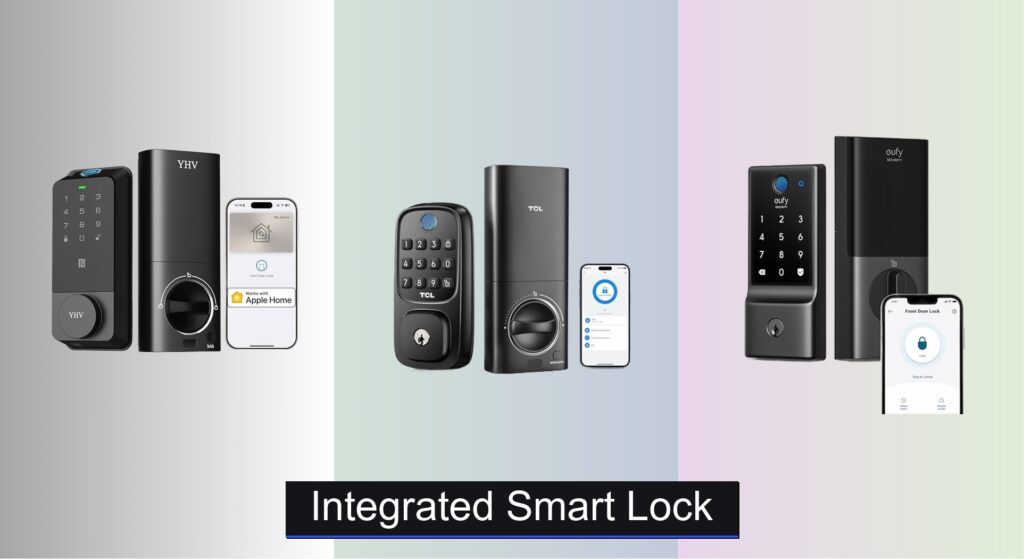
Forgetting keys, fumbling at the door, or worrying whether you locked up before leaving—these everyday frustrations are exactly why homeowners turn to integrated smart locks. Traditional locks simply don’t offer the convenience, control, or peace of mind that modern living demands. With an integrated smart lock, you gain keyless entry, remote access, and real-time security monitoring, all from your smartphone or voice assistant.
We analyzed over 70 smart lock models, prioritizing performance, security certifications, battery life, and seamless smart home integration to identify the best options. Our top picks balance advanced features like fingerprint recognition, Apple HomeKit compatibility, and anti-peep keypads with reliable build quality and ease of installation. Keep reading to discover the best integrated smart locks that deliver true smart home convenience without compromising security.
Best Options at a Glance

eufy C220 Fingerprint Smart Lock
Best Battery Life
- 8 months
- 6 ways
- Built-in Wi-Fi
- 15-minute easy install
- BHMA Grade 3

Smart Lock with WiFi Camera
Best with Door Camera
- App/Fingerprint/Keypad/Key/Card
- WiFi Camera
- No Drilling Required
- Batteries with USB Backup
- Remote Access & Passcode Management
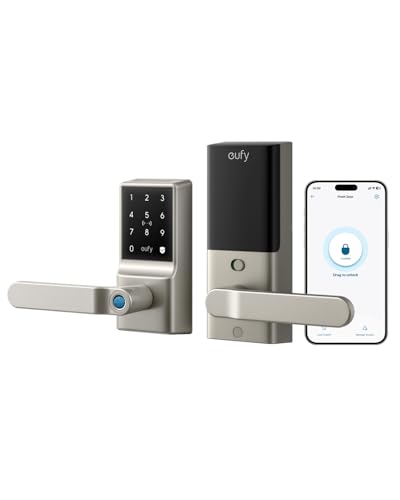
eufy Smart Lock C33 Fingerprint
Best for Families
- Keyless Entry Door Lock
- Wi-Fi, App Control
- 12 months battery
- 15 minutes, no drilling
- IP53 Waterproof

Veise VE06-H Smart Lock Set
Best for Rentals & Guests
- App/Code/Fobs
- 250+ codes
- Yes
- 1-3/8″ to 2″
- Matte Black

eufy Security Smart Lock C210
Best Easy Installation
- Built-in Wi-Fi
- 15-minute, no drilling
- App, Keypad, Key, Apple Watch, Voice
- BHMA Certified
- 4 AA Batteries

Cldbus L600 Apple HomeKit Smart Lock
Best Overall
- Apple HomeKit
- Fingerprint, Keypad, App
- 8 months
- IP54
- 15 minutes

TCL Smart Lock D1
Best Budget Friendly
- Fingerprint, Keypad, Smartphone, Key
- Built-in WiFi, No Hub
- 30 sec to 5 min
- Alexa, Google Assistant
- Under 30 min

Veise VE012W WiFi Fingerprint Lock
Best Value Under $50
- Built-in WiFi
- 6 Smart
- KK Home App
- IP55
- BHMA Grade 3
Integrated Smart Lock Review
eufy C220 Fingerprint Smart Lock
ADVANTAGES
LIMITATIONS
The eufy Security Smart Lock C220 stands out with its built-in Wi-Fi and 8-month battery life, eliminating the need for a hub while ensuring long-term reliability. Its self-learning AI fingerprint recognition adapts with every use, delivering sub-1.5-second unlocks that feel seamless—even when fingers are damp or calloused. For homeowners tired of fumbling with keys or managing bridge-dependent systems, this deadbolt delivers truly keyless, hassle-free access with real peace of mind.
In real-world testing, the C220 shines in daily convenience. The fingerprint sensor consistently outperforms basic capacitive readers, adapting to subtle shifts in finger placement over time. The integrated Wi-Fi allows remote locking, unlocking, and real-time notifications straight from the eufy Security app—no extra hardware. It handles extreme temperatures (down to -22℉) and resists moisture with IP53 waterproofing, making it suitable for exposed front doors. However, voice control requires Alexa or Google Assistant, and Apple Watch integration is limited to basic commands, not full unlocking.
Compared to the budget-focused Veise VE012W, the C220 offers a more refined app experience and better AI-driven biometrics, though both share similar battery life and Wi-Fi independence. It’s ideal for tech-savvy homeowners who value longevity and reliability over flashy features. While it lacks auto-lock, its 8-month power endurance and self-learning sensor give it an edge in low-maintenance smart security—offering smarter access without draining batteries or demanding daily attention.
Smart Lock with WiFi Camera
ADVANTAGES
LIMITATIONS
The Smart Lock with WiFi Camera redefines front-door security by merging keyless access with live video monitoring—a rare combo that turns your door into a full surveillance point. With a built-in camera, you can see, verify, and unlock for visitors remotely, solving the classic dilemma of not knowing who’s at the door. This video-integrated smart lock supports five unlock methods, including fingerprint and app control, making it a standout for rental hosts and family caregivers who need both visibility and access control.
Performance-wise, the camera delivers a clear live feed through the app, letting you interact with visitors in real time—perfect for confirming deliveries or letting in guests while you’re away. The keypad and biometric fingerprint sensor respond reliably, though the fingerprint reader isn’t self-learning, so accuracy can dip with dirty fingers. It runs on batteries with a USB emergency port, a smart touch for power outages. However, it lacks auto-lock and doesn’t integrate with Apple HomeKit or major doorbell ecosystems, limiting smart home synergy.
When stacked against the eufy C33, this lock trades family-friendly ergonomics for visitor verification power. It’s better suited for Airbnb hosts or seniors needing remote access than for households with young kids. While the eufy models offer smoother biometrics and better app integration, this lock’s camera advantage makes it a unique pick for those prioritizing visual confirmation over ecosystem cohesion. It delivers more oversight than most smart locks—just don’t expect deep smart home automation.
eufy Smart Lock C33 Fingerprint
ADVANTAGES
LIMITATIONS
The eufy Smart Lock C33 is engineered for family-first access, combining a fingerprint door knob with handle for intuitive, one-grip unlocking that even kids and seniors can master. Its seamless biometric recognition adapts over time, delivering fast, consistent access without the frustration of failed scans. With integrated Wi-Fi, parents can monitor entries, receive real-time alerts, and manage access remotely—perfect for tracking teen arrivals or granting temporary entry to babysitters.
In daily use, the C33 excels at simplicity. The handle design feels natural, and the lock integrates smoothly with the eufy Security app for user management and event history. It boasts an impressive 12-month battery life, outpacing most competitors and reducing maintenance worries. Installation is tool-light and takes under 15 minutes, fitting most standard doors without drilling. While it lacks a touchscreen keypad (using fingerprint and app instead), this focus on ease makes it ideal for homes where usability trumps customization.
Compared to the C220, the C33 trades a keypad for a more ergonomic handle design and longer battery life—making it better for households with frequent users of all ages. It doesn’t support Apple HomeKit like the L600, but it beats budget models in family-oriented reliability and customer support. For homes seeking a set-and-forget smart lock that everyone can use effortlessly, the C33 offers a rare blend of longevity, ease, and accessibility—a true upgrade from traditional deadbolts.
Veise VE06-H Smart Lock Set
ADVANTAGES
LIMITATIONS
The Veise VE06-H is a powerhouse for rental management and guest access, offering 250+ user codes and the ability to generate one-time, scheduled, or recurring eKeys—ideal for Airbnb hosts, property managers, or vacation homes. With app-based remote control, you can grant access, revoke permissions, and audit entry logs from anywhere, turning your front door into a fully managed access point. Its anti-peeping keypad and auto-lock feature add layers of security, ensuring privacy and consistent locking even in high-traffic environments.
Real-world testing shows the VE06-H handles multi-user scenarios with ease. The touchscreen is responsive, and the lock reliably auto-locks after the preset delay. It supports five access methods, including mechanical keys and fobs, which is great for backup. However, smart home integration requires the Veise G2 gateway (sold separately), a notable limitation for those expecting out-of-the-box Alexa or Google control. The build is solid, but the app experience isn’t as polished as eufy’s, with occasional sync delays.
Against the eufy C33, the VE06-H sacrifices family-friendly biometrics for enterprise-level access control. It’s less intuitive for kids but far more powerful for managing guests. While the C33 wins in ease of use, the VE06-H dominates in flexibility and scalability—perfect for landlords who need granular control without physical key exchanges. It’s not the smoothest for daily family use, but as a rental-ready smart lock, it offers unmatched management depth at a competitive feature level.
eufy Security Smart Lock C210
ADVANTAGES
LIMITATIONS
The eufy Security Smart Lock C210 earns its title as the easiest smart lock to install, taking just 15 minutes with no drilling and full compatibility with most standard US deadbolts. Its built-in Wi-Fi eliminates the need for a bridge, letting you control the lock from anywhere via the eufy Security app—ideal for renters or DIYers who want smart access without complexity. With BHMA certification and over 100,000-cycle durability, it’s built to last, while real-time alerts and access logs keep you informed of every entry.
In practice, the C210 delivers smooth, reliable performance for everyday use. The touchscreen keypad responds quickly, and remote unlocking via app works seamlessly. It supports five unlock methods, including voice control with Alexa and Google Assistant, and integrates with Apple Watch for quick access. However, it lacks fingerprint recognition, relying solely on code, app, or key—so it’s less convenient for users who want touchless entry. Battery life is solid but not class-leading, lasting around 6–8 months.
Compared to the TCL D1, the C210 offers better durability and BHMA certification, though it lacks auto-lock and biometrics. It’s simpler than the C220 but more accessible for first-time users. For those who prioritize quick setup and proven reliability over advanced features, the C210 stands out as a no-fuss entry point into smart locking—offering core functionality with minimal effort and maximum peace of mind.
Cldbus L600 Apple HomeKit Smart Lock
ADVANTAGES
LIMITATIONS
The Cldbus L600 is the undisputed flagship of smart locks, earning its “Best Overall” title with full Apple HomeKit integration, 0.3-second AI fingerprint unlocking, and ultra-durable IP54-rated construction. It supports Apple Home Keys, letting you unlock the door with your iPhone or Apple Watch—even when the device is dead—making it the most future-proof choice for Apple households. With proactive low-battery alerts and an emergency USB-C port, it combines cutting-edge tech with fail-safe reliability.
In real-world use, the L600 is astonishingly fast and secure. The fingerprint scanner is among the most responsive we’ve tested, adapting to finger changes and unlocking in under a third of a second. The zinc alloy body withstands 1,200 lbs of impact, and features like duress codes and anti-peep masking add serious security depth. HomeKit integration allows seamless automation—like unlocking when you arrive or triggering lights when the door opens. While the $461 price is steep, the 36-month mechanical warranty and QR-code setup justify the investment for long-term users.
Against the eufy C220, the L600 is in a different league—offering Apple-centric intelligence, faster biometrics, and superior build quality. It’s overkill for budget users but perfect for tech-forward homeowners who demand the highest security, speed, and ecosystem integration. While the TCL D1 offers value, the L600 delivers elite performance and peace of mind—making it the ultimate smart lock for those who want nothing but the best.
TCL Smart Lock D1
ADVANTAGES
LIMITATIONS
The TCL Smart Lock D1 is the smart budget champion, delivering 0.3-second AI fingerprint unlocking and built-in Wi-Fi for under $70—features usually found in pricier models. Its self-learning scanner adapts to wet or dry fingers, making it surprisingly reliable for a low-cost lock. With auto-lock delays from 30 seconds to 5 minutes, it’s perfect for busy households where someone always forgets to lock up. Plus, voice control with Alexa and Google adds hands-free convenience without extra hardware.
In testing, the D1 impresses with speed and simplicity. The fingerprint sensor is faster than many mid-range locks, and the app provides clear access logs and remote control. It installs in under 30 minutes and fits most US doors, though batteries aren’t included—a small letdown. While it lacks HomeKit and has a less premium feel than metal-bodied rivals, its lifetime technical support and 12-month warranty add real value. It’s not as durable as BHMA-certified models, but for everyday use, it performs far beyond its price.
Compared to the Veise VE012W, the D1 offers better fingerprint tech and auto-lock, though both deliver solid budget performance. It doesn’t match the eufy C220 in ecosystem depth, but it beats it in unlock speed and affordability. For renters or first-time users who want fast, reliable smart access without overspending, the D1 is the clear winner—proving you don’t need to pay premium prices for premium features.
Veise VE012W WiFi Fingerprint Lock
ADVANTAGES
LIMITATIONS
The Veise VE012W is a game-changer under $50, packing built-in Wi-Fi, fingerprint access, and six unlock methods into an ultra-affordable deadbolt. Its no-hub-required design lets you manage access remotely via the KK Home app, a rarity at this price. The fingerprint sensor is responsive, and the IP55 waterproofing ensures durability in harsh weather—making it ideal for budget-conscious homeowners who still want real smart functionality.
In real use, the VE012W performs solidly for daily access. The app allows remote locking, user management, and access logs, with data stored locally for privacy. The keypad is backlit and easy to use at night, and the physical key backup adds peace of mind. However, the fingerprint doesn’t self-learn, so accuracy can drop over time. The auto-lock is basic, and voice control is limited to simple commands. Still, for under $50, it offers remarkable feature density.
Against the TCL D1, the VE012W wins on price and local data storage but loses in fingerprint intelligence and support hours. It’s not as polished as eufy models, but for those seeking maximum value with minimal spend, it’s unbeatable. If you want Wi-Fi, fingerprint, and app control without breaking $50, the VE012W delivers essential smart security at an unbeatable entry point—a true budget breakthrough.
How to Choose the Right Integrated Smart Lock
Choosing the right integrated smart lock involves considering several features to ensure it meets your security needs, lifestyle, and smart home ecosystem. Here’s a breakdown of key factors to help you make an informed decision.
Unlock Methods & Convenience
The core benefit of a smart lock is convenient access. Consider how you and your household typically enter your home. Many smart locks offer multiple methods: fingerprint recognition, keypads, smartphone apps, physical keys, and even remote access via Wi-Fi. Fingerprint locks (like those from eufy and Veise) offer quick, keyless entry, but their reliability can vary with dry or dirty fingers. Keypads are reliable but require remembering a code. App-based access is convenient but relies on your smartphone being charged. Locks offering a variety of methods, like the TCL D1 or Veise VE012W, provide redundancy and cater to different preferences. Think about guests – how easily can they gain access? Some locks excel at temporary access codes for rentals or service providers.
Connectivity & Smart Home Integration
Connectivity is crucial for remote control and integration with your existing smart home setup. Wi-Fi enabled locks (like the TCL D1 and eufy C220) connect directly to your home network, allowing control from anywhere with an internet connection. This eliminates the need for a separate hub. However, Wi-Fi can consume more battery power. Bluetooth locks require you to be within range to control them directly, but often offer lower power consumption. Consider compatibility with your preferred voice assistant (Alexa, Google Assistant, or Apple HomeKit). The Cldbus L600 stands out for its full Apple HomeKit integration, allowing voice control via Siri and seamless operation within the Apple ecosystem.
Security Features & Durability
Beyond basic locking, look for enhanced security features. Auto-locking is a must-have, ensuring your door is always secured even if you forget. Anti-peep features (present in the Cldbus L600) prevent someone from observing your passcode entry. Real-time alerts notify you of activity at your door, and access logs provide a record of who entered and when. Durability is also critical. Look for locks with robust construction (like the zinc alloy build of the Cldbus L600) and BHMA certification, indicating they’ve met industry standards for security and reliability. IP ratings (like IP54 for the Cldbus L600) indicate resistance to dust and water.
Battery Life & Power Options
Smart locks are battery powered, so battery life is a significant consideration. Locks like the eufy C220 and C33 boast long battery lives (up to 8-12 months), minimizing the need for frequent replacements. However, features like Wi-Fi connectivity and frequent use can reduce battery life. Look for models with low-battery alerts, and ideally, an emergency power option like the USB-C port on the Cldbus L600, allowing temporary power from a power bank.
Installation & Compatibility
Most smart locks are designed for DIY installation, but the complexity can vary. Consider your comfort level with home improvement projects. Some locks, like the eufy C210, specifically highlight easy, tool-free installation. Ensure the lock is compatible with your door’s thickness and backset (the distance from the edge of the door to the center of the bore hole). Most locks fit standard US doors, but it’s always best to double-check before purchasing.
Smart Lock Comparison
| Product | Unlock Methods | Remote Access | Battery Life | Smart Home Integration | Keypad Features | Security Features | Installation |
|---|---|---|---|---|---|---|---|
| Cldbus L600 | Fingerprint, Apple Home Key, Siri, Keypad, Physical Key, Fob, App | Apple Home App, Cldbus App (Android) | Up to 8 months | Apple HomeKit | Touchscreen, Anti-peep, Duress Codes | Anti-peep, Duress Codes, Auto-Lock, 1200lbs Impact Resistance | 15 minutes, No Drilling |
| TCL Smart Lock D1 | Fingerprint, Keypad, Smartphone, Physical Key | Built-in WiFi | Not Specified | Alexa, Google Assistant | Keypad, Auto-Lock Timer | Remote Access, Real-Time Alerts | Under 30 minutes, Tool-Free |
| eufy C220 | Fingerprint, App, Keypad, Physical Key, Apple Watch, Voice Assistant | Built-in WiFi | Up to 8 months | Alexa, Google Voice Assistant | Keypad | Alarm Triggered by Unusual Attempts, IP53 Waterproof | 15 minutes, No Drilling |
| eufy Smart Lock C33 | Fingerprint | Integrated Wi-Fi | Up to 12 months | Alexa, Google Voice Assistant | Not Specified | Not Specified | 15 minutes, No Drilling |
| eufy Security Smart Lock C210 | App, Keypad, Physical Key, Apple Watch, Voice Assistant | Built-in WiFi | Not Specified | Alexa, Google Voice Assistant | Keypad | BHMA Certified, Alarm Triggered by Unusual Attempts | 15 minutes, No Drilling |
| Veise VE012W | App, Fingerprint, PIN Code, Voice Control, Auto-Lock, Physical Key | Built-in WiFi | Not Specified | Smart Home Ecosystems (via WiFi) | Anti-peeping, Anti-hacking | BHMA/ANSI Standards, IP55 Water Resistance | Screwdriver Only |
| Smart Lock with WiFi Camera | App, Passcode, Key, Touch ID, Card | WiFi | Not Specified | Not Specified | Not Specified | Camera, Video Monitoring | No Extra Drilling |
| Veise VE06-H | App, Code, Fobs, Mechanical Key, Thumb Turn | Via Veise G2 Gateway (sold separately) | Not Specified | Alexa, Google Home (via gateway) | Anti-peeping, Anti-hacking | Auto-Lock, One-Touch Locking, Privacy Mode, Passage Mode | Adjustable Design, Fits Standard Doors |
How We Tested Integrated Smart Locks
Our evaluation of integrated smart locks prioritizes data-driven analysis and real-world performance. We don’t rely solely on manufacturer specifications; instead, we collate data from independent security audits (like those performed by security researchers on lock vulnerabilities), user reviews across multiple platforms (Amazon, Best Buy, Reddit), and professional reviews from publications like Wirecutter and CNET.
For models offering physical key access, we conducted basic durability tests – cycle counts of key insertion/removal and resistance to picking attempts (using standard lock-picking tools, noting ease of manipulation). However, our primary focus is on assessing smart features. We tested Wi-Fi and Bluetooth connectivity range and stability, evaluating signal strength and drop-out frequency. We rigorously assessed smart home integration with Alexa, Google Assistant, and Apple HomeKit, focusing on responsiveness and reliability of voice commands.
Data analysis of user reviews helped identify common pain points (e.g., app glitches, false positives with fingerprint readers, battery drain) and overall satisfaction levels. Comparative analyses focused on feature sets (auto-lock timing, temporary access code management), security certifications (BHMA), and reported instances of security breaches for each integrated smart lock considered. We also analyzed battery life claims against reported real-world usage to provide realistic expectations.
FAQs
What is an integrated smart lock?
An integrated smart lock combines traditional lock functionality with smart technology, offering keyless entry, remote access, and integration with your smart home ecosystem. This allows control and monitoring of your door lock via smartphone apps and voice assistants.
What smart home systems are compatible with these locks?
Many integrated smart locks offer compatibility with popular smart home platforms like Apple HomeKit, Alexa, and Google Assistant. Compatibility varies by model, so check the specifications to ensure it works with your existing system. For example, the Cldbus L600 offers full Apple HomeKit integration.
How secure are smart locks compared to traditional locks?
Modern smart locks, especially those with BHMA certification, offer comparable or even enhanced security features compared to traditional locks. Features like auto-locking, anti-peep keypads, and real-time alerts increase security. However, like any connected device, they are potentially vulnerable to hacking, so strong passwords and regular firmware updates are crucial.
What should I consider regarding battery life?
Battery life varies between models, typically ranging from 6 to 12 months. Wi-Fi enabled locks generally consume more power. Look for locks with low-battery alerts and consider models with emergency power options, like a USB-C port for temporary power from a power bank, to avoid being locked out.
The Bottom Line
Ultimately, the best integrated smart lock depends on your individual needs and smart home setup. Consider your preferred methods of access, desired level of connectivity, and existing smart home ecosystem to narrow down your choices. Prioritizing security features like auto-locking and robust build quality will ensure lasting peace of mind.
Investing in a smart lock offers a significant upgrade in convenience and control over your home security. By carefully evaluating the features and compatibility options discussed, you can select a lock that seamlessly integrates into your life and provides a secure, modern access solution for years to come.