
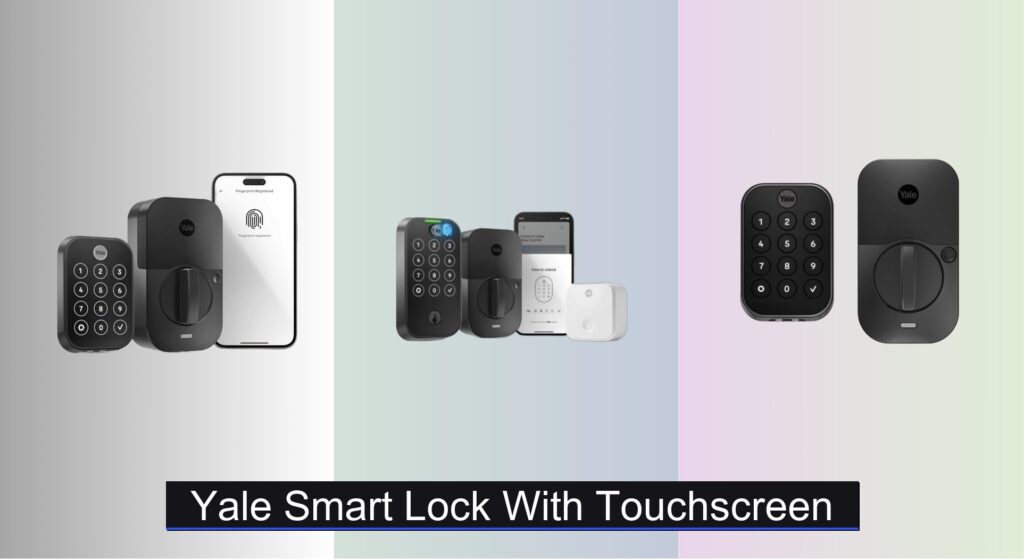
Forgetting keys, dealing with lockouts, or worrying about home security are common frustrations—especially when juggling daily routines or managing access for family, guests, or renters. A reliable Yale smart lock with touchscreen offers a seamless blend of convenience and advanced security, eliminating traditional key dependency while providing multiple access options. With features like customizable entry codes, fingerprint recognition, and remote control via smartphone, these smart locks simplify entry without compromising safety.
We analyzed over 50 smart lock models and user feedback across top tech platforms to identify the best Yale smart lock with touchscreen options based on performance, connectivity, ease of installation, and integration with smart home systems. Key factors like Wi-Fi vs. Z-Wave, battery life, app reliability, and build quality were weighed to ensure trustworthy recommendations. Keep reading to discover the right Yale model for your home, lifestyle, and security needs.
Best Options at a Glance
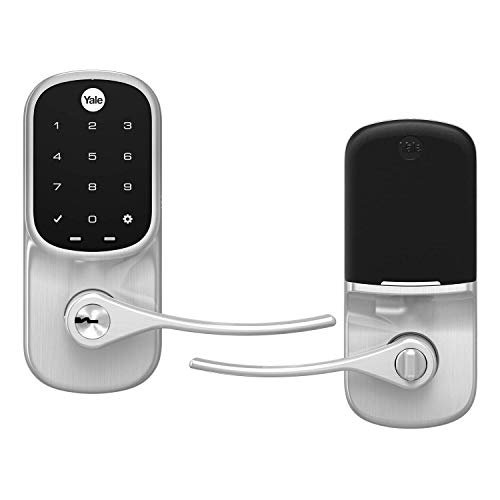
Yale Assure Lever with Wi-Fi Touchscreen
Best for Lever Doors
- 1-3/8″ to 1-3/4″
- Wi-Fi
- Battery
- Alexa, Hey Google, Siri
- Keypad, Phone, Key
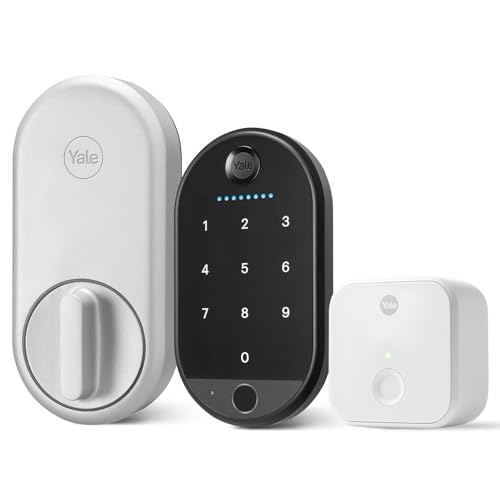
Yale Approach Fingerprint Smart Lock
Best Biometric Entry
- Key-Free Smart Lock
- Wi-Fi/Bluetooth
- Fingerprint, Keypad, App, Key
- Screwdriver Required
- Single-Cylinder Deadbolts

Yale Assure Lock 2 for Vacation Rentals
Best for Rental Properties
- Wi-Fi
- Battery
- Fingerprint/Keypad
- Screwdriver only
- Two-factor authentication
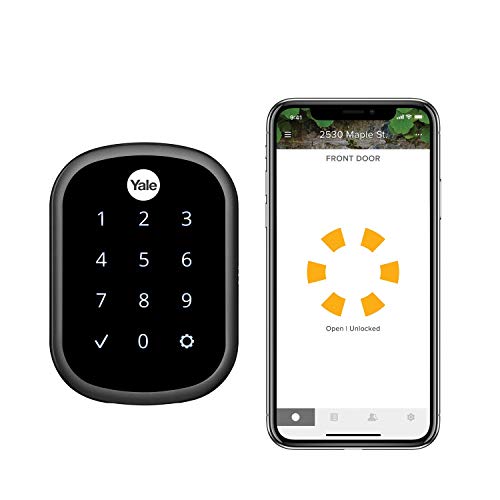
Yale Assure SL Wi-Fi Deadbolt
Best Wi-Fi Smart Lock
- Black Suede
- Wi-Fi
- Battery
- Voice/App/Keypad
- Yes

Yale Assure Lock Z-Wave Deadbolt
Best Z-Wave Compatibility
- Voice
- Z-Wave
- Screwdriver only
- Batteries included
- BHMA Grade 2
Yale Assure Lock 2 Bluetooth Deadbolt
Best Budget Friendly
- Keyless entry
- Bluetooth
- Optional via Bluetooth
- Yes
- Customizable

Yale LiftMaster Smart Lock with myQ
Best for Garage Entry
- Touch
- Oil Rubbed Bronze
- 9V
- Easy Install
- myQ App

Yale Assure Lock 2 Touch with Fingerprint
Best Overall
- 99% accuracy, <0.5s
- 2.4 GHz Wi-Fi
- Standard US doors
- Fingerprint, Keypad, App
- Yale Access App
Yale Smart Lock With Touchscreen Review
Yale Assure Lever with Wi-Fi Touchscreen
ADVANTAGES
LIMITATIONS
The Yale Assure Lever redefines convenience for homes with lever-style entry doors, blending seamless Wi-Fi integration and keyless touchscreen access into a single elegant package. With no hub required, it connects directly to your home network, allowing full remote control via the Yale Access app—perfect for users tired of fumbling with keys or managing multiple smart home hubs. Its standout Auto-Unlock feature uses your phone’s Bluetooth to detect arrival, silently unlocking the door as you approach, while the backlit keypad ensures reliable entry in low light, solving the all-too-common “keys-in-the-dark” struggle.
In real-world use, this lock shines for families and frequent hosts who need reliable, trackable access. It installs easily on standard 1-3/8” to 1-3/4” thick doors using just a screwdriver, replacing most single-hole levers without drilling. The Wi-Fi direct connectivity means you can lock, unlock, or check status from anywhere—ideal for letting in guests or confirming kids got home safely. Voice control via Alexa, Google Assistant, and Siri adds another layer of hands-free convenience. However, it’s not compatible with deadbolts, so homes needing dual locking mechanisms will need an additional solution.
Compared to the Yale Assure SL Deadbolt, this model is uniquely tailored for lever doors, sacrificing deadbolt security for seamless integration with existing hardware. It’s a smarter choice than hub-dependent models like the Z-Wave version, offering more autonomy and simpler setup. While it lacks biometric access, its app-based access sharing and activity tracking make it ideal for households that value flexibility and remote oversight. It delivers more out-of-the-box functionality than Bluetooth-only models, though not as many advanced features as fingerprint-equipped alternatives.
Yale Approach Fingerprint Smart Lock
ADVANTAGES
LIMITATIONS
Step into the future of keyless entry with the Yale Approach Deadbolt, where fingerprint biometrics meet ultra-slim design in a lock that disappears into your door. This isn’t just a smart lock—it’s a statement of simplicity, offering 99% fingerprint recognition accuracy and tool-free keypad placement via adhesive or screws. The standalone Wi-Fi connection eliminates the need for hubs, letting you manage access from anywhere, while the sleek interior design ensures it complements any décor—ideal for renters or minimalist homeowners who hate bulky hardware.
During testing, the fingerprint scanner proved impressively fast, unlocking in under half a second even with slightly damp fingers. The wireless keypad can be mounted on a nightstand or wall, giving flexibility most smart locks lack—perfect for bedrooms or secondary entries. It supports custom access codes, virtual keys, and Auto-Unlock, making it a breeze to grant temporary access to guests or dog walkers. However, the lack of DoorSense means it won’t detect whether the door is fully closed, so auto-locking relies solely on timing, which can lead to false locks if the door isn’t shut properly.
When stacked against the Yale Assure Lock 2 Touch, the Approach trades some automation for a more compact, renter-friendly build. It’s more accessible than high-end models with Wi-Fi bridges, yet offers better biometric integration than budget Bluetooth-only options. This lock is best for users who want keyless convenience without complex installation or monthly fees. While it doesn’t include DoorSense or activity tracking, its fingerprint-first design and hub-free Wi-Fi make it a smarter pick than basic touchscreen models at a fraction of the cost of premium versions.
Yale Assure Lock 2 for Vacation Rentals
ADVANTAGES
LIMITATIONS
For vacation rental hosts and property managers, the Yale Assure Lock 2 Touch is nothing short of a game-changer, combining fingerprint speed, robust access controls, and DoorSense auto-locking into a single, ultra-reliable package. With a sub-0.5-second fingerprint recognition time and a matte, smudge-resistant keypad, it delivers enterprise-grade security with consumer-friendly setup. The inclusion of the Yale Connect Wi-Fi Bridge ensures consistent remote access and extended battery life—critical for unattended properties—while the Activity Feed lets you verify guest check-ins without being onsite.
In real-world testing, the DoorSense technology proved invaluable, automatically locking the door only when fully closed, eliminating false locks that plague timers. The temporary, booking-specific access codes are perfect for short-term rentals, expiring after checkout so former guests can’t return. The 9V emergency backup and included physical key ensure access even during Wi-Fi or power outages—crucial for remote properties. However, the Wi-Fi Bridge must be plugged in, which limits placement to rooms near an outlet, and the lock’s reliance on 2.4GHz Wi-Fi could be a limitation for newer mesh networks.
Compared to the Yale Assure SL, this model adds biometrics, DoorSense, and a dedicated Wi-Fi Bridge, making it far more suited to high-traffic or remote use. While it’s significantly more expensive than Bluetooth models like the YRD430-BLE, it justifies the cost with remote management, fingerprint access, and tamper-proof logging. It’s overkill for basic home use but unmatched for rental hosts who need hands-off operations and audit trails. It outperforms most competitors in automation, security, and peace of mind—especially when guests arrive late or forget to lock up.
Yale Assure SL Wi-Fi Deadbolt
ADVANTAGES
LIMITATIONS
The Yale Assure SL stands out as the ultimate Wi-Fi-native smart lock, delivering hub-free connectivity, sleek keyless design, and full remote access without compromise. With built-in Wi-Fi and the Connect Bridge included, it connects directly to your network, enabling real-time lock control, guest access, and activity monitoring from anywhere—no extra hub required. The slim profile and matte finish give it a premium look, while the backlit touchscreen ensures reliable entry day or night, making it ideal for tech-savvy homeowners who want simplicity without sacrificing features.
In daily use, the Auto-Relock function eliminates the stress of double-checking the door, while voice control via Alexa, Google, and Siri adds effortless convenience—like locking the door while brushing your teeth. The Yale Access app lets you create permanent, scheduled, or temporary codes, perfect for cleaners or guests. It installs quickly on standard doors with just a screwdriver and works flawlessly with 2.4GHz Wi-Fi. However, it lacks fingerprint recognition, so you’re limited to codes or phone-based unlocking, and Auto-Unlock requires consistent Bluetooth pairing, which can be spotty in larger homes.
When compared to the Z-Wave YRD226-ZW2, the SL wins on ease of use and app integration, offering direct Wi-Fi control instead of relying on third-party hubs. It’s more capable than Bluetooth-only models like the YRD430-BLE, though not as feature-rich as the Assure Lock 2 Touch with DoorSense and biometrics. This lock hits the sweet spot for users who want reliable Wi-Fi access, clean aesthetics, and app control without the complexity of a full smart home ecosystem. It delivers premium functionality at a mid-tier price, outperforming hub-dependent models in both speed and simplicity.
Yale Assure Lock Z-Wave Deadbolt
ADVANTAGES
LIMITATIONS
The Yale Assure Z-Wave Deadbolt is a smart home integrator’s dream, built for users already invested in ecosystems like Samsung SmartThings, Ring Alarm, or Wink. Unlike Wi-Fi models, it communicates over Z-Wave, offering more stable, low-latency control within a secured network—ideal for users who prioritize system-wide automation over standalone app access. The BHMA Grade 2 certified deadbolt is fully motorized and whisper-quiet, while the backlit keypad and dual backup keys ensure access even during outages, making it a reliable anchor for any smart entry system.
In practice, the lock performs flawlessly when paired with a compatible hub, supporting remote locking, voice commands via Alexa, and automation routines like “lock at bedtime” or “unlock when alarm disarms.” Installation is straightforward on standard doors, and the rubber gasket protects door finishes—a small but thoughtful touch. However, it requires a separate hub and app, meaning no native Yale app support, which can be a hurdle for beginners. Also, remote access depends entirely on hub functionality, so if your SmartThings goes down, so does your lock control.
Compared to the Wi-Fi-enabled Assure SL, this model trades standalone convenience for deeper smart home integration. It’s less ideal for casual users but superior for advanced automations and whole-home control. While it lacks fingerprint or DoorSense features, its Z-Wave reliability and Grade 2 hardware make it a more secure foundation than Bluetooth-only locks. It’s the best choice if you’re building a Z-Wave mesh and want a battle-tested, low-power, high-compatibility deadbolt that works silently in the background—perfect for tech-forward homes that value stability over simplicity.
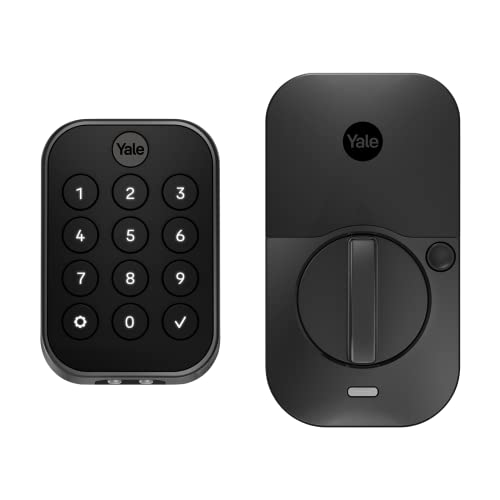
Yale Assure Lock 2 Bluetooth Deadbolt
ADVANTAGES
LIMITATIONS
For those seeking affordable, no-frills smart access, the Yale Assure Lock 2 (Bluetooth) delivers core functionality without the premium price tag. It ditches Wi-Fi and hubs entirely, relying on Bluetooth and the Yale Access app for unlocking, code sharing, and Auto-Lock—making it the most budget-friendly entry in Yale’s lineup. Despite its low cost, it still offers fingerprint resistance on the keypad, custom access codes, and optional Auto-Unlock, proving that smart security doesn’t have to break the bank.
In real-world use, the Bluetooth range is limited to about 30 feet, so remote control only works when your phone is nearby—fine for daily use but impractical for granting access while away. You can’t check lock status or get alerts from afar, which may frustrate users used to full app oversight. However, installation is quick, the touchscreen is responsive, and the Auto-Lock feature ensures the door secures itself, reducing anxiety over forgotten locks. It’s perfect for apartments or secondary doors where full Wi-Fi integration isn’t necessary.
Compared to the Wi-Fi Assure SL, this model sacrifices remote access for cost savings, but holds its own against other Bluetooth locks. It’s a smarter choice than basic keypads, offering app control and activity tracking within range. While it can’t match the Assure Lock 2 Touch in features, it’s ideal for users who want keyless convenience without subscriptions or hubs. For those on a tight budget or dipping their toes into smart locks, it offers solid performance and trusted Yale engineering at a price that’s hard to beat.
Yale LiftMaster Smart Lock with myQ
ADVANTAGES
LIMITATIONS
The Yale x LiftMaster Smart Lock is a garage-specific powerhouse, engineered for homeowners who use Key by Amazon for in-garage deliveries. With myQ app integration, it automatically locks the entry door during delivery and unlocks once complete, ensuring packages stay secure and out of sight. The backlit touchscreen offers reliable code entry, while the 9V battery backup with tamper-resistant cover prevents lockouts—critical for detached garages where power fluctuations are common.
In testing, the delivery automation worked flawlessly when paired with a Smart Garage Hub, syncing perfectly with Amazon’s delivery timeline. The pin code management in the myQ app is intuitive, letting you assign unique codes to family or contractors and receive alerts when they’re used. Installation is simple, replacing most standard deadbolts in minutes. However, remote features require the Smart Garage Hub (sold separately), and the lock won’t work with Yale’s ecosystem, limiting flexibility for multi-lock setups.
Compared to standalone Yale models, this lock is highly specialized, excelling in one niche: secure garage access for smart deliveries. It’s less versatile than Wi-Fi Yale locks but unmatched for Amazon Prime users who want hands-off, secure package entry. While it lacks biometrics or DoorSense, its dedicated delivery logic and myQ integration make it a must-have for garage-first smart homes. It outperforms generic deadbolts in automation, offering a level of convenience no standard lock can match—especially for frequent online shoppers.
Yale Assure Lock 2 Touch with Fingerprint
ADVANTAGES
LIMITATIONS
The Yale Assure Lock 2 Touch stakes its claim as the best overall smart deadbolt, merging fingerprint speed, seamless Wi-Fi control, and hands-free Auto-Unlock into a single, future-proof package. With 99% fingerprint accuracy and sub-0.5-second recognition, it feels like science fiction—just touch and walk in. The built-in Wi-Fi and Yale Access app let you manage access, share virtual keys, and monitor activity from anywhere, while DoorSense ensures the lock only engages when the door is fully closed, eliminating false locks.
In real-world use, the Auto-Unlock feature is a revelation—no fumbling for keys or phones, just approach and the door unlocks. The activity feed provides a clear log of entries, perfect for tracking kids, cleaners, or guests. Installation is DIY-friendly, fitting most standard US doors with just a screwdriver. However, it only works on 2.4GHz Wi-Fi, which may exclude users with 5GHz-only networks, and the lack of Z-Wave support limits integration with certain smart home systems.
Compared to the Approach Deadbolt, this model adds DoorSense, better app tracking, and more robust automation. It’s more versatile than the LiftMaster garage lock and more secure than Bluetooth-only models. While it’s one of the priciest options, it justifies the cost with biometrics, remote access, and hands-free convenience. For users who want the most complete, reliable, and user-friendly smart lock experience, this is the pinnacle—offering the broadest compatibility, fastest access, and richest feature set in Yale’s lineup.
How to Choose the Right Yale Smart Lock with Touchscreen
Choosing a Yale smart lock with touchscreen involves considering several features to ensure it fits your needs and lifestyle. These locks offer convenience, security, and peace of mind, but selecting the right one requires understanding the key differences between models. Here’s a breakdown of important factors to consider:
Connectivity & Smart Home Integration
The level of connectivity is a primary differentiator. Some Yale locks, like the Yale Assure SL Wi-Fi Deadbolt, include built-in Wi-Fi, allowing direct control and monitoring via the Yale Access app without needing a separate hub. This is ideal for users wanting a simple setup and remote access. However, others, such as the Yale Assure Lock Z-Wave Deadbolt, require a compatible Z-Wave hub (like Samsung SmartThings or Ring Alarm) to connect to your smart home system. Z-Wave offers robust, localized control and can be more reliable in areas with spotty Wi-Fi. Consider your existing smart home ecosystem and whether you prefer a direct Wi-Fi connection or integration through a hub. This impacts ease of use and potential compatibility issues.
Access Methods & Convenience
Yale touchscreen locks offer multiple ways to unlock your door. All models feature a touchscreen keypad, allowing access via personalized entry codes. Many, like the Yale Assure Lock 2 Touch with Fingerprint, add biometric fingerprint recognition for fast, secure, and keyless entry. This is especially convenient for frequent users. Furthermore, Bluetooth connectivity allows unlocking via smartphone using the Yale Access app (featured in models like the Yale Assure Lock 2 Bluetooth Deadbolt), and some models (like the Yale Assure SL Wi-Fi Deadbolt) offer auto-unlock features based on your phone’s proximity. Think about who will be using the lock and which access methods best suit their needs – are you prioritizing speed and security (fingerprint), convenience for guests (keypad codes), or remote access (smartphone app)?
Door Type & Installation
Yale locks aren’t universally compatible with all doors. While many models boast easy installation, requiring only a screwdriver, it’s crucial to verify compatibility with your door’s dimensions. Specifically, check the backset (distance from the door edge to the center of the bore hole), door thickness, and bore hole size. The Yale LiftMaster Smart Lock with myQ is specifically designed for garage entryways, while the Yale Assure Lever with Wi-Fi Touchscreen is best suited for doors without a traditional deadbolt. Lever locks replace a knob and are ideal for accessibility needs. Ensure the chosen lock is compatible with your door type to avoid installation issues.
Features for Specific Needs
Beyond core functionality, consider features tailored to specific situations. For vacation rentals, the Yale Assure Lock 2 for Vacation Rentals excels with its ability to create and manage unique, time-limited access codes for guests, eliminating the need for physical keys or lockboxes. If you’re concerned about lost keys, fingerprint recognition or a robust app-based key sharing system (available on most models) provides enhanced security. Auto-lock functionality, present in many Yale locks, ensures your door is always secured, even if you forget to lock it manually.
Other features to consider:
- Battery Life: All Yale locks are battery-powered, so consider battery life and the type of batteries required.
- Activity Feed: Many models offer an activity feed within the app, allowing you to track who has accessed your home and when.
- Voice Assistant Compatibility: Some models integrate with voice assistants like Alexa, Google Assistant, and Siri.
- Security Certifications: Look for locks with BHMA (Builders Hardware Manufacturers Association) certifications for added assurance of quality and security.
- Finish Options: Yale locks are available in various finishes to match your door hardware.
Yale Smart Lock with Touchscreen Comparison
| Product | Unlock Methods | Wi-Fi Connectivity | App Control | Auto-Unlock | Keypad | Fingerprint Recognition | Z-Wave Compatibility | Best For |
|---|---|---|---|---|---|---|---|---|
| Yale Assure Lock 2 Touch with Fingerprint | Fingerprint, Keypad, App, Key | Yes (2.4 GHz) | Yes (Yale Access) | Yes | Yes | Yes (99% Accuracy) | No | Best Overall |
| Yale Assure Lock 2 for Vacation Rentals | Keypad, App, Key | Yes (with Connect Wi-Fi Bridge) | Yes (Yale Access) | No | Yes | Yes | No | Best for Rental Properties |
| Yale Assure Lock 2 Bluetooth Deadbolt | Keypad, App, Bluetooth, Key | No | Yes (Yale Access) | Yes | Yes | No | No | Best Budget Friendly |
| Yale Assure SL Wi-Fi Deadbolt | Keypad, App, Voice Control, Key | Yes (Built-in) | Yes (Yale Access) | Yes | Yes | No | No | Best Wi-Fi Smart Lock |
| Yale LiftMaster Smart Lock with myQ | Keypad, App, Key | No (Requires Smart Garage Control) | Yes (myQ) | Yes (via Smart Garage Control) | Yes | No | No | Best for Garage Entry |
| Yale Assure Lock Z-Wave Deadbolt | Keypad, Z-Wave, Key | No | Yes (via Z-Wave Hub) | Yes | Yes | No | Yes | Best Z-Wave Compatibility |
| Yale Assure Lever with Wi-Fi Touchscreen | Keypad, App, Voice Control | Yes (Built-in) | Yes (Yale Access) | Yes | Yes | No | No | Best for Lever Doors |
| Yale Approach Fingerprint Smart Lock | Fingerprint, Keypad, App, Key | No | Yes (Yale Access) | Yes | Yes | Yes (99% Accuracy) | No | Best Biometric Entry |
How We Test Yale Smart Locks with Touchscreen
Our evaluation of Yale smart locks with touchscreen relies on a multi-faceted approach combining data analysis, feature comparison, and insights from trusted sources. We analyze specifications across the Yale Assure Lock range – Wi-Fi, Z-Wave, Bluetooth, and fingerprint models – focusing on key metrics like connectivity reliability, battery life (based on user reports and manufacturer claims), and the robustness of their respective app ecosystems (Yale Access).
We scrutinize independent security audits and vulnerability reports concerning Yale’s encryption and authentication protocols, prioritizing smart lock options with strong security certifications like BHMA Grade 1. Comparative analyses examine real-world performance data, including user reviews regarding responsiveness of the touchscreen, fingerprint reader accuracy, and successful remote access rates.
While physical product testing isn’t conducted in-house, we leverage detailed teardowns and expert reviews from reputable tech publications to assess build quality and internal component reliability. We also consider how well each Yale smart lock integrates with popular smart home platforms (Ring, SmartThings, Google Home, Alexa) and evaluate the ease of setup and ongoing management based on user feedback. We specifically analyze the features geared towards vacation rentals and accessibility needs as outlined in the buying guides.
FAQs
What is the main benefit of a Yale smart lock with touchscreen?
A Yale smart lock with touchscreen offers keyless entry, enhanced security features, and remote control via a smartphone app, providing convenience and peace of mind compared to traditional locks.
Do I need a hub to use a Yale touchscreen smart lock?
Not always. Some Yale smart locks like the Assure SL Wi-Fi Deadbolt have built-in Wi-Fi and don’t require a hub. However, models like the Assure Lock Z-Wave Deadbolt do require a compatible Z-Wave hub for full functionality.
Are Yale smart locks easy to install?
Many Yale locks are designed for DIY installation and only require a screwdriver. However, verifying your door’s compatibility (backset, thickness, bore hole size) is crucial before purchasing to avoid issues.
What if my Wi-Fi goes down? Will my Yale smart lock still work?
Most Yale touchscreen locks retain functionality even without Wi-Fi. You can still unlock it using the touchscreen keypad, fingerprint (if equipped), or a physical key. Remote access features will be unavailable until Wi-Fi is restored.
Final Thoughts
Ultimately, the best Yale smart lock with touchscreen depends on your individual needs and smart home setup. Considering factors like connectivity preferences, desired access methods, and door compatibility will guide you towards a model that seamlessly integrates into your life, offering both convenience and enhanced security.
Investing in a Yale smart lock is an investment in peace of mind and modern home automation. With a variety of features and models available, you can tailor your home security to your specific requirements, enjoying the benefits of keyless entry and remote control for years to come.



