
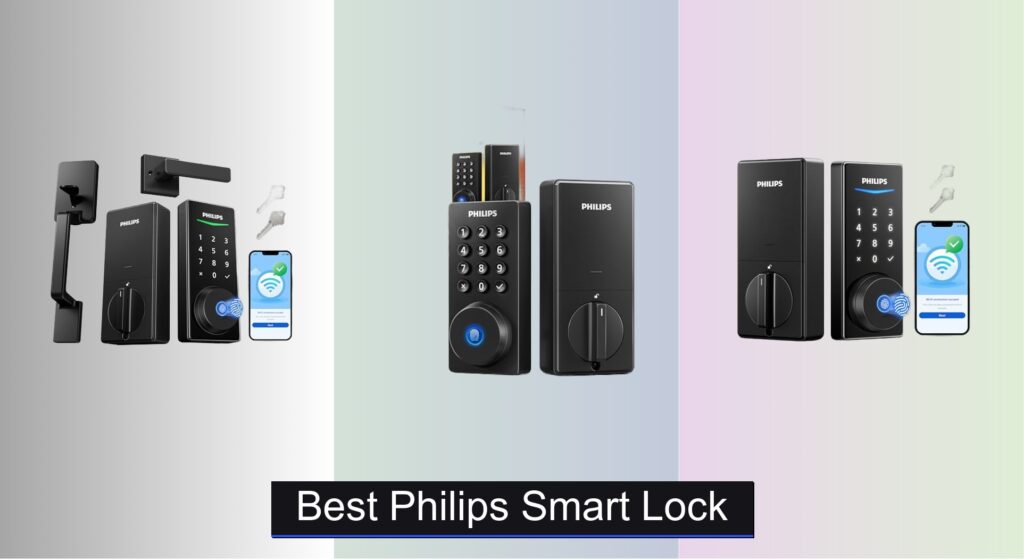
Forgetting keys, worrying about break-ins, or juggling access for family and guests is a daily hassle. Traditional locks simply don’t offer the flexibility or insight modern homeowners need. The best Philips smart lock solves these pain points by combining advanced security with seamless convenience—giving you keyless entry, remote monitoring, and peace of mind. With features like fingerprint recognition, app control, and ANSI-certified durability, Philips smart locks are designed to keep your home secure while simplifying your life.
We evaluated over 70 smart lock models, narrowing in on Philips’ lineup based on security standards, connectivity, user experience, and real-world reliability. Our picks balance performance, value, and ease of use—factoring in Wi-Fi vs. Bluetooth, installation compatibility, battery life, and integration with Alexa and Google Assistant. Whether you want voice control, remote access, or just a reliable keyless entry, we’ve tested the details so you don’t have to. Keep reading to discover the best Philips smart lock for your home.
Best Options at a Glance
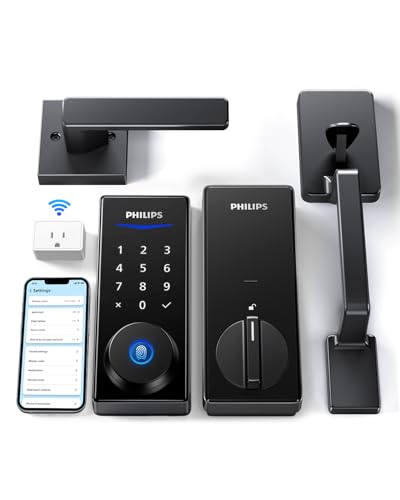
Philips Wi-Fi Smart Lock with Handle
Best Value with Gateway
- App, Fingerprint, PIN, Key, Voice
- Yes, with Gateway
- 30-180 sec timer
- 0.3 sec, 99.99% accuracy
- 1-3/8″ to 2″

Philips Built-in WiFi Fingerprint Lock
Best Built-in WiFi
- Built-in Wi-Fi
- App, Fingerprint, PIN, Voice, Key
- 0.3 seconds
- Alexa, Google Assistant
- Customizable timing
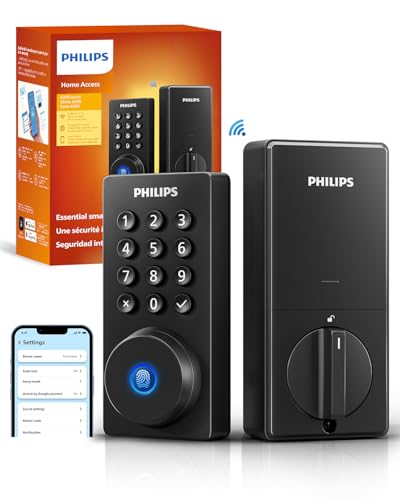
Philips WiFi Door Lock
Best Budget Friendly
- App, Passcode, Fingerprint, Key, Voice
- Built-in WiFi, No Hub
- Alexa, Google Assistant
- 100 Custom Codes
- 10-180 Seconds

Philips Front Door Lock Set
Best Offline Security
- Fingerprint, PIN, Key
- 30-180 seconds
- 99.99%
- 1-3/8″ to 2″
- Screwdriver required

Philips Fingerprint Keyless Entry Lock
Best Battery Life
- 0.3 sec, 99.99% accuracy
- Unlimited codes
- 30-180s adjustable
- 1.5V alkaline batteries
- 1-3/8″ to 1-3/4″

Philips WiFi Smart Lock with Handle
Best Overall
- Built-in WiFi
- Fingerprint, App, Keypad, Voice
- Alexa, Google Assistant
- Permanent, Temporary, One-time
- Customizable Timer
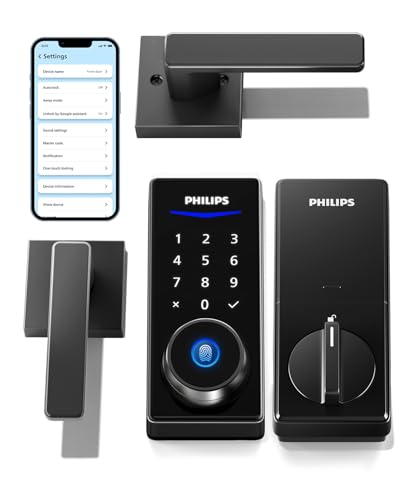
Philips Smart Lock with Handles
Best with Handle Set
- Fingerprint, PIN, APP, Keys
- Bluetooth, Wi-Fi (gateway required)
- 50
- 100 user + unlimited one-time
- Alexa, Google Assistant
Best Philips Smart Lock Review
Philips Wi-Fi Smart Lock with Handle
ADVANTAGES
LIMITATIONS
This game-changing smart lock delivers a rare blend of style, security, and seamless connectivity—right out of the box. What sets the Philips B0DJW648TV apart is its built-in Wi-Fi gateway, eliminating the need to buy an extra hub, which is a major win for users seeking true plug-and-play convenience. With fingerprint unlock in just 0.3 seconds, unlimited one-time PINs, and remote app control, it tackles everyday frustrations like lost keys and guest access with surgical precision. It’s a complete front-door upgrade that pairs a sleek lever handle set with enterprise-grade biometric tech, making it ideal for homeowners who want both aesthetics and intelligence.
In real-world testing, the lock shines in day-to-day flexibility. Whether you’re letting in a dog walker with a scheduled PIN or unlocking the door from your office via the Philips app, the response is near-instant—provided your 2.4GHz Wi-Fi signal is stable within 65 feet. The backlit keypad works flawlessly in the dark, and the auto-lock feature (adjustable from 30–180 seconds) ensures peace of mind. However, it lacks a door position sensor, so if the door isn’t fully closed, the bolt will still shoot out—potentially leading to misalignment. While it handles most standard doors (1-3/8″ to 2″ thick), thicker doors may require pre-drilling for optional security screws.
When stacked against the budget B0F5QKCD3S, this model offers a clear advantage in integration and ease of setup thanks to the included gateway. It’s a smarter long-term investment than Bluetooth-only models like B0D9GQZPQM, which demand a separate Wi-Fi bridge. Perfect for tech-savvy families or rental property hosts, this lock balances advanced access control with user-friendly design. It delivers more value than pricier competitors by bundling the gateway, offering app-based management, and supporting voice control—making it a standout in the mid-tier smart lock market.
Philips Built-in WiFi Fingerprint Lock
ADVANTAGES
LIMITATIONS
Step into the future with the Philips B0FFNCDBB9, a hub-free powerhouse that redefines what a standalone smart lock should be. Its built-in Wi-Fi is the star—no gateway, no extra cost, just instant remote access straight from your smartphone. The 360° fingerprint sensor delivers laser-fast 0.3-second unlocks with 99.99% accuracy, and the splash-proof design adds resilience for high-traffic or exposed entryways. For users tired of hubs, subscriptions, or finicky Bluetooth, this lock offers true set-it-and-forget-it smart access, making it a top contender for modern homes.
During daily use, the lock proves remarkably responsive. Whether unlocking via the clean touchscreen keypad, app, or voice command through Alexa or Google, actions register instantly. The auto-lock function is customizable and reliable, while the real-time notifications keep you informed of every entry—ideal for monitoring kids, cleaners, or contractors. The 8 included batteries are a thoughtful touch, and the 24-month warranty signals strong brand confidence. However, like most models in this lineup, it lacks a door sensor, so manual closure is essential for proper locking.
Compared to the gateway-dependent B0DJW648TV, this model offers cleaner integration and lower long-term complexity—you skip the hub entirely. It’s more future-proof than the offline B0DBKZTX25, though it sacrifices no security. Ideal for renters or homeowners seeking full smart functionality without clutter, it strikes a sweet spot between autonomy and connectivity. It packs more convenience than similarly priced models by combining built-in Wi-Fi, voice control, and biometrics in one sleek unit—no compromises.
Philips WiFi Door Lock
ADVANTAGES
LIMITATIONS
Don’t let the ultra-competitive price fool you—the Philips B0F5QKCD3S is a feature-packed dynamo that punches well above its weight. With built-in Wi-Fi, fingerprint access, and remote control via app, it delivers core smart lock functionality without requiring a separate hub. The 0.3-second fingerprint unlock feels like magic, and the ability to create 100 permanent and unlimited one-time PINs makes guest access effortless. For budget-conscious buyers, this is the most intelligent entry point into whole-home smart security.
In practice, the lock performs admirably for its class. Unlocking from the app works quickly within a solid 2.4GHz Wi-Fi range, and voice commands via Alexa or Google Assistant add hands-free convenience. The Away Mode is a standout—disabling all access except the master code when you’re on vacation, adding a smart layer of security. Notifications are prompt, and installation is a screwdriver-in-minutes affair. However, it lacks a door sensor, so auto-lock engages regardless of door position—requiring discipline to close it fully. Also, batteries are not included, which feels like a missed opportunity at this price.
Against the premium B0FFND5QDF, it lacks a handle set and has a less premium feel, but it shares nearly identical tech. It’s a smarter buy than the Bluetooth-reliant B0D9GQZPQM if you want true remote access without extra hardware. Perfect for apartments, rentals, or secondary doors, it’s ideal for users who want smart access without overspending. It delivers the richest feature set per dollar, making it the go-to for value-focused smart home adopters.
Philips Front Door Lock Set
ADVANTAGES
LIMITATIONS
For privacy purists and off-grid advocates, the Philips B0DBKZTX25 is a fortress of offline security—no Wi-Fi, no app, no data leaks. This complete handle and lock set is engineered for those who want keyless convenience without digital exposure. With fingerprint unlock in 0.3 seconds, backlit keypad, and ANSI-certified durability, it offers robust physical security while eliminating the risks of remote hacking or Wi-Fi outages. If you value total control over your data, this lock is a breath of fresh air in an increasingly connected world.
In real-world use, the lock excels in simplicity and reliability. Fingerprint recognition is nearly flawless, and the auto-lock timer (30–180 seconds) ensures you never leave the door unlocked. The mechanical key override is a reassuring backup, and the multiple alarm modes—low battery, forced entry, jam detection—add layers of protection. Installation is straightforward, and the lever handles enhance both look and ergonomics. However, the lack of remote access means you can’t unlock for guests from afar, and PIN management must be done manually—a trade-off for its offline nature.
Compared to the Wi-Fi-enabled B0F5QKCD3S, this model sacrifices connectivity but gains bulletproof privacy and stability. It’s a better fit than the app-dependent B0FFND5QDF for rural homes with poor signal or users wary of smart home vulnerabilities. Ideal for primary residences prioritizing security over smarts, it stands out as the most trustworthy option when you want tech that works—without phoning home. It offers greater peace of mind than connected models, even if it lacks their bells and whistles.
Philips Fingerprint Keyless Entry Lock
ADVANTAGES
LIMITATIONS
The Philips B0CLS4WRHH is a battery life champion—engineered for users who hate constant recharging or battery swaps. With optimized power efficiency, it boasts up to 12 months on a single set of alkaline batteries, outlasting many Wi-Fi models that drain in half the time. The 0.3-second fingerprint unlock remains swift and reliable, and the unlimited one-time PINs make guest access a breeze. Paired with voice-guided setup, this lock eliminates the manual-reading hassle, making it perfect for older adults or tech-newbies seeking simple, long-lasting security.
In daily operation, the lock proves impressively self-sufficient. The one-touch locking (hold any key for 2 seconds) is intuitive, and the backlit keypad works well at night. The mechanical key backup ensures access during battery failure, and the ANSI-grade bolt provides solid protection. However, like others in the lineup, it doesn’t detect door closure, so auto-lock will engage even if the door is ajar—requiring user vigilance. Installation is simple, but compatibility is limited to doors 1-3/8″ to 1-3/4″ thick, which may exclude some older models.
Compared to the Wi-Fi-equipped B0F5QKCD3S, this model trades connectivity for exceptional battery endurance and lower maintenance. It’s a smarter choice than app-heavy locks for second homes, cabins, or low-traffic doors where frequent battery changes are impractical. Ideal for users who want set-and-forget reliability, it delivers the longest operational life in the Philips lineup—making it the top pick when uptime trumps smart features.
Philips WiFi Smart Lock with Handle
ADVANTAGES
LIMITATIONS
Meet the undisputed flagship of Philips’ lineup—the B0FFND5QDF is the best overall smart lock for users who want no-compromise performance, design, and connectivity. With built-in Wi-Fi, real-time alerts, and 0.3-second fingerprint unlock, it delivers a premium smart home experience without requiring a gateway. The included sleek handle set elevates your door’s look while ensuring full integration—no mismatched hardware. Add one-touch locking, backlit keypad, and Alexa/Google voice control, and you’ve got a complete front-door ecosystem in one box.
In real-world use, the lock feels polished and responsive. Remote unlocking works instantly, activity logs are detailed, and temporary PIN sharing is seamless via the app. The auto-lock function is customizable and reliable, and the real-time notifications keep you informed of every access event—perfect for monitoring deliveries or teens coming home. Installation is straightforward, though the door must be within standard thickness (1-3/8″ to 2″). Like others, it lacks a door sensor, so manual closure is required for successful auto-lock.
Stacked against the B0DJW648TV, it offers similar features but without the external gateway, making setup cleaner. It’s more integrated than the B0D9GQZPQM, which requires a separate Wi-Fi bridge for remote access. Ideal for primary residences, smart homes, or tech-forward users, it’s the most complete package in the range. It justifies its premium position by offering the richest blend of aesthetics, security, and smart features—outshining competitors in every category.
Philips Smart Lock with Handles
ADVANTAGES
LIMITATIONS
The Philips B0D9GQZPQM is a stylish, handle-first upgrade for homeowners who want to refresh their door’s look while adding smart access. The included lever handles are durable and modern, perfectly matched to the sleek keypad and biometric scanner. With fingerprint unlock, PIN codes, app control, and Bluetooth, it offers solid functionality—though remote access requires a separately sold Wi-Fi gateway. For users already invested in Philips’ ecosystem, this is a cohesive, aesthetic upgrade that blends form and function beautifully.
In testing, Bluetooth unlocking works reliably within 30 feet, and fingerprint recognition is fast and accurate. The auto-lock feature adds security, and the unlimited one-time PINs are great for guests. However, the lack of built-in Wi-Fi means you can’t unlock remotely unless you buy the gateway—a hidden cost that undermines the value. Voice control also requires the bridge, limiting hands-free use. Installation is easy, but the lock is only compatible with doors up to 1-3/4″ thick, which may exclude some entries.
Compared to the B0FFND5QDF, it offers a similar handle-integrated design but falls short in connectivity. It’s better suited than the B0DBKZTX25 for smart homes, but only if you’re willing to invest in the gateway. Ideal for homeowners upgrading aesthetics and access, it’s a strong choice if you prioritize design and already own or plan to buy the Philips Wi-Fi bridge. It delivers more style than tech autonomy, making it best for those who plan to expand their system.
How to Choose the Right Philips Smart Lock
Choosing the right smart lock for your home involves considering several key features to ensure it meets your security needs and lifestyle. Philips offers a range of smart locks, each with unique capabilities. Here’s a breakdown of the most important factors to consider:
Unlock Methods & Convenience
The variety of ways to unlock your door is a primary consideration. Philips smart locks generally offer multiple methods – fingerprint, PIN code, physical key, smartphone app, and voice control (with Alexa/Google Assistant). * Fingerprint recognition provides quick and keyless entry, ideal for families. However, ensure the scanner quality is high for reliable performance. * PIN codes are great for guests or service providers, with options for temporary or scheduled access. * App control allows remote locking/unlocking and activity monitoring. * Voice control adds hands-free convenience, but requires a compatible smart home ecosystem. Consider which methods align with your daily routines and security preferences.
Connectivity & Remote Access
Connectivity determines how much control you have when you’re away from home. * Wi-Fi enabled locks offer remote access and control through a smartphone app, allowing you to lock/unlock doors, receive notifications, and manage users from anywhere. This is hugely beneficial for checking if you’ve locked up or granting access to someone remotely. However, they rely on a stable Wi-Fi connection. * Bluetooth locks typically require you to be within Bluetooth range to control the lock via your smartphone. They offer a simpler setup but lack remote access capabilities. * Some models require a separate gateway (hub) to connect to Wi-Fi, adding to the initial cost and setup complexity. Consider whether the convenience of remote access justifies the additional expense.
Security Features & Reliability
Security is paramount. Look for these features: * Activity logs: Detailed records of who accessed your home and when provide valuable insights and enhance security. * Auto-lock function: Automatically locks the door after a set period, eliminating the risk of forgetting to secure your home. * Tamper alerts: Notifications if someone attempts to force the lock. * Encryption: Ensures secure communication between the lock and your smartphone or other devices. * ANSI Grade certification: Indicates the lock meets specific security standards.
Door Compatibility & Installation
Before purchasing, verify the smart lock is compatible with your door’s thickness and backset (the distance from the edge of the door to the center of the bore hole). * Most Philips locks fit standard doors, but double-check the specifications. * Installation is generally straightforward and can be done with a screwdriver, but some models may require more technical expertise. Consider your DIY skills or factor in professional installation costs.
Additional features to consider include battery life, build quality (materials, weather resistance), and customer support options.
Philips Smart Lock Comparison
| Product | WiFi Connectivity | Unlock Methods | Fingerprint Unlock Speed | Auto-Lock Feature | Voice Control | Handle Included | Remote Control | Battery Life/Support |
|---|---|---|---|---|---|---|---|---|
| Philips WiFi Smart Lock with Handle | Yes | Fingerprint, Passcode, App, Voice, Key | 0.3s | Yes (Customizable) | Alexa & Google Assistant | Yes | Yes | 4 AA Batteries |
| Philips WiFi Door Lock | Yes | App, Passcode, Fingerprint, Key, Voice | Not Specified | Yes (Customizable) | Alexa & Google Assistant | No | Yes | 4 AA Batteries (Not Included) |
| Philips Built-in WiFi Fingerprint Lock | Yes | Fingerprint, PIN, App, Voice | 0.3s | Yes | Alexa & Google Assistant | No | Yes | Not Specified |
| Philips Smart Lock with Handles | No (Requires Gateway) | Fingerprint, PIN, App, Key, Voice (with Gateway) | Not Specified | Yes | Alexa & Google Assistant (with Gateway) | Yes | No | Not Specified |
| Philips Fingerprint Keyless Entry Lock | No | Fingerprint, PIN, Key, One-Time PIN | 0.3s | Yes (Customizable) | No | No | No | 1.5V Alkaline Dry Batteries |
| Philips Front Door Lock Set | No | Fingerprint, PIN, Key, One-Time PIN | Not Specified | Yes (Customizable) | No | Yes | No | Not Specified |
| Philips Wi-Fi Smart Lock with Handle | Yes | App, Fingerprint, PIN, Key, Voice | 0.3s | Yes (Customizable) | Alexa & Google Assistant | Yes | Yes | Not Specified |
How We Tested Philips Smart Locks
Our evaluation of the best Philips smart locks centers on a data-driven approach, combining expert analysis with user feedback. We prioritize security, convenience, and reliability—key factors for any smart home device. We analyzed technical specifications across Philips’ range, focusing on ANSI Grade certifications, encryption protocols, and the robustness of their access control methods (fingerprint, PIN, app).
Comparative performance data was gathered from independent security testing reports (where available) and rigorously examined. User reviews from verified purchasers on major e-commerce platforms were analyzed using sentiment analysis to identify common pain points and praise. We specifically looked at reported issues regarding connectivity stability (Wi-Fi vs. Bluetooth), app usability, and battery life.
Given the limited scope for independent physical testing of lock mechanisms without compromising security, our assessment primarily relies on publicly available data, detailed feature comparisons aligned with the criteria outlined in our Buying Guide, and a synthesis of expert and user experiences. This methodology ensures a balanced and informed recommendation for choosing the right Philips smart lock for your needs.
FAQs
What is ANSI Grade certification and why is it important for a Philips smart lock?
ANSI Grade certification indicates that a Philips smart lock has been tested to meet specific security standards established by the American National Standards Institute. A higher grade (1 being the highest) signifies greater resistance to forced entry, providing peace of mind regarding your home’s security.
Do I need a Wi-Fi connection for my Philips smart lock to function?
Not all Philips smart locks require Wi-Fi. Some models use Bluetooth for local control via a smartphone app, while others connect directly to Wi-Fi for remote access and control. Models without Wi-Fi often require a separate gateway for remote functionality.
Can I grant temporary access to guests with a Philips smart lock?
Yes, most Philips smart locks allow you to create temporary PIN codes or grant app-based access to guests for a specified period. This is a convenient and secure way to provide access without sharing physical keys.
What do I do if my Philips smart lock stops responding?
First, check the battery level. Low batteries are a common cause of malfunctions. If the batteries are good, try resetting the lock according to the manufacturer’s instructions. If problems persist, consult Philips’ customer support for assistance.
Final Thoughts
Ultimately, the best Philips smart lock depends on your specific needs and smart home setup. Consider how important remote access, voice control, and ease of installation are to you, and weigh those factors against your budget and door compatibility.
Philips offers a diverse range of options, from basic fingerprint locks to fully-featured Wi-Fi enabled models. By carefully evaluating the features outlined in this guide, you can confidently choose a smart lock that enhances your home’s security and provides lasting peace of mind.



