
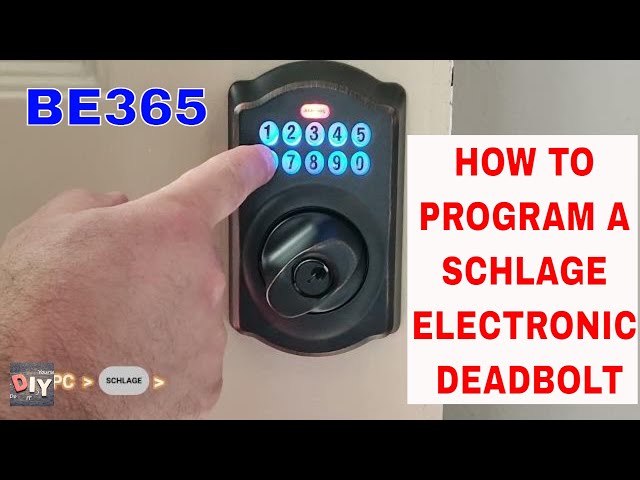
Fumbling for keys in the dark or leaving spare keys under flowerpots ends the moment you master your Schlage BE365 programming. This popular keypad deadbolt delivers true keyless convenience through its straightforward button-based system—no smartphone apps, WiFi passwords, or cloud accounts required. When your house sitter arrives unexpectedly or your teenager forgets their key, knowing how to program Schlage smart lock codes becomes your instant solution. Within minutes, you’ll add, delete, and manage access for family, guests, or service providers using only the physical keypad.
Unlike app-dependent smart locks that fail during internet outages, the BE365 stores up to 19 unique 4-digit codes directly in its internal memory. You’ll rely on its visual and audio cues—orange flashes, blue glows, and distinct beeps—to navigate every programming step. This guide cuts through common frustrations by focusing exclusively on the feedback signals that confirm successful code changes. Whether you’re installing a new lock or troubleshooting unresponsive codes, you’ll learn precisely when to press buttons and when to wait for confirmation.
Find Your Schlage BE365 Programming Code Immediately
Locate the yellow adhesive label on the interior side of your keypad assembly—the portion pressed against your door during installation. This 6-digit code is your master key for all programming functions. Without it, you cannot add, delete, or modify any user codes. Peel this sticker carefully during installation and transfer it to your phone’s password manager or a secure home records file. Never discard the original; Schlage support requires this code for factory resets if lost.
Why This Code Is Non-Negotiable
The programming code differs fundamentally from your 4-digit user access codes. While user codes unlock your door, this 6-digit sequence grants administrative control. Attempting to use a 4-digit user code for programming triggers no response—the lock simply ignores the input. If your yellow label is damaged, contact Schlage support immediately with your lock’s serial number before attempting a factory reset.
Add User Codes to Your Schlage BE365 in 45 Seconds
Enter programming mode by pressing the 6-digit code from your yellow sticker. Watch for three rapid orange flashes from the Schlage button accompanied by three distinct beeps—this confirms programming access. If you see red flashes or hear no beeps, restart immediately; incorrect digits prevent progression. Wait 2 full seconds after this confirmation before proceeding—rushing causes 90% of programming failures.
Access the User Code Menu
Press the Schlage button repeatedly until the entire keypad glows solid blue. This blue illumination is critical—it means you’ve successfully entered the programming menu. Press “1” to select user code addition. The lock responds with three orange flashes and beeps. Any deviation here (like a single flash) means you pressed “1” too soon; restart from the programming code entry.
Create and Confirm Your 4-Digit Code
Enter any 4-digit sequence (e.g., 7825) using the numeric keypad. The Schlage button flashes three orange lights with three beeps to acknowledge receipt. Immediately re-enter the exact same 4 digits—typos during this step cause silent failures where codes appear programmed but won’t work. Successful completion triggers one steady green light with a long beep. Test the new code instantly by locking the door and entering it.
Critical reminder: All user codes must be exactly four digits. Codes like “123” (too short) or “12345” (too long) won’t register—your lock remains silent with no error indication. Avoid obvious sequences like 1111 or your house number.
Fix These 3 Common Schlage BE365 Programming Errors
Why Your 4-Digit Code Won’t Save
Rushing past confirmation signals is the top reason codes fail. After entering your new 4-digit sequence, you must wait for the three orange flashes/beeps before re-entering it. Skipping this wait period stores incomplete data. If the green light never appears, restart the process but count “one-Mississippi” between steps to ensure full signal completion.
When the Keypad Won’t Turn Blue
Weak batteries sabotage programming before you begin. If the keypad stays dark when pressing the Schlage button, replace both AA batteries—even if the lock still unlocks. Fresh batteries ensure consistent blue illumination during menu access. Clean sticky buttons with a dry microfiber cloth; residue can block electrical contacts needed for signal recognition.
Recovering from a Lost Programming Code
Without the original 6-digit code, you cannot add or delete user codes. Schlage support will require proof of ownership and the lock’s serial number (found on the deadbolt’s side) before guiding you through a factory reset. This erases all user codes, reverting to the default “0000” until you reprogram with a new 6-digit master code.
Delete Unused Codes From Your Schlage Lock
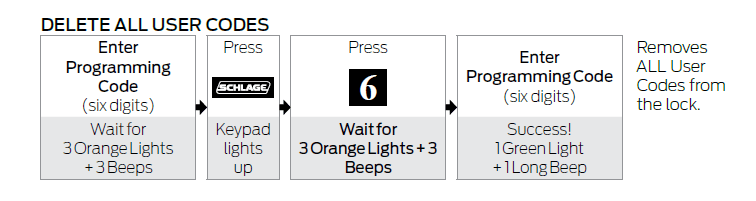
Initiate deletion by entering your 6-digit programming code until you see three orange flashes and hear three beeps. Press the Schlage button until the keypad glows blue, then press “2” to access the delete function. After the confirmation beeps, enter the specific 4-digit code you want to remove. The lock signals successful deletion with three orange flashes/beeps—immediately test the deleted code by attempting to unlock the door; it should now fail.
Verify Deletion Before Leaving Home
Never assume deletion worked based on signals alone. After removing a house sitter’s code, physically test it with the door locked. If the code still works, restart the deletion process but hold the Schlage button 1 full second longer during blue illumination—this ensures the lock registers your “2” input correctly.
Schlage BE365 Programming Pro Tips You Need
Code Management That Prevents Break-Ins
Assign unique codes to each person rather than sharing one family code. Change seasonal service provider codes (like pool cleaners) every 90 days. Test every code monthly by locking the door and entering it—this catches battery issues before they strand you outside. Keep a written log in your safe with names and code purposes (e.g., “Dog Walker – Code 4482”).
Battery Maintenance for Flawless Programming
Replace batteries annually even if the low-battery indicator hasn’t activated. Weak power causes inconsistent orange flashes during programming, leading to corrupted code storage. During programming, if blue illumination flickers or beeps sound muffled, install fresh batteries immediately—older ones lack the burst power needed for reliable signal processing.
The Essential Physical Key Backup
Always keep your mechanical key in your car or with a trusted neighbor. Electronic components can fail from power surges or extreme temperatures. Test the key monthly; Schlage’s Precision Engaged Technology ensures smooth mechanical override even when programming codes malfunction.
Troubleshoot Schlage BE365 Programming Failures
Lock Stuck in Programming Mode
If the keypad stays blue after completing steps, press any number key to exit. This often happens when you pause too long between steps. If blue persists, remove one battery for 10 seconds to reset the circuit—this won’t erase programmed codes but clears temporary glitches.
Green Light Confirms but Code Won’t Work
Clean the keypad contacts with 90% isopropyl alcohol on a cotton swab. Residue buildup causes intermittent recognition, especially on frequently used digits. Reprogram the code immediately after cleaning—alcohol evaporates quickly without damaging components.
Why Schlage BE365 Programming Works Without Apps
The BE365’s app-free design delivers instant programming during internet outages and zero data privacy risks since codes never touch the cloud. You avoid app update failures that brick other smart locks. However, you must physically access the lock to change codes—no remote management for vacation rentals. No usage logs mean you can’t track who entered when, making unique personal codes essential for security.
Maintain Your Programmed Schlage Lock Long-Term
Test all active codes quarterly during battery changes. Delete unused codes immediately after service providers leave (e.g., terminate a cleaner’s code the same day they finish work). Store spare batteries inside your home—not in the garage where temperature extremes reduce lifespan. Schlage recommends alkaline batteries only; lithium variants can damage the circuitry.
Mastering how to program Schlage smart lock BE365 codes transforms your entry experience within minutes. Keep your yellow programming code secure, respect every orange flash and beep as your guide, and test changes instantly. This lock delivers decade-long reliability through its brilliantly simple, offline system—no tech expertise required. Within days, you’ll wonder how you ever managed keys.



