
You’re returning home with arms full of groceries, sweat dripping from your morning run, or simply tired of digging through your pockets for keys. With a smart lock that opens via Apple Watch, you can bypass the frustration entirely—just raise your wrist, tap the screen, and walk right in. This isn’t science fiction; it’s today’s reality with Tapkey and August smart lock systems designed specifically for seamless Apple Watch integration. In this guide, you’ll discover exactly how to set up and use these systems to transform your daily home entry into a frictionless experience.
Smart locks compatible with Apple Watch eliminate the need to carry keys or even your phone for basic access. Whether you’re a runner who hates carrying devices or a parent juggling kids and bags, these systems deliver genuine convenience without sacrificing security. You’ll learn which smart lock system fits your lifestyle best, how to set it up in under 10 minutes, and practical tips for daily use that most users never discover.
Tapkey vs August: Which Smart Lock Works Best with Apple Watch?
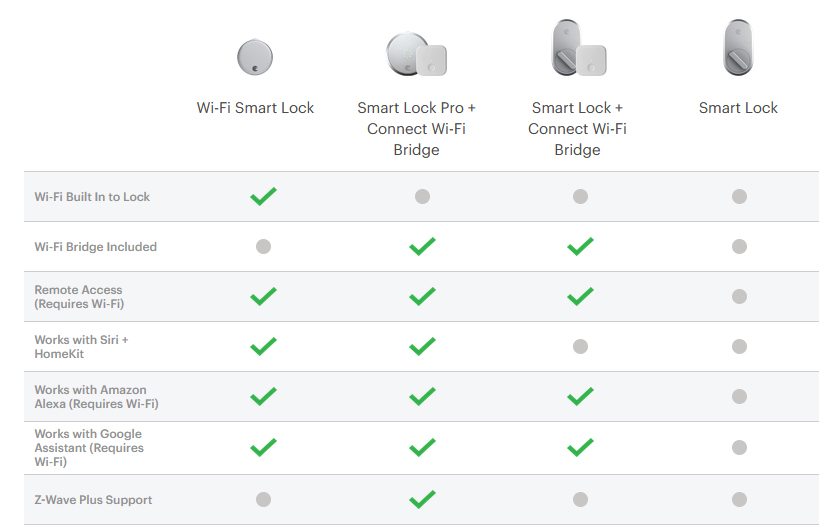
Tapkey’s Phone-Free Smart Lock System for Apple Watch
Tapkey revolutionized smart lock access when it launched its dedicated Apple Watch app in November 2021. What sets Tapkey apart is its complete phone independence—once configured, your Apple Watch becomes your sole access device with no iPhone required. The system displays all your available locks directly on your watch face, and a simple tap opens your door with immediate visual confirmation through a green checkmark.
Key advantages for Apple Watch users:
– Operates entirely without your iPhone nearby
– Works during activities like running where carrying a phone is impractical
– Provides instant visual feedback on successful unlocks
– Supports multiple lock types including padlocks and storage units
August Smart Lock: Comprehensive Apple Watch Control Since 2015
August pioneered Apple Watch integration back in July 2015, offering more than just basic lock/unlock functionality. Their system focuses on comprehensive home security management from your wrist, allowing you to view activity logs, receive real-time notifications, and monitor who enters your home—all without pulling out your phone.
Core capabilities that differentiate August:
– Swipe-to-unlock gesture controls for faster access
– Complete access history viewable directly on Apple Watch
– Instant security notifications when doors unlock
– Glances integration for one-tap access to your lock status
Get Tapkey Running on Your Apple Watch in 5 Minutes
Tapkey Apple Watch App Installation: Quick Setup Guide
Setting up Tapkey requires minimal effort thanks to its automatic synchronization between devices. Existing Tapkey users simply need to update their Tapkey iPhone app to the latest version, and the watch app installs automatically—no additional downloads required. New users follow this streamlined process:
- Download the Tapkey app from the App Store
- Create your account and verify your locks in the iPhone app
- Wait 30 seconds for the Apple Watch version to appear automatically
- Open the Watch app on your iPhone to confirm installation
Unlike many smart home systems, Tapkey eliminates complicated configuration steps. The entire installation process takes less than two minutes once your iPhone app is updated.
Tapkey Account Setup on Apple Watch: One-Time Configuration
After installation, you’ll need to log into your Tapkey account directly on the Apple Watch. This one-time setup enables true phone-free operation:
- Open the Tapkey app on your Apple Watch
- Enter your account credentials using the watch keyboard
- Verify all configured locks appear in the watch interface
- Test the unlock function with your closest lock
Pro tip: Use Scribble or dictation for faster login rather than the tiny watch keyboard. Once configured, you’ll never need to repeat this process unless you change your account credentials.
Configure August Smart Lock for Apple Watch Control
August iPhone App Setup Before Apple Watch Integration
August requires your iPhone as the primary control hub, making initial setup slightly more involved but offering greater functionality. Begin by:
- Downloading the August iOS app from the App Store
- Creating your August account and adding your smart lock
- Configuring lock settings and user permissions in the iPhone app
This iPhone setup takes approximately 10 minutes and must be completed before Apple Watch integration. Critical step: Ensure your August lock appears as “Online” in the iPhone app before proceeding to watch configuration.
Activate August Apple Watch App in 4 Simple Steps
After iPhone setup, enable August on your Apple Watch through these specific actions:
- Open the Apple Watch app on your iPhone
- Scroll to August in the list of available apps
- Toggle on “Show App on Apple Watch”
- Enable “Glances” for instant lock access
Within 30 seconds, the August app will appear on your Apple Watch. Test it immediately by accessing it through your watch’s app grid or via Glances for confirmation.
How to Open Your Smart Lock with Apple Watch Daily
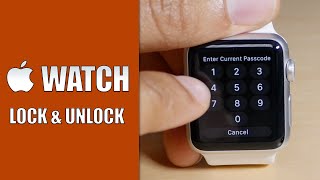
Tapkey Apple Watch Unlock: Complete Phone Independence
Tapkey’s interface shows all available locks in a simple scrollable list. To unlock your door:
- Raise your wrist to wake the Apple Watch
- Open Tapkey from your app grid
- Select your desired lock from the displayed list
- Tap once to open the lock instantly
- Watch for the green checkmark confirmation
Optimal use cases: Morning runs without your phone, grocery shopping with full bags, or quick access to your garage or storage unit—situations where pulling out your phone would be inconvenient.
August Smart Lock Controls: More Than Just Unlocking
August provides a richer experience beyond basic unlock functionality. Access your lock through the app or Glances, then:
- Swipe left to reveal the lock/unlock button
- Tap to execute your command
- Feel the haptic confirmation of successful operation
- View activity logs if needed
Security advantage: August displays real-time entry notifications and complete access history, letting you monitor exactly who enters your home and when—information unavailable through Tapkey’s simplified interface.
Fix Apple Watch Smart Lock Problems in Minutes

Tapkey Apple Watch Not Working? 5 Quick Fixes
When Tapkey fails to respond, check these common issues first:
- Watch battery below 20%: Recharge before attempting unlock
- Lock out of range: Move within 10 feet of your lock
- Account timeout: Re-enter credentials in the watch app
- Bluetooth interference: Move away from crowded WiFi areas
- Physical obstruction: Ensure nothing blocks the lock mechanism
Persistent problems: Restart both devices, reinstall Tapkey apps, or check lock battery status through your iPhone app.
August Watch Sync Failures: Step-by-Step Resolution
August occasionally loses connection between devices. Resolve sync issues by:
- Force quit the August app on both iPhone and watch
- Toggle Bluetooth off/on in iPhone settings
- Restart your Apple Watch
- Re-enable August in Watch app settings
- Test lock response from both devices
Time-saving shortcut: If problems persist, disable “Glances” temporarily to isolate whether the issue affects the main app or just quick access features.
Smart Lock Apple Watch Limitations You Should Know
Tapkey Apple Watch Limitations: What You Can’t Do From Your Wrist
Tapkey intentionally limits Apple Watch functionality to maintain simplicity. You cannot:
- Add new locks to your account
- Grant or revoke access for other users
- Modify lock settings or permissions
- View detailed access logs
All management tasks require your iPhone. The Apple Watch serves strictly as an access device, not a control center.
August Dependence on iPhone: Why Your Phone Must Be Nearby
Unlike Tapkey, August requires your iPhone to be within Bluetooth range (approximately 30-50 feet) even when using the Apple Watch app. Critical limitations:
- August app must stay active in your iPhone’s background
- iPhone battery level affects watch functionality
- Network connection needed for remote access features
- iPhone must remain powered on for watch controls to work
Extend Battery Life When Using Smart Locks with Apple Watch
Apple Watch Battery Tips for Smart Lock Users
Smart lock usage drains battery faster than typical watch functions. Maximize battery life by:
- Use Glances instead of opening the full app
- Disable unnecessary lock notifications
- Close apps after use (double-tap Digital Crown, swipe up)
- Enable Power Reserve during extended outdoor activities
Pro tip: Check your watch battery percentage before leaving home—nothing defeats the purpose of smart lock convenience like a dead watch.
Smart Lock Battery Monitoring Through Apple Watch
Both systems provide limited battery visibility through the watch interface. For reliable monitoring:
- Check lock battery weekly via your iPhone app
- Set iPhone reminders for battery checks
- Keep spare batteries for Tapkey locks
- Schedule August charging during low-usage periods
Critical warning: Most smart locks provide only 1-2 weeks of battery life after low-battery warnings appear—don’t ignore these alerts.
Keep Your Smart Lock Secure with Apple Watch Features
Built-in Apple Watch Security Features for Smart Locks
Your Apple Watch includes essential protections against unauthorized access:
- Automatic lock when removed from your wrist
- Required passcode for first unlock after removal
- Remote wipe capability through Find My
- Encrypted communication with your smart lock
Security must-do: Enable wrist detection in Watch settings and use a complex passcode—don’t compromise security for convenience.
Essential Physical Security Measures for Smart Lock Users
Smart locks complement but don’t replace traditional security fundamentals:
- Maintain traditional key backup in a secure location
- Install motion-activated cameras near entry points
- Use multiple lock types for high-value areas
- Update firmware regularly for security patches
Smart locks controlled by Apple Watch represent more than convenience—they deliver seamless home access that adapts to your lifestyle. Whether you choose Tapkey’s phone-free simplicity or August’s comprehensive monitoring, these systems eliminate daily friction while maintaining robust security. Start with one lock, master the basics, then expand your smart home ecosystem as your comfort grows. Your wrist becomes the key to your entire property, making lost keys and forgotten phones problems of the past.



