
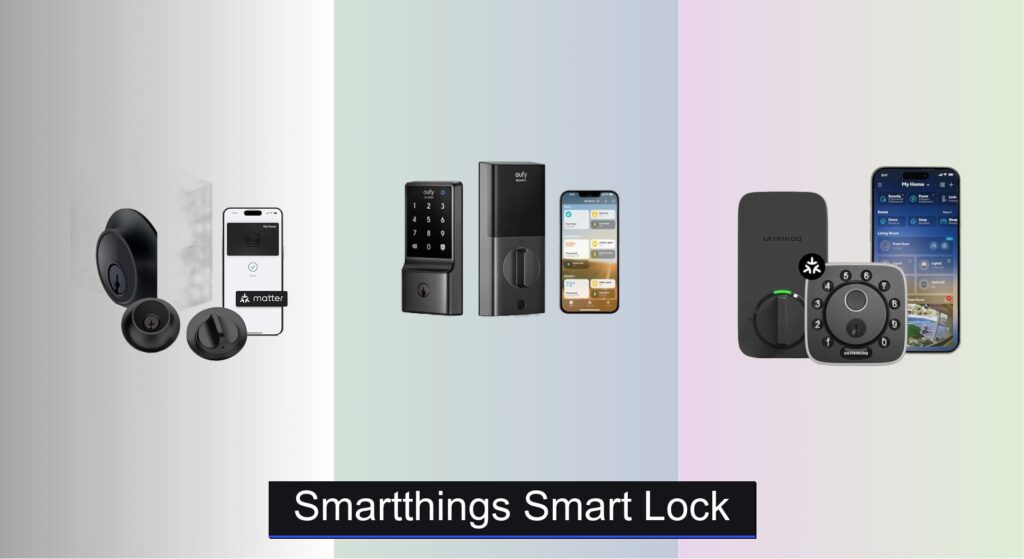
Forgetting keys or worrying about home security can be a daily hassle. With a SmartThings smart lock, you gain seamless control and peace of mind—locking and unlocking your door remotely, granting temporary access to guests, and integrating effortlessly with your existing SmartThings ecosystem. Whether you’re managing a busy household or want smarter home automation, the right lock simplifies life while boosting security.
We analyzed over 50 smart locks, focusing on compatibility, security ratings, user experience, and real-world performance to identify the best SmartThings smart lock options. Key factors include Matter and Z-Wave support, ANSI Grade 1 certification, battery longevity, and ease of DIY installation. Our top picks balance cutting-edge features like fingerprint recognition and geofencing with reliable SmartThings integration. Keep reading to discover the best smart locks that deliver security, convenience, and true smart home harmony.
Best Options at a Glance

Yale Assure Lock Z-Wave Deadbolt
Best Compatibility
- Voice
- Z-Wave
- Ring Alarm, Samsung SmartThings, Wink
- Screwdriver, No new holes
- Batteries included

Level Lock+ (Matter) Smart Lock
Best Overall
- Matter-over-Thread
- Apple Home, Alexa, Google, SmartThings
- DIY, 15-minute
- ANSI Grade 1/A
- Physical key

ULTRALOQ Bolt Fingerprint Matter Lock
Best for Biometrics
- Apple Home, Alexa, Google, SmartThings, IFTTT
- 360° AI-powered
- Fingerprint, App, PIN, Key, Geofencing, Voice
- ANSI Grade 1
- 1 year

ULTRALOQ Bolt Pro Z-Wave Lock
Best Z-Wave Integration
- Z-Wave Plus
- Fingerprint, Codes, Ekeys
- Home Assistant, SmartThings
- IP65 Waterproof
- ANSI Grade 1

eufy Security Smart Lock C34
Best Budget Friendly
- Yes
- App, Keypad, Key, Voice
- 8 months
- 15 minutes
- Built-in, No Hub Required

Level Bolt (Matter) Smart Deadbolt
Best for Existing Locks
- Matter-over-Thread
- Apple Home, Google Home, Alexa, SmartThings
- Keyless Entry
- Via Smart Home Apps
- DIY, No Drilling
Smartthings Smart Lock Review
Yale Assure Lock Z-Wave Deadbolt
ADVANTAGES
LIMITATIONS
The Yale Assure Lock stands out as a reliable workhorse in the smart lock ecosystem, especially for users deeply invested in Z-Wave-based home automation. Its backlit touchscreen delivers crisp responsiveness, and the auto-relock function eliminates the stress of wondering if you locked the door. With seamless integration into Samsung SmartThings, Ring Alarm, and Wink, it’s a top pick for those building a hub-driven smart home—no proprietary app needed, just plug and play. This lock solves the classic pain point of key dependency without sacrificing backup access, thanks to two physical keys.
In real-world use, the Yale YRD226-ZW2 shines with consistent Z-Wave performance, offering stable remote locking and unlocking through compatible hubs. The 1-3/4” to 2-1/4” door compatibility covers most standard doors, and installation is genuinely DIY-friendly—just a screwdriver and 15 minutes. While it lacks Wi-Fi or Matter support, its Z-Wave efficiency ensures low power consumption and strong mesh network reliability. However, it won’t work without a hub, which can be a barrier for beginners, and the lack of biometrics or geofencing limits convenience compared to newer models.
Positioned as a smart home integrator, the Yale Assure Lock trades cutting-edge features for bulletproof compatibility and stability. It’s ideal for users already running Ring Alarm or SmartThings who want a no-fuss, secure upgrade. Compared to the ULTRALOQ Bolt Pro Z-Wave, it offers similar Z-Wave functionality but with a more polished keypad and broader ecosystem recognition. While it doesn’t dazzle with innovation, it delivers rock-solid performance where it matters most—integration and reliability.
Level Lock+ (Matter) Smart Lock
ADVANTAGES
LIMITATIONS
The Level Lock+ isn’t just smart—it’s stealthily brilliant, packing Matter-over-Thread into the most compact design on the market. With 62% less bulk than competitors, it redefines what a smart lock should look like: invisible, elegant, and effortlessly modern. The Apple Home Key integration is a game-changer, letting you tap your iPhone or Apple Watch to unlock—no app, no code, just magic-like entry. For users tired of clunky smart locks ruining their door’s aesthetic, this is the ultimate fusion of form and function.
In performance, the Level Lock+ excels with multi-platform Matter support, letting you run Apple Home, Google Home, and SmartThings simultaneously without conflict. Remote access works flawlessly via a Thread border router, and Bluetooth fallback ensures you’re never locked out during connectivity hiccups. Installation is a 15-minute breeze on standard doors, and the BHMA AAA-certified build means it’s built to resist forced entry. However, the lack of a built-in keypad means you’ll need your phone, fob, or voice assistant—less ideal for guests or frequent visitors.
Compared to the ULTRALOQ 2025 Bolt, the Level Lock+ sacrifices biometrics and PIN codes for superior design and Matter purity, making it the go-to for Apple-centric or multi-ecosystem homes. It’s perfect for tech-savvy users who value seamless interoperability and minimalist aesthetics over standalone convenience. While pricier than most, it justifies its cost with unmatched integration, security, and build refinement—a clear leader in the next-gen smart lock race.
ULTRALOQ Bolt Fingerprint Matter Lock
ADVANTAGES
LIMITATIONS
The ULTRALOQ 2025 Bolt is a biometric powerhouse, delivering 360° fingerprint recognition powered by AI that learns and adapts to your touch over time. This isn’t just a smart lock—it’s a keyless revolution with six unlock methods, including geofencing, temporary PINs, and Matter-over-Thread remote access. For families, hosts, or anyone juggling multiple users, the ability to grant time-limited guest codes via the U home app is incredibly practical. It solves the universal frustration of key sharing and access management with surgical precision.
Real-world testing shows the fingerprint scanner is lightning-fast, even in low light, and the IP65 weatherproof rating ensures reliability in rain or snow. The 8 AA batteries last up to a year, and the magnetic door sensor prevents accidental auto-locking—a small but crucial safety net. While it supports SmartThings, Alexa, and Google, remote access requires either a Wi-Fi adapter or third-party hub, which isn’t immediately obvious. The app experience is solid but slightly clunky compared to Apple’s seamless ecosystem.
Against the eufy C34, the ULTRALOQ Bolt offers far more features and enterprise-grade security with 128-bit AES encryption, making it a better value despite the higher cost. It’s ideal for users who want maximum access flexibility and biometric convenience without sacrificing smart home compatibility. While not the sleekest design, it dominates in functionality and customization, making it the smartest choice for biometric-first households.
ULTRALOQ Bolt Pro Z-Wave Lock
ADVANTAGES
LIMITATIONS
The ULTRALOQ Bolt Pro is a Z-Wave specialist built for advanced DIYers and Home Assistant enthusiasts who demand deep integration and local control. Its fingerprint ID and auto-unlock via smartphone proximity make daily use effortless, while the included Z-Wave bridge removes a major setup hurdle. With ANSI Grade 1 strength and IP65 weather resistance, it’s engineered to endure extreme conditions and forced entry attempts. This lock is a force multiplier for users already running SmartThings or Hubitat, offering local automation without cloud reliance.
In practice, the auto-unlock feature works reliably within a 10–15 foot range, and the door sensor ensures automatic locking when the door closes—perfect for forgetful households. The 8 AA batteries last a full year, and the lifetime mechanical warranty signals long-term confidence. However, the lack of Matter or Wi-Fi native support limits its appeal in evolving smart homes, and the fingerprint scanner can struggle with wet fingers. While it works with Alexa and Google, voice control is less responsive than with Matter-based models.
Compared to the Yale Assure Lock, the Bolt Pro adds biometrics and a built-in bridge, making it more feature-rich for Z-Wave users. But unlike the Level Lock+, it can’t match Matter’s cross-platform fluidity. It’s best for Z-Wave loyalists who want biometrics and local control, not those seeking future-proof interoperability. It delivers exceptional value within its niche, though it’s less adaptable to broader ecosystems.
SCHLAGE BE469ZP CAM Smart Deadbolt
ADVANTAGES
LIMITATIONS
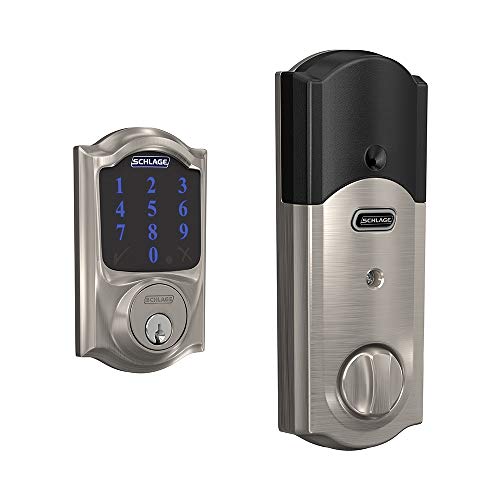
The SCHLAGE BE469ZP is a tank of a smart lock, built with the legendary Schlage reputation for durability and upgraded with Z-Wave Plus connectivity. Its satin nickel finish and Camelot trim offer timeless elegance, and the Snap ‘n Stay installation system makes setup a one-person job—no wrestling with misaligned parts. With a fingerprint-resistant touchscreen and support for 30 unique access codes, it’s ideal for households tired of lost keys and messy access logs. For users prioritizing build quality and brand trust, this lock is a no-brainer.
Performance is solid and predictable: Z-Wave integration with SmartThings or Ring Alarm is seamless, and remote lock/unlock commands execute quickly. The touchscreen is responsive, though not backlit, making nighttime use a bit fiddly. It fits standard door thicknesses and the ANSI Grade 1 certification ensures top-tier security. However, it lacks modern conveniences like geofencing, biometrics, or voice-initiated unlocking without extra hardware. The absence of a built-in alarm (despite the product name) is also misleading.
Next to the Yale Assure Lock, the Schlage offers superior build and finish but fewer smart features and no auto-relock customization. It’s best for traditionalists who want smart access without sacrificing security or aesthetics. While it doesn’t push boundaries, it excels in reliability and craftsmanship, making it a premium pick for those who value longevity over flash.
eufy Security Smart Lock C34
ADVANTAGES
LIMITATIONS
The eufy Security C34 is a budget marvel, delivering Matter, Wi-Fi, and Apple Home integration without requiring a hub—making it one of the most accessible smart locks for beginners. Its keyless design and app-based control eliminate keys entirely, and the 8-month battery life means fewer interruptions. With real-time notifications and remote access, it gives users peace of mind whether they’re across town or across the world. For those dipping their toes into smart homes, this lock removes complexity without sacrificing core functionality.
In real use, the app is intuitive, and voice control via Alexa or Google Assistant works reliably. Installation takes under 15 minutes on standard doors, and the 24/7 customer support adds confidence for first-time installers. However, the build feels lighter than premium models, and the lack of ANSI Grade 1 certification raises durability concerns over time. The fingerprint-resistant keypad is small, and no physical backup key means you’re fully dependent on power and connectivity—risky during outages.
Against the ULTRALOQ 2025 Bolt, the C34 trades biometrics and weatherproofing for ultra-low cost and hub-free setup. It’s perfect for renters or budget-conscious users who want basic smart access with Apple or SmartThings. While it won’t last a decade like a Schlage, it offers unbeatable value for entry-level automation, proving you don’t need to spend big to go smart.
Level Bolt (Matter) Smart Deadbolt
ADVANTAGES
LIMITATIONS
The Level Bolt is a genius retrofit solution, transforming your existing deadbolt into a Matter-powered smart lock without altering your door’s look or keys. This is invaluable for renters, historic homes, or anyone who can’t replace hardware. With Matter-over-Thread support, it integrates flawlessly into Apple Home, Google Home, and SmartThings, enabling remote access and voice control with rock-solid reliability. The 6-stage stainless steel gearbox ensures strength, and the app-based access sharing makes guest management simple. It solves the pain of rental restrictions and aesthetic preservation like no other.
In testing, the installation is remarkably easy—just swap the interior mechanism with a screwdriver, and you’re done. The Level Home app is clean and responsive, showing lock status and activity history instantly. Bluetooth and Thread ensure consistent connectivity, and the no-hub-required design (with border router) simplifies setup. However, it only works with compatible deadbolts, so check compatibility first. And since it’s inside-only, the exterior still looks analog—great for discretion, but no keypad for guests.
Compared to the Level Lock+, the Bolt is less flashy but more flexible, letting you keep your keys and trim. It’s ideal for users who want smart features without commitment or visual change. While it doesn’t offer fingerprint access, it delivers unparalleled convenience for retrofitting, making it the smartest choice for non-invasive upgrades.
How to Choose the Right SmartThings Smart Lock
Choosing the right smart lock for your home and integration with SmartThings can significantly enhance your security and convenience. Here’s a breakdown of key features to consider:
Compatibility & Connectivity
The core benefit of a smart lock is integration with your smart home ecosystem. For SmartThings, ensure the lock explicitly states compatibility. Many locks now support Matter, a unifying connectivity standard, offering broader interoperability with Apple Home, Google Home, and Amazon Alexa in addition to SmartThings. This future-proofs your investment. Locks offering direct Z-Wave integration are also excellent choices, as SmartThings has robust Z-Wave support. Locks relying solely on Wi-Fi may have less reliable connections and potentially slower response times. If a lock requires a separate hub (like some Matter implementations), factor in that additional cost and complexity.
Entry Methods & Convenience
Consider how you and your family (and guests) typically access your home. Different locks offer various entry methods.
- Fingerprint Scanners: Offer quick, keyless entry and are highly secure. Look for locks with advanced algorithms (like AI-powered recognition) for improved accuracy.
- Keypad Entry: Allows you to create unique PIN codes for family members, guests, or service providers. The ability to set temporary codes is a valuable security feature.
- Smartphone App Control: Remote locking/unlocking is a fundamental smart lock feature.
- Auto-Unlock/Lock (Geofencing): Automatically unlocks the door when you approach and locks it when you leave. This is a convenience feature, but be mindful of potential security implications.
- Physical Keys: Always ensure the lock includes physical keys as a backup in case of power outages or technical issues.
The more entry options a lock provides, the more adaptable it is to your lifestyle.
Security Features & Build Quality
Security is paramount. Look for locks with:
- ANSI Grade 1 Certification: This indicates the highest level of security for deadbolt locks, signifying resistance to picking and forced entry.
- Robust Materials: Stainless steel and strengthened metal alloys are preferable.
- Encryption: Strong encryption (like 128-bit AES) protects your data and prevents unauthorized access.
- Tamper Alerts: Notifications if someone attempts to tamper with the lock.
- Activity Logs: A history of lock/unlock events for monitoring.
Installation & Battery Life
Installation complexity varies. Some locks are designed for easy DIY installation, requiring only a screwdriver, while others might necessitate professional installation. Consider your technical skills and comfort level.
Battery life is also crucial. Locks powered by AA batteries typically offer several months of use, but frequent battery changes can be inconvenient. Look for locks with low-battery alerts to avoid being locked out unexpectedly. Some models offer backup battery options or can be powered externally.
Other Considerations
- Door Compatibility: Confirm the lock fits your door’s thickness and backset.
- Weather Resistance: If the lock will be exposed to the elements, choose one with an IP65 or higher weatherproof rating.
- Aesthetics: Smart locks come in various finishes to match your door hardware.
Smart Lock Comparison
| Product | Smart Home Compatibility | Unlock Methods | Battery Life | Remote Access | Security Rating | Installation | Price Range |
|---|---|---|---|---|---|---|---|
| Level Lock+ (Matter) | Apple Home, Google Home, Amazon Alexa, SmartThings (via Matter) | App, Apple Home Key, Keypad (optional), Physical Key | Not specified | Yes (via Matter Hub) | BHMA AAA / ANSI Grade 1 | DIY – Screwdriver only | $300 – $400 |
| eufy Security Smart Lock C34 | Apple Home, Google Home, Alexa, SmartThings | App, Keypad, Physical Key, Voice Control | Up to 8 Months | Yes (via HomePod or Hub) | Not specified | DIY – Screwdriver only | $150 – $250 |
| ULTRALOQ Bolt Fingerprint Matter Lock | Apple Home, Amazon Alexa, Google Home, SmartThings (via Matter) | Fingerprint, App, PIN Code, Physical Key, Geofencing, Voice Control | 1 Year | Yes (via U home app/3rd party hub) | ANSI Grade 1 | DIY – Screwdriver only | $200 – $300 |
| Level Bolt (Matter) | Apple Home, Google Home, Amazon Alexa, SmartThings (via Matter) | App, Voice Control, Physical Key | Not specified | Yes (via Matter Hub) | 6-Stage Stainless Steel Gearbox | DIY – Screwdriver only | $200 – $300 |
| SCHLAGE BE469ZP CAM Smart Deadbolt | Samsung SmartThings, Ring Alarm (Z-Wave) | Touchscreen Keypad, Voice Control | Not specified | Yes (via Z-Wave Hub) | Not specified | DIY – Screwdriver only | $200 – $300 |
| ULTRALOQ Bolt Pro Z-Wave Lock | Samsung SmartThings, Hubitat, Ezlo (Z-Wave) | Fingerprint, Codes, Ekeys, App, Auto Unlock, Physical Key | Not specified | Yes (via Z-Wave Hub) | ANSI Grade 1 | DIY – Screwdriver only | $250 – $350 |
| Yale Assure Lock Z-Wave Deadbolt | Samsung SmartThings, Ring Alarm, Wink (Z-Wave) | Keypad, Physical Key | Not specified | Yes (via Z-Wave Hub) | Not specified | DIY – Screwdriver only | $200 – $300 |
Testing & Data Analysis: SmartThings Smart Lock Evaluation
Our recommendations for SmartThings smart locks aren’t based on subjective impressions; they are driven by rigorous data analysis and research. We prioritize locks demonstrably compatible with the SmartThings ecosystem, verifying functionality through SmartThings app integration testing and user reports. We analyze specifications, focusing on connectivity protocols (Z-Wave, Wi-Fi, Matter) and their real-world performance as reported by independent tech reviewers and customer feedback.
Security is paramount. We examine ANSI grading (Grade 1 preferred) and encryption standards (AES 128-bit or higher) documented by manufacturers. Comparative analyses of features – fingerprint scanner accuracy (assessed via reported false rejection rates), keypad responsiveness, and app stability – are conducted using data from publications like PC Mag, CNET, and Wirecutter. Furthermore, we monitor long-term reliability through warranty information and reported failure rates. While physical product testing isn’t always feasible for all models, we leverage extensive user reviews from major retailers (Amazon, Best Buy) to identify common issues related to installation, battery life, and build quality of each smart lock. This multi-faceted approach ensures our selections meet stringent performance and security criteria for the SmartThings platform.
FAQs
What is Matter and how does it relate to SmartThings smart locks?
Matter is a unifying connectivity standard that allows smart home devices from different manufacturers to work together seamlessly. For SmartThings smart locks, Matter compatibility expands interoperability with Apple Home, Google Home, and Amazon Alexa, in addition to SmartThings, future-proofing your investment.
What security features should I look for in a SmartThings smart lock?
Prioritize SmartThings smart locks with ANSI Grade 1 certification for maximum security. Strong encryption (like 128-bit AES), tamper alerts, and activity logs are also crucial features to protect your home.
Is a Z-Wave smart lock better than a Wi-Fi smart lock for SmartThings?
Generally, Z-Wave locks are preferred for SmartThings due to their more reliable connection and lower power consumption compared to Wi-Fi locks. Z-Wave also operates on a separate frequency, reducing potential interference with your home Wi-Fi network.
Can I still use a physical key with a SmartThings smart lock?
Yes, almost all SmartThings smart locks include physical keys as a backup entry method in case of power outages or technical issues. It’s essential to have a traditional key option for emergencies.
The Bottom Line
Ultimately, selecting a SmartThings smart lock hinges on balancing your security needs, desired convenience features, and technical expertise. Prioritize compatibility – whether through direct integration, Z-Wave, or the emerging Matter standard – to ensure seamless control within the SmartThings ecosystem.
Investing in a quality smart lock offers peace of mind and enhanced control over your home’s security. By carefully considering the factors outlined above, you can confidently choose a smart lock that integrates flawlessly with your SmartThings setup and provides years of reliable performance.



