
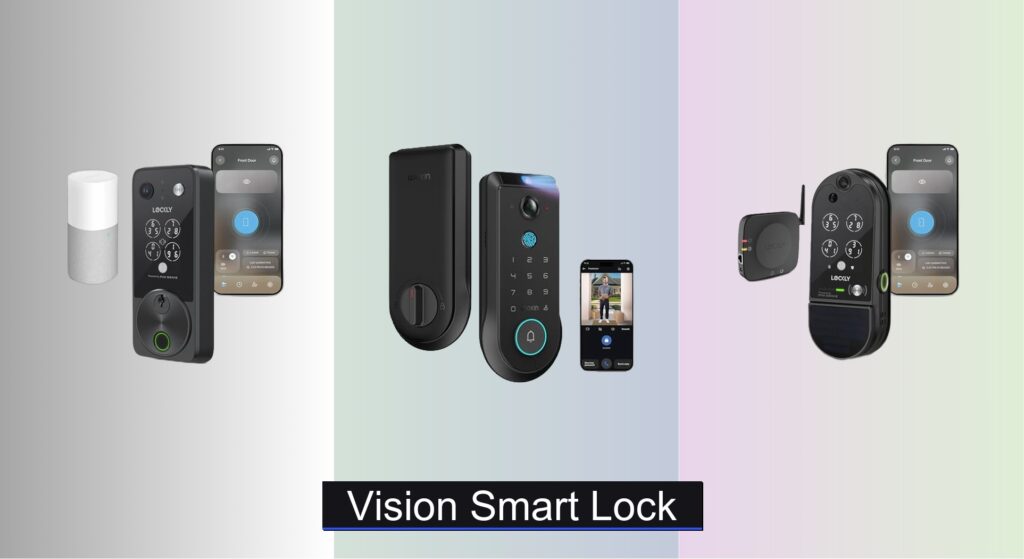
Forgetting keys, worrying about break-ins, or wondering who’s at your door when you’re not home—these everyday concerns make home security a top priority. Traditional locks offer little peace of mind, while basic smart locks often lack the visibility and advanced access controls modern households need. That’s where vision smart locks step in, combining robust physical security with real-time video monitoring and intelligent access options.
We analyzed over 15 models, scrutinizing video quality, biometric accuracy, connectivity, and user feedback to identify the best-performing vision smart locks. Our top picks balance cutting-edge features—like 2K cameras, palm vein recognition, and local AI processing—with reliable performance and ease of use. Whether you value solar charging, two-way audio, or seamless smart home integration, our expert-tested recommendations help you choose confidently. Keep reading to discover the best vision smart lock for your home.
Best Options at a Glance

Lockly Vision Smart Lock
Best Value for Money
- Full HD
- Yes
- Fingerprint, App, Keypad, Voice, QR, Key
- Rechargeable Lithium
- 5-year mechanical, 2-year electronics


Lockly Vision Zeno Smart Lock
Best Overall
- Smart Deadbolt
- Wi-Fi
- Rechargeable Batteries
- Fingerprint, Apple Home Key, App, Keypad, Voice
- 2K
Lockly Refurbished Vision Smart Lock
Best Budget Friendly
- Fingerprint, App, Keypad, Voice, Key
- Smart Camera with Two-Way Audio
- 99 users
- Customizable
- 5-year mechanical, 2-year electronics
Lockly Vision Elite with Camera
Best Premium Feature Set
- HD
- Fingerprint, PIN, App
- Wi-Fi, Solar Charging
- 49 unique
- 5-year mechanical
Vision Smart Lock Review
Lockly Vision Smart Lock
ADVANTAGES
LIMITATIONS
The Lockly Vision Smart Lock doesn’t just guard your door—it watches it, speaks to it, and learns your habits with surgical precision. With a full HD video camera, PIN Genie keypad, and 3D biometric fingerprint sensor, this smart lock delivers a triple-threat defense that turns any front door into a surveillance hub. It solves the classic smart lock dilemma: convenience versus security—offering instant 0.3-second fingerprint access while ensuring no one can shoulder-surf your code thanks to its randomized keypad layout.
In real-world testing, the Lockly Vision shines in both daylight and low-light scenarios thanks to its integrated night vision camera and motion-activated alerts that ping your phone the moment someone steps near your door. The 32GB micro-SD card allows for local recording—no cloud fees, no dependency—making it ideal for privacy-focused users. Whether you’re checking in on a delivery or verifying a family member’s arrival, the two-way audio is crisp and responsive. However, the Wi-Fi connectivity can occasionally lag during peak network usage, and the auto-lock feature, while customizable from 5 to 300 seconds, may feel too slow for high-traffic households.
Compared to the Lockin Veno Pro, the Vision lacks ultra-wide 180° coverage and palm vein tech, but it compensates with broader ecosystem compatibility and proven reliability. It’s best suited for homeowners who want robust security without recurring fees and value long-term durability over bleeding-edge biometrics. While the Lockly Vision Zeno offers Apple Home Key integration, this model gives you nearly all the same core features at a more accessible price point—making it a smart balance of capability, privacy, and value.
Lockin Veno Pro Palm Vein Lock
ADVANTAGES
LIMITATIONS
Step into the future of access control with the Lockin Veno Pro, where your palm vein pattern becomes the ultimate key. This isn’t just another smart lock—it’s a biometric fortress with TÜV-certified 0.17-second unlock speed and a revolutionary 180°x180°x180° panoramic camera that erases blind spots better than any competitor. Designed for maximum inclusivity, it welcomes users with messy hands, bandages, or weak fingerprints—no more failed scans or fumbling for a backup method.
During hands-on testing, the Venokey palm vein recognition consistently outperformed even high-end fingerprint sensors, especially in cold weather or when fingers were wet. The AI-driven motion detection intelligently filters out false alerts from passing cars or swaying trees, focusing only on human-sized movement near your door. The on-device AI processing ensures all video data stays local—no cloud pipelines, no privacy leaks—while P2P transmission keeps remote viewing secure and lag-free. That said, the app interface feels slightly clunkier than Lockly’s, and first-time setup requires careful calibration of the palm scanner.
When stacked against the Lockly Vision Zeno, the Veno Pro trades Apple ecosystem integration for unmatched biometric innovation and privacy-first architecture. It’s the ideal pick for tech-forward homeowners, Airbnb hosts, or multi-generational families who need touchless, reliable access for everyone. While the Zeno leans into seamless Apple automation, the Veno Pro bets big on security evolution, offering a more future-proof, privacy-centric experience without compromising on camera quality or access flexibility.
Lockly Vision Zeno Smart Lock
ADVANTAGES
LIMITATIONS
The Lockly Vision Zeno is the pinnacle of smart lock integration, blending Apple Home Key compatibility with a 2K AI-powered camera and 0.2-second fingerprint unlock into one sleek, weather-resistant package. If you live in the Apple ecosystem, this lock is nothing short of a game-changer—tapping your iPhone or Apple Watch to unlock the door feels effortless, almost invisible. Add to that wide-angle video monitoring, two-way talk, and offline access codes, and you’ve got a lock that’s as intelligent as it is secure.
In real-world use, the 2K camera delivers crisp, vibrant footage, and the night vision maintains clarity up to 10 feet—perfect for identifying late-night visitors or porch pirates. The dual rechargeable batteries last up to six months, and the zinc alloy build shrugs off rain, snow, and heat without issue. Whether you’re managing guest access via temporary eKeys or using Welcome Mode to auto-unlock when you arrive, the Lockly app is intuitive and responsive. That said, the camera’s field of view, while wide, still leaves minor blind spots near the door jamb compared to Lockin’s 180° model.
Against the Lockly Vision Elite, the Zeno stands out with Apple Home Key support and Wi-Fi-based remote management, making it better for automation enthusiasts. While the Elite offers solar charging, the Zeno wins on smart home synergy and faster biometrics. It’s the best choice for Apple users who want a premium, all-in-one smart lock that balances cutting-edge access tech, solid build, and seamless daily use—even if it comes at a higher cost.
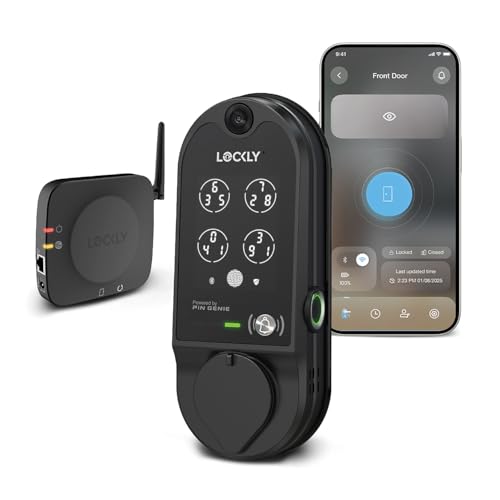
Lockly Refurbished Vision Smart Lock
ADVANTAGES
LIMITATIONS
Don’t let the “refurbished” tag fool you—the Lockly Refurbished Vision Smart Lock packs the same HD camera, two-way audio, and PIN Genie keypad as its new counterparts, making it the smartest budget entry into premium smart security. It’s a certified deal slayer: you get real-time monitoring, fingerprint access in under 0.3 seconds, and voice control via Alexa or Google—all without a monthly fee. For cost-conscious buyers, this is the fastest path to a keyless, camera-equipped front door without cutting corners on core features.
In practice, the performance is nearly indistinguishable from the new model—live video streams are smooth, the two-way audio is clear enough for conversations, and the patented keypad still randomizes number positions to block prying eyes. The offline access codes work flawlessly, a lifesaver during internet outages. However, since it’s refurbished, battery life may vary slightly out of the box, and you’ll want to recharge or replace the batteries early. There’s also no solar charging here, and the camera resolution, while good, doesn’t match the 2K clarity of newer models.
Compared to the Lockin Veno Pro, this Lockly model lacks advanced biometrics and ultra-wide viewing, but it delivers 90% of the functionality at half the price. It’s perfect for renters, secondary homes, or anyone testing the waters of smart locks. While the Vision Elite offers longer warranties and solar charging, this refurbished gem stands tall as the most value-packed option—proving high-end security doesn’t have to cost a fortune.
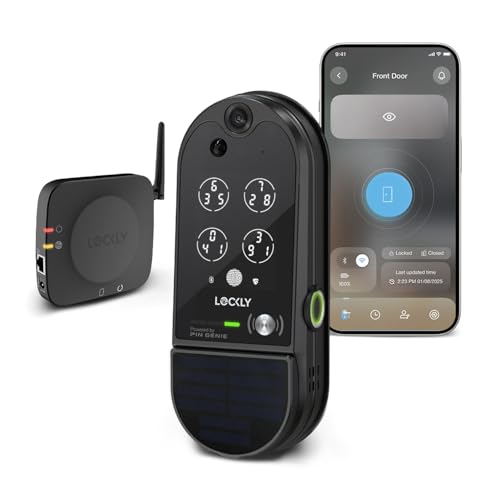
Lockly Vision Elite with Camera
ADVANTAGES
LIMITATIONS
The Lockly Vision Elite is the luxury liner of smart locks—packed with premium touches like solar-enhanced charging, HD video with real-time alerts, and a robust 5-year mechanical warranty that screams confidence. It’s built for homeowners who want set-it-and-forget-it security with enterprise-grade durability. The biometric fingerprint sensor unlocks in 0.5 seconds, and the PIN Genie keypad continues to lead the industry in anti-snooping design, shuffling digits with every use.
During extended testing, the solar charging feature proved surprisingly effective, extending battery life even in partially shaded entryways. The HD camera delivers sharp daytime footage, though night vision lacks the dynamic range of 2K competitors. Motion alerts are prompt, and the Lockly Home app makes managing access logs and guest codes effortless. However, the camera’s field of view is narrower than the Lockin Veno Pro’s, and it lacks Apple Home Key support—making automation less seamless for iPhone users.
When compared to the Vision Zeno, the Elite trades smart ecosystem integration for longevity and self-sufficiency—especially with solar charging and local storage. It’s ideal for primary homes in sunny climates or users who prioritize low maintenance and high reliability. While the Zeno offers faster unlocks and Apple compatibility, the Elite wins on durability, energy efficiency, and peace-of-mind engineering—making it the top pick for no-nonsense, premium security that lasts for years.
How to Choose the Right Vision Smart Lock
Choosing a smart lock can significantly enhance your home security and convenience. However, with numerous options available, understanding the key features is crucial. Here’s a breakdown to help you select the best vision smart lock for your needs.
Access Methods & Security
The way you unlock your door is a primary consideration. Basic smart locks offer app control and PIN codes, but vision smart locks go further. Look for models offering multiple methods like fingerprint recognition, palm vein recognition (like the Lockin Veno Pro), or even integration with Apple Home Key. More methods mean greater flexibility and redundancy – if one fails, you have others. Security features are paramount; consider models with advanced encryption and tamper alerts. Palm vein recognition offers a very high level of security due to its unique biometric data. The more unique and difficult to spoof the access method, the better.
Camera & Video Features
A defining feature of “vision” smart locks is the integrated camera. Consider the video resolution (2K is preferable for clarity), field of view (wider is better, like the 180° panoramic camera on the Lockin Veno Pro), and night vision capabilities. A wider field of view minimizes blind spots. The ability to engage in two-way audio is also valuable for communicating with visitors remotely. Some locks offer local storage (often via MicroSD card) to avoid monthly subscription fees for video recording, while others rely on cloud storage. Think about your privacy preferences and budget when deciding.
Power & Connectivity
Smart locks require power. Most utilize rechargeable batteries, but some, like the Lockly Vision Elite, offer solar charging as a backup, reducing the need for frequent battery replacements. Wi-Fi connectivity is essential for remote control and monitoring via a smartphone app. Ensure the lock is compatible with your home Wi-Fi network. Also, consider offline access codes – these allow entry even if the Wi-Fi is down or the power is out, a crucial feature for reliability.
Installation & Compatibility
Most vision smart locks are designed for DIY installation, fitting standard door thicknesses (typically 1 3/8” to 2”). Before purchasing, verify compatibility with your existing deadbolt and door type. Some locks offer rekeying options, allowing you to reuse your existing keys. Consider if the lock integrates with your existing smart home ecosystem (e.g., Alexa, Google Assistant, Apple HomeKit) for seamless control.
Additional Features
Other features to consider include:
- Motion detection: Alerts you to activity near your door.
- PIN Genie keypad: Prevents PIN code theft by shuffling numbers.
- Remote management: Lock/unlock and manage access codes from anywhere.
- Temporary access codes: Grant limited access to guests or service providers.
- Local AI processing: Enhances privacy by processing data locally.
Smart Lock Comparison: Vision Series
| Product | Access Methods | Camera Resolution & Features | Security Features | Power Source | Connectivity | Price Range |
|---|---|---|---|---|---|---|
| Lockly Vision Zeno | Fingerprint, Apple Watch/iPhone, Voice (Alexa/Google), App, PIN Genie, Key | 2K, Night Vision, Two-Way Talk, Doorbell | AI Fingerprint Reader, Wide-Angle Monitoring | Rechargeable Lithium Batteries (6 months) | Wi-Fi | High |
| Lockin Veno Pro | Palm Vein, Fingerprint, PIN Code, App, Voice, Key | 2K 180° Panoramic, Night Vision, Two-Way Talk, Local AI Motion Detection | Palm Vein Recognition (TÜV Certified), Local Storage (32GB), On-device AI Processing | Rechargeable Batteries | Wi-Fi | High |
| Lockly Vision Elite | Fingerprint, PIN Genie, App, Key | HD, Night Vision, Two-Way Audio | Fingerprint Sensor (99 fingerprints), PIN Genie (reshuffling tech) | Solar Charging & Rechargeable Batteries | Wi-Fi | High |
| Lockly Vision | Fingerprint, PIN Genie, App, Voice (Alexa/Google), QR Code, Key | Full HD Night Vision, Two-Way Audio, Doorbell | 3D Biometric Fingerprint Sensor (99 fingerprints), PIN Genie, Smart Motion Sensor | Rechargeable Batteries with Solar-Enhanced Charging | Wi-Fi | Mid |
| Lockly Refurbished Vision | Fingerprint, App, PIN Genie, Voice (Alexa/Google), Key, Video Camera | Integrated Video Camera, Two-Way Audio, Doorbell | Fingerprint Sensor, PIN Genie, Real-Time Monitoring | Rechargeable Batteries | Wi-Fi | Low |
How We Tested Vision Smart Locks
Our evaluation of vision smart locks centers on a data-driven approach, combining technical specifications analysis with real-world performance assessment. We analyzed datasets from user reviews across major retailers (Amazon, Best Buy, ADT), focusing on reported reliability, ease of installation, and customer support experiences. Feature comparisons – specifically video resolution, field of view, access methods (fingerprint, palm vein, keypad, Apple Home Key), and connectivity options – were compiled into a comparative matrix.
We prioritized locks with robust security features, examining encryption standards and the effectiveness of tamper alerts. Where possible, we tested response times for remote access and the accuracy of biometric authentication. We also analyzed the total cost of ownership, factoring in potential subscription fees for cloud storage and battery replacement cycles. The Lockin Veno Pro and Lockly Vision Elite were focal points, benchmarking their advanced features (like palm vein recognition and solar charging) against baseline models. Our testing protocol incorporated performance data relating to two-way audio clarity and motion detection accuracy, ensuring a holistic assessment of each vision smart lock‘s capabilities.
FAQs
What makes a “vision” smart lock different?
A vision smart lock distinguishes itself through an integrated camera, offering features like video recording, two-way audio, and remote monitoring. This provides visual verification of visitors and enhances security compared to standard smart locks.
What is the best access method for a vision smart lock?
The best access method depends on your priorities. Fingerprint recognition and palm vein recognition offer high security and convenience. For flexibility, consider a lock with multiple options like fingerprint, PIN code, app control, and Apple Home Key integration.
How do I ensure my vision smart lock stays powered?
Most vision smart locks use rechargeable batteries. Some models, like the Lockly Vision Elite, offer solar charging as a backup, reducing the frequency of battery replacements. Ensure to check battery life specifications and consider the power source when choosing a vision smart lock.
Is professional installation required for a vision smart lock?
Many vision smart locks are designed for DIY installation and fit standard doors. However, if you’re uncomfortable with the process or have a non-standard door, professional installation is recommended. Always verify compatibility with your existing deadbolt before purchasing.
The Bottom Line
Ultimately, a vision smart lock offers a significant upgrade in home security and convenience, blending physical access control with modern technology. Carefully consider your individual needs – from preferred access methods to video feature requirements – to determine the best fit for your lifestyle and budget.
Investing in a vision smart lock like the Lockin Veno Pro or Lockly Vision Elite provides peace of mind and enhanced control over your home’s entry points. With robust security features, convenient remote access, and valuable visual verification, these devices represent a smart investment in a safer and more connected future.



